How to Fix Common MongoDB Issues (Connection, Query, Locking)


MongoDB is fast, flexible, and widely used—but like any database, it can give you trouble when something misfires. Whether you’re running MongoDB locally, in Docker, or on a cloud platform, the most common issues usually fall into three categories: connection problems, query performance issues, and locking or concurrency problems.
This guide breaks each one down and shows you how to diagnose and fix them with practical steps.
1. Fixing MongoDB Connection Issues
Connection issues can stop your app from talking to MongoDB entirely. Let’s check the most common root causes.
1.1 Incorrect Connection String
A tiny mistake in your connection URI can break everything.
Checklist:
- Ensure the hostname/IP is correct
- Validate the port (default:
27017) - Use the correct authentication database
- Ensure username/password are correct
Example valid URI:
mongodb://user:password@localhost:27017/mydb?authSource=admin1.2 MongoDB Service Not Running
MongoDB might simply be stopped.
Linux systemd:
sudo systemctl status mongod
sudo systemctl start mongod
Docker:
docker ps
docker logs <mongodb-container>
1.3 Firewall or Network Blocking
For remote MongoDB access:
- Allow port 27017 on the server
- Ensure security groups / VPC rules allow access
- Avoid exposing MongoDB directly to the internet
1.4 TLS/SSL Certificate Problems
If you’re using TLS:
- Validate CA and client certificates
- Check expiration dates
- Ensure the hostname matches the certificate CN
1.5 Authentication Errors
Check:
- Wrong password
- Disabled user
- Wrong auth database (
authSource=admin)
Use:
db.auth("username", "password")2. Fixing Query Performance Problems
Slow queries usually mean something isn’t indexed properly or your dataset has grown significantly.
2.1 Missing Indexes
Indexes are essential for fast lookups.
Detect slow queries:
db.setProfilingLevel(1)
db.system.profile.find().sort({ millis: -1 }).limit(5)
Create an index:
db.users.createIndex({ email: 1 })2.2 Unoptimized Query Patterns
Avoid:
$regexwithout anchors- Full collection scans
$wherequeries with JavaScript
Try:
- Add indexes
- Use projections to limit returned fields
- Use exact matches where possible
2.3 Large Documents or Collections
MongoDB performance drops if:
- Documents exceed ~1–2 MB
- Collections exceed millions of documents without proper sharding or indexing
Fix:
Refactor document structure → smaller subdocuments, pagination, archiving old data.
2.4 High CPU / Memory Usage
Check resource utilization:
top
mongostat
db.serverStatus()
If too high:
- Add indexes
- Optimize queries
- Increase hardware/container resources
3. Fixing Locking and Concurrency Issues
MongoDB uses fine-grained locking, but issues can still arise on busy clusters.
3.1 Write Lock Contention
Symptoms:
- Writes are slow
mongotopshows long wait times
Fixes:
- Use more granular updates (
$setinstead of overwriting documents) - Scale writes horizontally using sharding
- Tune write concern levels
3.2 Long-Running Queries Blocking Others
A slow query can block concurrent operations.
Identify slow ops:
db.currentOp()Kill the problem query:
db.killOp(<opid>)3.3 Journal or Storage Engine Problems
WiredTiger issues can cause locking delays.
Check logs:
grep -i wiredtiger /var/log/mongodb/mongod.logFixes:
- Repair database:
mongod --repair- Increase IOPS for the storage disk
- Upgrade MongoDB to latest stable version
4. General Troubleshooting Tools
Here are your go-to commands when something feels off:
4.1 mongostat
Real-time performance summary.
mongostat4.2 mongotop
Shows read/write activity per collection.
mongotop4.3 Logs
MongoDB logs usually reveal authentication, connection, or storage issues.
/var/log/mongodb/mongod.log4.4 MongoDB Compass
Useful for:
- Visual query optimization
- Checking index usage
- Monitoring real-time operations
5. Best Practices to Prevent Future Issues
- Always index your frequently queried fields
- Monitor slow operations using profiler
- Use replica sets for HA and better performance
- Use TLS for secure connections
- Avoid exposing MongoDB directly to the public internet
- Optimize schema design early
- Keep MongoDB updated
Conclusion
MongoDB is powerful, but troubleshooting it doesn’t need to be stressful. Most issues fall into three categories—connections, queries, and locking—and each has clear steps you can take to diagnose and resolve them.
With the right tools, logs, and indexes in place, your MongoDB environment will stay fast, stable, and production-ready.
Related posts:
 How To Install MongoDB Community Edition on Linux CentOS 7
 How To Install MongoDB 5.0 On Rocky Linux 8
 MongoDB Installation Guide for Ubuntu 24.04
 Apache CouchDB vs MongoDB: Which NoSQL Database is Right for You?
How To Drop Database on MongoDB: A Complete Beginner’s Guide
MongoDB Troubleshooting Guide: Common Issues and How to Fix Them
Apache CouchDB vs MongoDB: Which NoSQL Database is Right for You?
How To Drop Database on MongoDB: A Complete Beginner’s Guide
MongoDB Troubleshooting Guide: Common Issues and How to Fix Them
 MongoDB Backup: Complete Guide to Backing Up and Restoring Your Database in 2026
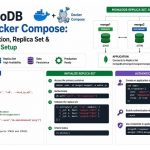 MongoDB with Docker Compose: Authentication, Replica Set, and Production-Ready Setup
