Rocky Linux vs Ubuntu: Command Cheat Sheet for Sysadmins

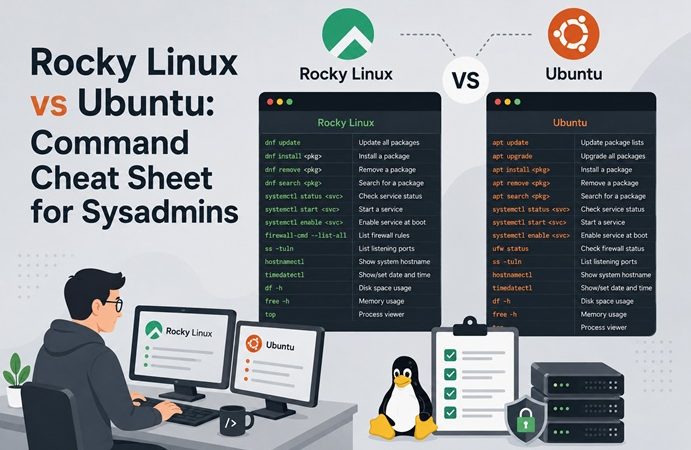
If you’ve run Ubuntu long enough that apt, ufw, and AppArmor feel like muscle memory, moving to Rocky Linux can feel like learning a second language with the same grammar but different vocabulary. Both are solid, production-grade Linux distributions — but Rocky Linux inherits RHEL’s toolchain (dnf, SELinux, firewalld) instead of Debian’s (apt, AppArmor, ufw). This cheat sheet maps the commands and concepts side by side, so you can go from “which distro is this again?” to productive in a homelab or enterprise environment without re-learning Linux from scratch.
Table of Contents
- Why Learn Rocky Linux If You Already Know Ubuntu
- Distro Family Overview
- Package Management: dnf vs apt
- Service Management: systemd (mostly identical)
- Firewall: firewalld vs ufw
- Security: SELinux vs AppArmor
- User & Permission Management
- Networking Configuration
- Docker on Rocky Linux: Key Differences
- Full Command Reference Table
- Troubleshooting
- FAQ
- Related Articles
1. Why Learn Rocky Linux If You Already Know Ubuntu
Rocky Linux is a 1:1 binary-compatible rebuild of Red Hat Enterprise Linux (RHEL), maintained by the Rocky Enterprise Software Foundation as the community successor to the original (pre-Stream) CentOS. A large share of enterprise data centers, government infrastructure, and regulated industries (finance, healthcare) standardize on RHEL-family distros — so Rocky Linux experience translates directly to RHEL, AlmaLinux, and Oracle Linux environments in a way Ubuntu experience doesn’t.
If your homelab or portfolio is Ubuntu-only, adding Rocky Linux demonstrates you can operate across both major Linux lineages — Debian-based and RPM/RHEL-based — which is exactly the kind of cross-distro fluency enterprise infrastructure roles look for.
2. Distro Family Overview
| Aspect | Ubuntu | Rocky Linux |
|---|---|---|
| Upstream family | Debian | RHEL (Red Hat Enterprise Linux) |
| Package format | .deb | .rpm |
| Package manager | apt / apt-get | dnf (yum-compatible) |
| Default firewall tool | ufw (frontend for iptables/nftables) | firewalld (zone-based) |
| Mandatory Access Control | AppArmor | SELinux |
| Release cycle | Fixed (Apr/Oct, LTS every 2 yrs) | Point releases tracking RHEL minor versions |
| Typical use case | Cloud-native, developer workstations, general server use | Enterprise servers, regulated industries, RHEL-compatible workloads |
| License/support model | Canonical (commercial + community) | Community-driven, RHEL-compatible, no vendor lock-in |
3. Package Management: dnf vs apt
# Update package index
# Ubuntu
sudo apt update

# Rocky Linux
sudo dnf check-update

# ---

# Upgrade all packages
# Ubuntu
sudo apt upgrade -y

# Rocky Linux
sudo dnf upgrade -y

# ---

# Install a package
# Ubuntu
sudo apt install nginx -y

# Rocky Linux
sudo dnf install nginx -y

# ---

# Remove a package
# Ubuntu
sudo apt remove nginx

# Rocky Linux
sudo dnf remove nginx

# ---

# Search for a package
# Ubuntu
apt search nginx

# Rocky Linux
dnf search nginx

# ---

# List installed packages
# Ubuntu
dpkg -l

# Rocky Linux
rpm -qa

# ---

# Show package info
# Ubuntu
apt show nginx

# Rocky Linux
dnf info nginx

# ---

# Add a third-party repository
# Ubuntu
sudo add-apt-repository ppa:example/ppa

# Rocky Linux
sudo dnf config-manager --add-repo https://example.com/repo.repo
# or install an .rpm that defines the repo, e.g. epel-release:
sudo dnf install epel-release -y
Tip: EPEL (Extra Packages for Enterprise Linux) is the Rocky Linux equivalent of Ubuntu’s “universe” repository — many common tools (htop, tmux, certbot) live there instead of the base repos.
4. Service Management: systemd (mostly identical)
Both distros use systemd, so this is the smoothest part of the transition — the commands are nearly identical:
# Start / stop / restart a service (same on both)
sudo systemctl start nginx
sudo systemctl stop nginx
sudo systemctl restart nginx
sudo systemctl reload nginx

# Enable on boot (same on both)
sudo systemctl enable nginx

# Check status (same on both)
systemctl status nginx

# View logs (same on both, journald is universal)
journalctl -u nginx -f
The only practical difference is which services exist by default and what they’re named — e.g., Rocky Linux ships firewalld.service active by default, while Ubuntu ships ufw inactive by default.
5. Firewall: firewalld vs ufw
# Check firewall status
# Ubuntu
sudo ufw status

# Rocky Linux
sudo firewall-cmd --state

# ---

# Allow a port
# Ubuntu
sudo ufw allow 8080/tcp

# Rocky Linux
sudo firewall-cmd --permanent --add-port=8080/tcp
sudo firewall-cmd --reload

# ---

# Allow a service by name
# Ubuntu
sudo ufw allow 'Nginx Full'

# Rocky Linux
sudo firewall-cmd --permanent --add-service=http
sudo firewall-cmd --permanent --add-service=https
sudo firewall-cmd --reload

# ---

# Deny/remove a rule
# Ubuntu
sudo ufw delete allow 8080/tcp

# Rocky Linux
sudo firewall-cmd --permanent --remove-port=8080/tcp
sudo firewall-cmd --reload

# ---

# List active rules
# Ubuntu
sudo ufw status verbose

# Rocky Linux
sudo firewall-cmd --list-allfirewalld‘s zone concept (public, internal, trusted, dmz) has no direct ufw equivalent — think of a zone as a named bundle of rules you assign to a network interface, useful when a server has multiple NICs with different trust levels (e.g., a public-facing NIC vs. an internal management NIC).
6. Security: SELinux vs AppArmor
| Aspect | AppArmor (Ubuntu) | SELinux (Rocky Linux) |
|---|---|---|
| Model | Path-based profiles | Label-based (type enforcement) |
| Default state | Enabled, mostly silent unless configured | Enabled and enforcing by default |
| Common pain point | Rarely blocks things unexpectedly | Frequently blocks Docker volume mounts, non-standard ports, custom service paths |
| Check status | sudo aa-status | sestatus |
| Temporarily disable (debug only) | sudo systemctl stop apparmor | sudo setenforce 0 |
| View denials | journalctl | grep -i apparmor | sudo ausearch -m avc -ts recent |
# Rocky Linux: common SELinux troubleshooting workflow

# 1. Check current mode
sestatus

# 2. Temporarily set to permissive (logs but doesn't block) — for debugging only
sudo setenforce 0

# 3. Reproduce the issue, then check what was denied
sudo ausearch -m avc -ts recent

# 4. Generate a custom policy to allow the specific action (instead of disabling SELinux)
sudo ausearch -m avc -ts recent | audit2allow -M mypolicy
sudo semodule -i mypolicy.pp

# 5. Re-enable enforcing mode
sudo setenforce 1
Do not permanently disable SELinux (
SELINUX=disabledin/etc/selinux/config) as a fix — this is the RPM-world equivalent ofchmod 777-ing your way past a permissions error. Useaudit2allowto generate a scoped policy instead.
7. User & Permission Management
# Add a user (same on both)
sudo useradd -m -s /bin/bash deploy

# Set password (same on both)
sudo passwd deploy

# Add user to sudoers group
# Ubuntu
sudo usermod -aG sudo deploy

# Rocky Linux
sudo usermod -aG wheel deploy

# ---

# List groups a user belongs to (same on both)
groups deploy
The main difference: Ubuntu’s sudo group is named sudo; Rocky Linux (inherited from RHEL) uses wheel.
8. Networking Configuration
# Show IP addresses (same on both — modern iproute2)
ip a

# Ubuntu: netplan-based config
# /etc/netplan/00-installer-config.yaml
network:
  ethernets:
    eth0:
      addresses: [192.168.1.50/24]
      gateway4: 192.168.1.1
      nameservers:
        addresses: [8.8.8.8]
  version: 2
# Apply with:
sudo netplan apply

# Rocky Linux: NetworkManager (nmcli) based config
sudo nmcli con mod eth0 ipv4.addresses 192.168.1.50/24
sudo nmcli con mod eth0 ipv4.gateway 192.168.1.1
sudo nmcli con mod eth0 ipv4.dns "8.8.8.8"
sudo nmcli con mod eth0 ipv4.method manual
sudo nmcli con up eth0
9. Docker on Rocky Linux: Key Differences
If you’re following our existing Docker installation and security guides written for Ubuntu, watch for these Rocky-specific gotchas:
# Install Docker Engine on Rocky Linux (official repo, not EPEL)
sudo dnf install -y dnf-plugins-core
sudo dnf config-manager --add-repo https://download.docker.com/linux/rhel/docker-ce.repo
sudo dnf install -y docker-ce docker-ce-cli containerd.io docker-compose-plugin

sudo systemctl enable --now docker
SELinux + volume mounts: on Rocky Linux, bind-mounting a host directory into a container often fails silently (permission denied inside the container) because of SELinux context, even though the same command works fine on Ubuntu. Fix by adding the :z or :Z suffix to the volume mount:
# :z = shared context across containers, :Z = private to this container
docker run -v /data/app:/app:Z my-image
# docker-compose.yml equivalent
services:
app:
image: my-image
volumes:
- /data/app:/app:ZFirewall for exposed ports: Ubuntu with ufw inactive by default means published Docker ports are often reachable without extra steps. On Rocky Linux, firewalld is active by default, so you’ll need to open the port explicitly (see Section 5) even after docker run -p 8080:8080.
10. Full Command Reference Table
| Task | Ubuntu | Rocky Linux |
|---|---|---|
| Update package list | apt update | dnf check-update |
| Upgrade packages | apt upgrade -y | dnf upgrade -y |
| Install package | apt install <pkg> | dnf install <pkg> |
| Remove package | apt remove <pkg> | dnf remove <pkg> |
| List installed packages | dpkg -l | rpm -qa |
| Add sudo access | usermod -aG sudo <user> | usermod -aG wheel <user> |
| Firewall status | ufw status | firewall-cmd --state |
| Open a port | ufw allow <port>/tcp | firewall-cmd --permanent --add-port=<port>/tcp && firewall-cmd --reload |
| MAC framework | AppArmor (aa-status) | SELinux (sestatus) |
| Network config | Netplan (YAML) | NetworkManager (nmcli) |
| Service control | systemctl | systemctl (identical) |
| Log viewing | journalctl | journalctl (identical) |
| Default web server user | www-data | nginx or apache |
| Config file location convention | /etc/<service>/ | /etc/<service>/ (mostly identical) |
11. Troubleshooting
| Symptom | Likely Cause | Fix |
|---|---|---|
Permission denied inside a Docker container using a bind mount | SELinux blocking the mount | Add :Z or :z to the volume mount (see Section 9) |
| Service works but is unreachable from another machine | firewalld blocking the port by default | firewall-cmd --permanent --add-port=<port>/tcp && firewall-cmd --reload |
sudo: command not found for a new user | User not in wheel group | usermod -aG wheel <user> |
dnf install fails with “no package found” for common tools | Package lives in EPEL, not base repos | dnf install epel-release -y first |
| Application silently fails, no clear error in app logs | SELinux denial not shown in app logs | sudo ausearch -m avc -ts recent to check for AVC denials |
| Netplan habits don’t apply | Rocky Linux uses NetworkManager, not Netplan | Use nmcli or edit /etc/NetworkManager/system-connections/ |
apt-based install script fails on Rocky | Script hardcoded for Debian/Ubuntu | Rewrite install steps using dnf equivalents from this cheat sheet |
12. FAQ
Is Rocky Linux free, like Ubuntu Server?
Yes. Rocky Linux is fully free and open-source, with no paid tier required for full functionality — unlike RHEL itself, which requires a subscription for updates on production systems.
Is Rocky Linux good for a homelab, or only for enterprise servers?
It’s a strong homelab choice specifically because it mirrors enterprise/RHEL environments — running it at home is a low-risk way to build muscle memory for dnf, SELinux, and firewalld before encountering them on the job.
Should I disable SELinux to make things easier?
Avoid it. Disabling SELinux removes a real security layer and isn’t representative of how production RHEL/Rocky systems are actually run. Learning to read AVC denials and use audit2allow is a more valuable skill than turning it off.
Can I run the same Docker Compose files on both Ubuntu and Rocky Linux?
Mostly yes, with one caveat: add :Z to any bind-mount volumes so they also work correctly on Rocky Linux’s SELinux-enforced filesystem — this suffix is harmless and ignored on Ubuntu.
Is Rocky Linux the same as CentOS?
Rocky Linux is the spiritual and technical successor to the original (pre-Stream) CentOS — founded by CentOS’s original creator after Red Hat shifted CentOS to the rolling-release “CentOS Stream” model in 2020. Rocky Linux restores the stable, RHEL-point-release model that classic CentOS used to provide.
Related posts:
 How To Clear the APT Cache and Free Up Disk Space on Ubuntu 24.04
 How To Expand Ubuntu 24.04 LTS File System Volume On VM Ware
 Changing Hostname on Rocky Linux 8
Removing Files with Hyphenated Names in Unix Systems
How To Install Zsh (Z Shell) on Ubuntu 24.04
Changing Hostname on Rocky Linux 8
Removing Files with Hyphenated Names in Unix Systems
How To Install Zsh (Z Shell) on Ubuntu 24.04
 Ubuntu 26.04 LTS Release: What to Expect from Canonical’s Next Long-Term Support Linux Distribution
ip Command in Linux: Complete Beginner Guide (2026 Edition)
Ubuntu 26.04 LTS Release: What to Expect from Canonical’s Next Long-Term Support Linux Distribution
ip Command in Linux: Complete Beginner Guide (2026 Edition)
 PowerShell Automation Scripts: Practical Examples for IT Sysadmins
