How to Install Docker on Rocky Linux 10 with SELinux (Complete 2026 Guide)

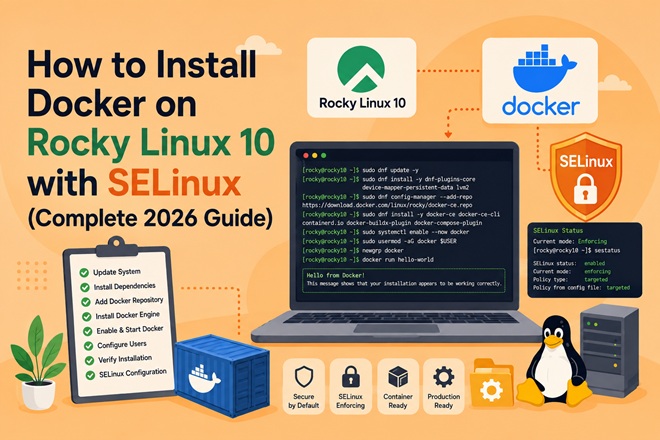
Rocky Linux 10 ships with Podman as its default container runtime — not Docker. If you’re moving a homelab or production workload from Ubuntu, or you specifically need Docker Engine’s tooling and Compose v2 workflow, you’ll need to add Docker’s official repository yourself, and — critically — you’ll need to handle SELinux correctly instead of disabling it.
This guide installs Docker CE on a clean Rocky Linux 10.x host, keeps SELinux in enforcing mode throughout, and walks through the one gotcha that trips up almost everyone coming from a minimal or cloud image: a missing kernel module that silently breaks Docker’s network bridge.
Table of Contents
- Architecture Overview
- Prerequisites
- Step 1: Remove Conflicting Packages
- Step 2: Fix the kernel-modules-extra Gotcha
- Step 3: Add the Docker CE Repository
- Step 4: Install Docker Engine
- Step 5: Start and Enable Docker
- Step 6: Configure SELinux for Docker (Don’t Disable It)
- Step 7: Run Docker as a Non-Root User
- Step 8: Verify the Install
- Docker CE vs Podman on Rocky Linux
- Troubleshooting
- Related Articles
- FAQ
Architecture Overview
┌─────────────────────────────────────────────────────────┐
│                  Rocky Linux 10.x Host                  │
│                                                         │
│   ┌─────────────┐        ┌──────────────────────────┐   │
│   │   SELinux   │◄──────►│   container-selinux      │   │
│   │  (enforcing)│        │   policy module          │   │
│   └─────────────┘        └──────────────────────────┘   │
│           ▲                          ▲                  │
│           │                          │                  │
│   ┌───────┴──────────────────────────┴────────────┐     │
│   │              dockerd (Docker Engine)          │     │
│   └───────┬──────────────────────────┬────────────┘     │
│           │                          │                  │
│   ┌───────▼───────┐         ┌────────▼──────────┐       │
│   │  containerd   │         │  docker network   │       │
│   │  + runc       │         │  bridge (needs    │       │
│   │               │         │xt_addrtype module)│       │
│   └───────────────┘         └───────────────────┘       │
└─────────────────────────────────────────────────────────┘
Prerequisites
| Requirement | Detail |
|---|---|
| OS | Rocky Linux 10.0, 10.1, or 10.2 (minimal or full install) |
| Access | Root or a user with sudo privileges |
| RAM | 2 GB minimum, 4 GB+ recommended |
| Network | Outbound access to download.docker.com |
| SELinux | Enforcing mode (default) — this guide keeps it that way |
Step 1: Remove Conflicting Packages
Rocky Linux 10 includes Podman, Buildah, and related tools by default. These don’t strictly conflict with Docker at the package level, but overlapping runc versions and CLI shims cause confusing errors later. Remove them first if you don’t need Podman side-by-side:
sudo dnf remove -y podman buildah runcIf you want to keep Podman installed alongside Docker (some homelabs do), skip this step — just be aware runc version mismatches are the most common source of “works sometimes” bugs.
Step 2: Fix the kernel-modules-extra Gotcha
This is the step most guides skip, and it’s specific to Rocky Linux 10 minimal and cloud images. Docker’s default bridge networking depends on the xt_addrtype netfilter module, which lives in the kernel-modules-extra package — not installed by default on minimal images.
If you skip this, Docker installs cleanly, the service starts, and then fails the moment it tries to create its network bridge, with an error buried in journalctl that doesn’t obviously point back to a missing kernel module.
Install it now, before Docker:
sudo dnf install -y kernel-modules-extra
sudo reboot
After reboot, confirm the module loads cleanly:
sudo modprobe xt_addrtype
lsmod | grep xt_addrtype
No error output means you’re clear to proceed.
Step 3: Add the Docker CE Repository
Rocky Linux doesn’t ship Docker packages in its own repos. Add Docker’s official RPM repository, built for RHEL and compatible with Rocky:
sudo dnf install -y dnf-plugins-core
sudo dnf config-manager --add-repo https://download.docker.com/linux/rhel/docker-ce.repo
Confirm the repo registered:
dnf repolist | grep docker
Step 4: Install Docker Engine
Install Docker CE, the CLI, containerd, Buildx, and the Compose v2 plugin in one command:
sudo dnf install -y docker-ce docker-ce-cli containerd.io docker-buildx-plugin docker-compose-plugin
container-selinux is pulled in automatically as a dependency — this is the policy package that lets Docker interact correctly with SELinux instead of fighting it. Don’t remove it.
If dnf reports a version-lock conflict against Rocky’s own base packages, use:
sudo dnf install -y docker-ce --allowerasingStep 5: Start and Enable Docker
sudo systemctl enable --now docker
sudo systemctl status docker
You should see active (running). If not, jump to the Troubleshooting section before continuing.
Step 6: Configure SELinux for Docker (Don’t Disable It)
Setting SELINUX=disabled in /etc/selinux/config is the fastest way to make Docker “just work,” and it’s also the fastest way to fail a security review. Rocky Linux 10 with Docker CE is fully usable in enforcing mode. Here’s the correct configuration instead:
1. Confirm SELinux is enforcing:
getenforce
# Expected output: Enforcing
2. Always use the :z or :Z volume flags on bind mounts. This is the actual fix most people are looking for when they reach for setenforce 0:
# :z  -> shared label, multiple containers can access the volume
docker run -d -v /srv/appdata:/data:z nginx

# :Z  -> private label, only this container can access the volume
docker run -d -v /srv/appdata:/data:Z nginx
3. If a container needs a capability SELinux is blocking (rare, and worth investigating first), check the audit log:
sudo ausearch -c 'dockerd' --raw | audit2allow -M dockerd-fix
sudo semodule -i dockerd-fix.pp
Only apply a generated policy module after reading what it actually grants — don’t audit2allow blindly in production.
4. For rootless Docker specifically, SELinux needs the container_runtime_t domain, which container-selinux already registers. No extra steps are needed beyond having that package installed (Step 4 handles this automatically).
| Approach | Security posture | When to use |
|---|---|---|
SELINUX=disabled | ❌ Weakest — no MAC enforcement anywhere on the host | Never in production |
setenforce 0 (temporary) | ⚠️ Weak — disables enforcement until reboot | Debugging only, revert immediately |
:z / :Z volume flags | ✅ Correct fix for 90% of “permission denied” volume errors | Every bind mount |
audit2allow custom policy | ✅ Correct for genuine edge cases | After reading the generated rule |
Step 7: Run Docker as a Non-Root User
sudo usermod -aG docker $(whoami)
newgrp docker
Log out and back in (or start a fresh SSH session) for group membership to take effect everywhere. Verify:
docker psIf this returns a table header with no permission error, you’re running Docker without sudo.
Step 8: Verify the Install
docker version
docker compose version
docker run hello-world

docker run hello-world pulls a tiny test image and prints a confirmation message — this exercises the full path: registry pull, containerd, runc, and the network bridge you fixed in Step 2.
Docker CE vs Podman on Rocky Linux
| Aspect | Docker CE | Podman (Rocky default) |
|---|---|---|
| Daemon | Yes (dockerd, root-owned socket by default) | No — daemonless, fork-exec model |
| Rootless mode | Supported, extra setup | Rootless by default |
| Compose | docker-compose-plugin (Compose v2) | podman-compose (community) or podman generate kube |
| SELinux integration | Via container-selinux, needs :z/:Z flags | Native, same flags apply |
| Systemd integration | Standard unit file | Native podman generate systemd, better fit for RHEL-family init |
| Best fit | Teams standardizing tooling across Ubuntu + Rocky | RHEL-native homelabs and single-user hosts |
If your homelab is purely Rocky Linux and you don’t need cross-distro tooling parity, Podman is arguably the more “native” choice. Docker CE makes sense when you’re running the same Compose files and CI pipelines across both Ubuntu and Rocky hosts.
Troubleshooting
| Symptom | Likely Cause | Fix |
|---|---|---|
docker: Error response from daemon: driver failed programming external connectivity | Missing xt_addrtype module | Re-run Step 2, confirm lsmod | grep xt_addrtype |
Cannot connect to the Docker daemon | Docker service not running, or user not in docker group | sudo systemctl status docker; re-check Step 7 |
permission denied on bind-mounted volume | Missing SELinux volume label | Add :z or :Z to the -v mount |
dnf reports package conflicts with runc or containerd | Leftover Podman packages | Re-run Step 1 |
| Docker fails silently after a minimal-image install | kernel-modules-extra never installed | Step 2, then reboot |
docker-ce install fails with “nothing provides” error | Repo added for the wrong distro (e.g. CentOS repo on Rocky 10) | Confirm you used the linux/rhel/docker-ce.repo path from Step 3 |
SELinux denials in /var/log/audit/audit.log for container processes | Custom app writing outside expected paths | Use audit2allow (Step 6.3) — don’t disable SELinux |
FAQ
Does Rocky Linux 10 support Docker officially?
Docker doesn’t publish a Rocky-specific repository, but the RHEL repository is fully compatible and is the method documented by Rocky Linux’s own project docs.
Should I disable SELinux to run Docker on Rocky Linux?
No. container-selinux plus the :z/:Z volume flags cover the overwhelming majority of cases. Disabling SELinux removes a security layer for no real gain in day-to-day Docker usage.
Why does Docker fail only on minimal Rocky Linux installs?
Minimal and cloud images omit kernel-modules-extra, which contains the xt_addrtype module Docker’s default bridge network depends on. Full/server installs usually include it already.
Can I run Docker and Podman on the same Rocky Linux host?
Yes, but expect runc version conflicts during dnf install. Keep them separate unless you have a specific reason to run both.
Related posts:
 How To Install Docker On Fedora 38
 How to Set Up a Local DNS Server Using Docker: A Practical Guide for Developers
 Install GitLab on Docker: Step-by-Step Guide for DevOps and IT Operations
 How to Containerize a Spring Boot Application Using Docker
 Docker Compose Security: Complete Hardening Guide for 2026
 How to Install Kubernetes Dashboard on Ubuntu 26.04 with Secure Access
 Longhorn Persistent Storage on Rocky Linux 10 Kubernetes
 How to Install Buildah and Podman on Rocky Linux 10 (Rootless Containers & SELinux)
