How to Install Buildah and Podman on Rocky Linux 10 (Rootless Containers & SELinux)

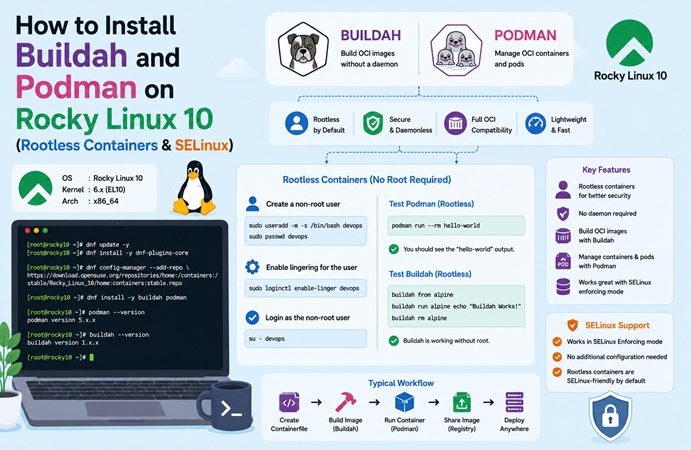
If you followed our Docker on Rocky Linux 10 guide, you already know Docker runs fine on Rocky — but it isn’t the RHEL-native way to build and run containers. Red Hat’s own toolchain is Buildah (build container images) and Podman (run them), both daemonless, rootless-by-default, and deeply integrated with SELinux and systemd. This guide walks through installing both on Rocky Linux 10, building an image with Buildah, running it rootless with Podman, wiring it into systemd with Quadlet, and the SELinux gotchas you’ll hit along the way — following the same structure as our other Rocky Linux 10 guides.
Table of Contents
- Why Buildah + Podman Instead of Docker on Rocky Linux
- Buildah vs Podman vs Docker: Comparison
- Architecture Overview
- Prerequisites
- Installing Podman and Buildah
- Building an Image with Buildah
- Running Containers with Podman (Rootless)
- SELinux and Rootless Networking Considerations
- Podman Compose for Multi-Container Apps
- Running Podman as a systemd Service with Quadlet
- Full Command Reference Table
- Troubleshooting
- FAQ
- Related Articles
1. Why Buildah + Podman Instead of Docker on Rocky Linux
Podman and Buildah are developed by Red Hat and ship in Rocky Linux’s default (AppStream) repositories — no third-party repo needed, unlike Docker CE. They’re built around three ideas that matter more on an RPM/enterprise distro than on Ubuntu:
- Daemonless. There’s no background
dockerdprocess running as root. Eachpodmancommand runs as a direct child process, which reduces attack surface and simplifies systemd integration. - Rootless by default. Unprivileged users can build and run containers without ever touching the root-owned Docker socket — a meaningful security win in shared or regulated environments.
- SELinux-native. Podman and Buildah were designed alongside SELinux, so container isolation is enforced by policy, not just namespaces.
If your portfolio goal (as covered in our Rocky Linux vs Ubuntu Cheat Sheet) is demonstrating RHEL-ecosystem fluency, Podman/Buildah is the expected toolchain — many RHEL shops actively avoid Docker CE in favor of the Red Hat-native stack.
2. Buildah vs Podman vs Docker: Comparison
| Feature | Docker | Podman | Buildah |
|---|---|---|---|
| Architecture | Client-server (daemon) | Daemonless | Daemonless |
| Root requirement | Daemon runs as root | Rootless by default | Rootless by default |
| Default in Rocky Linux repos | No (needs docker-ce repo) | Yes (AppStream) | Yes (AppStream) |
| Primary purpose | Build + run | Run (+ can build) | Build only (specialized) |
| systemd integration | Via docker.service | Native (Quadlet) | N/A (build tool) |
| Compose support | docker compose (native) | podman-compose / podman compose | N/A |
| Image format compatibility | OCI / Docker | OCI / Docker | OCI / Docker |
| Typical use case | Cloud-native, CI/CD, dev workstations | RHEL-family servers, security-sensitive workloads | CI pipelines building images without a daemon |
In practice: Podman can both build and run images (podman build works fine), but Buildah gives finer-grained control over the build process — layer-by-layer scripting — which is why the two are often paired: Buildah for building, Podman for running.
3. Architecture Overview
   Docker model (daemon-based)              Podman/Buildah model (daemonless)
   ───────────────────────────              ─────────────────────────────────

   ┌────────────┐                            ┌────────────┐
   │ docker CLI │                            │ podman CLI │
   └─────┬──────┘                            └─────┬──────┘
         │ talks to socket (root)                  │ direct fork/exec
         ▼                                          ▼
   ┌────────────────┐                          ┌────────────────────┐
   │ dockerd daemon │ (runs as root)           │ conmon (per-       │
   │  (always-on)   │                          │  container monitor)│
   └───────┬────────┘                          └─────────┬──────────┘
           │                                              │
           ▼                                              ▼
   ┌────────────────┐                          ┌────────────────────┐
   │  containerd    │                          │  runc / crun       │
   └───────┬────────┘                          │  (OCI runtime)     │
           ▼                                   └─────────┬──────────┘
   ┌────────────────┐                                     ▼
   │  runc          │                          Container process runs
   └────────────────┘                           as the invoking user
                                                (rootless, no daemon)
Because there’s no long-running daemon, each Podman container is a direct child of the process that started it — which is also why Podman integrates naturally with systemd (via Quadlet, covered in Section 10) instead of needing a separate daemon to survive reboots.
4. Prerequisites
- Rocky Linux 10 (minimal or server install), updated:
sudo dnf update -y - A non-root user for rootless container work (recommended over using
rootdirectly) - SELinux in
Enforcingmode (default) — this guide assumes it, per our Docker on Rocky Linux 10 guide - Basic
firewalldfamiliarity if you’ll expose container ports externally (see our Rocky Linux vs Ubuntu Cheat Sheet, Section 5)
5. Installing Podman and Buildah
Both packages are in Rocky Linux’s default AppStream repo — no dnf config-manager --add-repo needed, unlike Docker CE.
# Update system packages first
sudo dnf update -y

# Install Podman, Buildah, and Skopeo (image inspection/copy tool)
sudo dnf install -y podman buildah skopeo

# Verify versions
podman --version
buildah --version
Expected output (versions will track whatever ships with your Rocky Linux 10 point release):
podman version 5.x.x
buildah version 1.3x.x
Confirm rootless mode works for your current user:
podman info --format '{{.Host.Security.Rootless}}'
# Expected: true
6. Building an Image with Buildah
Buildah supports both Dockerfile-based builds and its own scripted, layer-by-layer approach. Start with the familiar Dockerfile method:
# Dockerfile
FROM rockylinux:10-minimal
RUN microdnf install -y nginx && microdnf clean all
COPY index.html /usr/share/nginx/html/index.html
EXPOSE 8080
CMD ["nginx", "-g", "daemon off;"]
# Build with Buildah (Dockerfile-compatible)
buildah bud -t my-nginx:latest .
# Alternative: buildah's native scripted build (no Dockerfile needed)
container=$(buildah from rockylinux:10-minimal)
buildah run "$container" microdnf install -y nginx
buildah copy "$container" index.html /usr/share/nginx/html/index.html
buildah config --port 8080 --cmd "nginx -g 'daemon off;'" "$container"
buildah commit "$container" my-nginx:latest
buildah rm "$container"The scripted approach is useful in CI pipelines where you want to conditionally add layers without maintaining multiple Dockerfiles.
7. Running Containers with Podman (Rootless)
# Run the image built above, rootless, unprivileged port
podman run -d --name web -p 8080:8080 my-nginx:latest

# Check running containers
podman ps

# View logs
podman logs -f web

# Stop / remove
podman stop web
podman rm web
Note: rootless Podman cannot bind to privileged ports (<1024) by default. Map to an unprivileged host port (like 8080 above) instead of 80, or adjust net.ipv4.ip_unprivileged_port_start if you specifically need a low port for a rootless container.
8. SELinux and Rootless Networking Considerations
Just like Docker on Rocky Linux (see our Docker + SELinux guide), bind-mounted volumes need an SELinux context label or the container will get Permission denied even though the file permissions look correct:
# :Z = private label (only this container can access)
podman run -d --name web -p 8080:8080 -v /data/html:/usr/share/nginx/html:Z my-nginx:latest

# :z = shared label (multiple containers can access the same volume)
podman run -d --name web -p 8080:8080 -v /data/html:/usr/share/nginx/html:z my-nginx:latest
Check SELinux denials the same way as with Docker:
sudo ausearch -m avc -ts recent | grep podmanRootless networking note: rootless Podman containers, by default, run in a separate network namespace via slirp4netns or pasta (Podman 5+ defaults to pasta for better performance). This means rootless containers are NOT directly visible on the host’s bridge network the way rootful Docker containers are — published ports (-p) still work as expected, but if you need containers to be reachable exactly like on a standard bridge, consider rootful Podman (sudo podman ...) for that specific workload, or explicitly configure pasta/slirp4netns options.
9. Podman Compose for Multi-Container Apps
# Install podman-compose (Python-based, from EPEL)
sudo dnf install -y epel-release
sudo dnf install -y podman-compose
# docker-compose.yml (podman-compose reads the same format)
services:
web:
image: my-nginx:latest
ports:
- "8080:8080"
volumes:
- ./html:/usr/share/nginx/html:Z
redis:
image: docker.io/library/redis:7
ports:
- "6379:6379"podman-compose up -d
podman-compose ps
podman-compose downNewer Podman versions also support podman compose (no hyphen) as a built-in subcommand if the podman-plugins package or a compatible compose provider is installed — check podman compose version to see which backend is active.
10. Running Podman as a systemd Service with Quadlet
Quadlet is Podman’s native way to define containers as systemd units, replacing the older podman generate systemd approach. This is the idiomatic way to make a container start on boot on Rocky Linux.
# Create the Quadlet directory for a rootless user
mkdir -p ~/.config/containers/systemd
# ~/.config/containers/systemd/my-nginx.container
[Unit]
Description=My Nginx container (Podman Quadlet)
After=network-online.target
[Container]
Image=localhost/my-nginx:latest
PublishPort=8080:8080
Volume=%h/data/html:/usr/share/nginx/html:Z
[Service]
Restart=always
[Install]
WantedBy=default.target# Reload systemd (user scope) and start
systemctl --user daemon-reload
systemctl --user enable --now my-nginx.service
# Check status like any systemd unit
systemctl --user status my-nginx.service
# Allow the rootless service to keep running after logout
loginctl enable-linger "$(whoami)"11. Full Command Reference Table
| Task | Docker | Podman / Buildah |
|---|---|---|
| Build image (Dockerfile) | docker build -t img . | buildah bud -t img . or podman build -t img . |
| Run container | docker run -d -p 80:80 img | podman run -d -p 8080:8080 img |
| List running containers | docker ps | podman ps |
| View logs | docker logs -f <ctr> | podman logs -f <ctr> |
| Stop / remove container | docker stop/rm <ctr> | podman stop/rm <ctr> |
| List images | docker images | podman images |
| Pull image | docker pull <img> | podman pull <img> |
| Inspect image without pulling | — (needs docker pull first) | skopeo inspect docker://<img> |
| Compose up | docker compose up -d | podman-compose up -d or podman compose up -d |
| Run on boot (systemd) | docker.service (daemon) | Quadlet .container unit (per-container) |
| Rootless by default | No | Yes |
12. Troubleshooting
| Symptom | Likely Cause | Fix |
|---|---|---|
permission denied on bind-mounted volume | Missing SELinux context label | Add :Z (private) or :z (shared) to the volume mount |
podman run -p 80:80 fails with “permission denied” | Rootless container can’t bind privileged port (<1024) | Use a port ≥1024 (e.g., 8080), or lower net.ipv4.ip_unprivileged_port_start |
Container unreachable from another host despite -p | firewalld blocking the port | firewall-cmd --permanent --add-port=8080/tcp && firewall-cmd --reload |
podman-compose: command not found | EPEL not enabled | sudo dnf install -y epel-release && sudo dnf install -y podman-compose |
Quadlet .container unit not picked up | Wrong directory or missing daemon-reload | Confirm file is in ~/.config/containers/systemd/, run systemctl --user daemon-reload |
| Rootless service stops after logout | Lingering not enabled for the user | loginctl enable-linger $(whoami) |
buildah bud can’t resolve base image | No network access or registry misconfigured | Check /etc/containers/registries.conf, confirm outbound DNS/network |
| Container loses network reachability intermittently (rootless) | slirp4netns/pasta networking limitation | Consider rootful Podman (sudo podman) for that workload, or review pasta network options |
13. FAQ
Do I need Docker installed alongside Podman?
No. Podman and Buildah are fully independent of Docker — they read the same Dockerfile syntax and OCI image format, so existing Dockerfiles work unmodified.
Can Podman run Docker Compose files directly?
Yes, via podman-compose or the podman compose subcommand — both read standard docker-compose.yml syntax without modification, aside from occasionally needing SELinux :Z/:z suffixes added to volumes.
Is rootless Podman actually more secure than rootful Docker?
Rootless mode significantly reduces the blast radius of a container escape, since the container process runs with the invoking user’s privileges rather than root — but it isn’t a complete substitute for other hardening (image scanning, SELinux, least-privilege). Treat it as one layer of defense-in-depth, not the whole strategy.
Why does Red Hat prefer Podman over Docker?
Podman’s daemonless, rootless design aligns with RHEL’s general security posture (fewer always-on root processes) and its systemd-first service model — which is why Podman/Buildah, not Docker CE, ship in Rocky Linux’s default repositories.
Does Buildah replace Podman?
No, they’re complementary. Buildah specializes in building images with fine-grained control; Podman specializes in running and managing containers day to day. Many workflows use both together.
Related posts:
 NGINX Ingress on Rocky Linux 10 Kubernetes (kubeadm)
 Longhorn Persistent Storage on Rocky Linux 10 Kubernetes
 How To Install Podman On Ubuntu 20.04 LTS
How To Install Podman On CentOS Stream 9
How To Install Podman On Ubuntu 20.04 LTS
How To Install Podman On CentOS Stream 9
 How to Install Docker and Docker Compose on Ubuntu 26.04 LTS
 How to Back Up and Restore Kubernetes Cluster Using Velero (2026 Guide)
 How to Install Podman on Ubuntu 26.04 LTS (2026)
 How to Set Up a Kubernetes Cluster on Rocky Linux 10 with kubeadm (SELinux & firewalld)
