NGINX Ingress on Rocky Linux 10 Kubernetes (kubeadm)

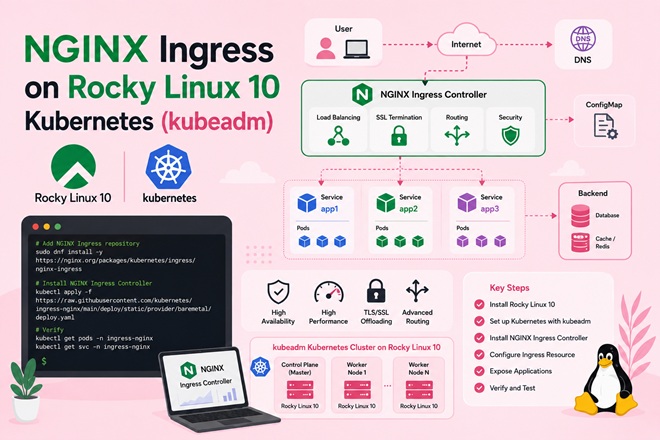
If you followed our guide to setting up a Kubernetes cluster on Rocky Linux 10 with kubeadm, you now have a working control plane and worker nodes — but no way to route external traffic into your Pods. That’s where an Ingress Controller comes in.
This guide walks through deploying the NGINX Ingress Controller on that same Rocky Linux 10 cluster, covering the firewalld rules, SELinux considerations, and bare-metal external IP problem that trip up most first attempts.
Table of Contents
- Why You Need an Ingress Controller
- Prerequisites
- Ingress Options Compared
- Architecture Overview
- Step 1: Open Required firewalld Ports
- Step 2: Install ingress-nginx via Helm
- Step 3: Solve the Bare-Metal External IP Problem
- Step 4: Deploy a Sample App and Ingress Resource
- Step 5: Add TLS with cert-manager (Optional)
- Troubleshooting Table
- FAQ
- Conclusion
Why You Need an Ingress Controller
Without an Ingress, exposing a service outside the cluster means either a NodePort (ugly high-numbered ports) or a cloud LoadBalancer (which doesn’t exist on bare metal). An Ingress Controller gives you:
- Name-based virtual hosting (multiple domains/services on ports 80/443)
- Centralized TLS termination
- Path-based routing (
/api,/app, etc.) to different backend Services
Prerequisites
- A working kubeadm cluster on Rocky Linux 10 (control plane + at least one worker), per the previous guide
kubectlconfigured against the clusterhelmv3 installed on your admin machinefirewalldactive on all nodes (default on Rocky Linux 10)
Ingress Options Compared
| Controller | Maturity | Config Style | Best Fit |
|---|---|---|---|
| ingress-nginx | Very mature, most widely deployed | Annotations on Ingress resources | General-purpose, largest community, this guide |
| Traefik | Mature | CRDs (IngressRoute) | Teams wanting built-in dashboard and dynamic config reload |
| HAProxy Ingress | Mature | Annotations + ConfigMap | High-throughput environments already standardized on HAProxy |
| Kong Ingress | Mature | CRDs + plugins | API-gateway features (rate limiting, auth) built in |
ingress-nginx remains the default choice for most bare-metal clusters because of its documentation depth and predictable annotation-based configuration — which is why it’s the one used here.
Architecture Overview
                 Internet / LAN
                       │
                       ▼
        ┌──────────────────────────────┐
        │   Node (firewalld: 80/443)   │
        │  ┌─────────────────────────┐ │
        │  │ ingress-nginx-controller│ │  (DaemonSet / hostNetwork
        │  │       (Pod)             │ │   or NodePort)
        │  └───────────┬─────────────┘ │
        └──────────────┼───────────────┘
                       │  routes by Host/Path
                       ▼
        ┌─────────────────────────────┐
        │  Ingress resource (rules)   │
        └─────────────┬───────────────┘
                      ▼
        ┌─────────────────────────────┐
        │  ClusterIP Service(s)       │
        └─────────────┬───────────────┘
                      ▼
        ┌─────────────────────────────┐
        │  Application Pods           │
        └─────────────────────────────┘
Step 1: Open Required firewalld Ports
Run on every node that will run an ingress-nginx Pod (with hostNetwork: true, that’s effectively every worker):
sudo firewall-cmd --permanent --add-port=80/tcp
sudo firewall-cmd --permanent --add-port=443/tcp
sudo firewall-cmd --permanent --add-port=8443/tcp   # admission webhook
sudo firewall-cmd --reload
This follows the same explicit-port-table approach used in the cluster setup guide — no blanket firewalld disable.
Step 2: Install ingress-nginx via Helm
helm repo add ingress-nginx https://kubernetes.github.io/ingress-nginx
helm repo update

helm install ingress-nginx ingress-nginx/ingress-nginx \
  --namespace ingress-nginx \
  --create-namespace \
  --set controller.hostNetwork=true \
  --set controller.kind=DaemonSet \
  --set controller.service.type=ClusterIP
hostNetwork=true + DaemonSet binds the controller directly to ports 80/443 on each node — the simplest working pattern on bare metal, avoiding the external-IP problem for the controller itself (though individual Services behind it still resolve internally).
Verify:
kubectl get pods -n ingress-nginx
kubectl get ds -n ingress-nginx
Step 3: Solve the Bare-Metal External IP Problem
If you instead installed with controller.service.type=LoadBalancer (the Helm chart default), you’ll see:
NAME                                 TYPE           EXTERNAL-IP   PORT(S)
ingress-nginx-controller             LoadBalancer   <pending>     80:xxxxx/TCP,443:xxxxx/TCP
That <pending> state is expected — there’s no cloud controller on bare metal to assign an IP. Two ways to resolve it:
Option A — MetalLB (recommended for production-like setups):
helm install metallb metallb/metallb -n metallb-system --create-namespaceThen define an IPAddressPool covering a free range on your LAN so LoadBalancer Services get a real, reachable IP.
Option B — hostNetwork/DaemonSet (used in Step 2): simplest for homelab/single-cluster setups — traffic reaches the controller directly via each node’s IP on ports 80/443, no external IP needed at all.
Step 4: Deploy a Sample App and Ingress Resource
kubectl create deployment demo-app --image=nginxdemos/hello --port=80
kubectl expose deployment demo-app --port=80 --type=ClusterIP
apiVersion: networking.k8s.io/v1
kind: Ingress
metadata:
name: demo-ingress
namespace: default
annotations:
nginx.ingress.kubernetes.io/rewrite-target: /
spec:
ingressClassName: nginx
rules:
- host: demo.local
http:
paths:
- path: /
pathType: Prefix
backend:
service:
name: demo-app
port:
number: 80Apply it, then add demo.local to your admin machine’s /etc/hosts pointing at a worker node’s IP to test:
kubectl apply -f demo-ingress.yaml
curl -H "Host: demo.local" http://<worker-node-ip>
Step 5: Add TLS with cert-manager (Optional)
For a homelab with no public DNS, a self-signed ClusterIssuer is the pragmatic option:
helm install cert-manager jetstack/cert-manager \
  --namespace cert-manager --create-namespace \
  --set installCRDs=true
apiVersion: cert-manager.io/v1
kind: ClusterIssuer
metadata:
name: selfsigned-issuer
spec:
selfSigned: {}For internet-facing production domains, switch to a letsencrypt-prod ClusterIssuer with an HTTP-01 or DNS-01 solver instead.
Troubleshooting Table
| Symptom | Likely Cause | Fix |
|---|---|---|
EXTERNAL-IP stuck at <pending> | No cloud LB on bare metal | Install MetalLB, or switch to hostNetwork/DaemonSet (Step 3) |
502 Bad Gateway from ingress | Backend Service selector doesn’t match Pod labels | kubectl describe svc demo-app and confirm selector/labels align |
| Ingress rule ignored, default backend served instead | Missing or wrong ingressClassName | Set ingressClassName: nginx explicitly in the Ingress spec |
curl: (7) Failed to connect to node IP on port 80 | firewalld port not open on that node | Re-run the firewall-cmd --add-port commands from Step 1 on that specific node |
Admission webhook timeout during helm install | Port 8443 blocked by firewalld | Open 8443 per Step 1; webhook Pod needs it to validate Ingress objects |
SELinux denial in /var/log/audit/audit.log for controller Pod | Missing container-selinux policy context | sudo ausearch -m avc -ts recent | audit2allow -M ingress-fix && semodule -i ingress-fix.pp — same pattern used for Docker in the earlier guide |
FAQ
Why does my Ingress external IP stay <pending> on Rocky Linux?
On bare-metal kubeadm clusters there’s no cloud load balancer to assign an IP automatically. Install MetalLB for a real external IP, or use hostNetwork/NodePort mode and reach the controller via a node’s own IP instead.
Does SELinux need to be disabled to run ingress-nginx on Rocky Linux?
No — keep it enforcing and resolve specific denials with audit2allow, or make sure container-selinux and the correct volume :z/:Z flags are in place, the same approach used for Docker on Rocky Linux.
Can I use firewalld and ingress-nginx together?
Yes. Open the specific ports the controller needs (80, 443, and the 8443 webhook port) on each node rather than disabling firewalld entirely.
Conclusion
With the NGINX Ingress Controller running, your Rocky Linux 10 kubeadm cluster can now route real HTTP(S) traffic into workloads instead of relying on raw NodePorts. From here, the natural next step is layering in cert-manager for automated Let’s Encrypt certificates on a public domain, or adding MetalLB for a fully self-contained bare-metal load-balancing setup.
Related reading: How to Install Docker on Rocky Linux 10 with SELinux · How to Set Up a Kubernetes Cluster on Rocky Linux 10 with kubeadm · Managing Kubernetes Applications with Helm Charts
Related posts:
 How to Deploy NGINX Ingress Controller on Kubernetes Step-by-Step (2026 Guide)
 Longhorn Persistent Storage on Rocky Linux 10 Kubernetes
 How to Set Up a Kubernetes Cluster on Rocky Linux 10 with kubeadm (SELinux & firewalld)
 Install and Configure K3s with NVIDIA GPU Operator on Ubuntu 22.04
 How to Install Kubernetes Cluster on Ubuntu 26.04 LTS Using kubeadm (2026 Guide)
 KubeSphere and Kubernetes Security: Complete Hardening Guide for 2026
 Kubernetes Services: ClusterIP, NodePort, LoadBalancer, and ExternalName Explained
 How to Install Docker on Rocky Linux 10 with SELinux (Complete 2026 Guide)
