Managing Kubernetes Applications with Helm Charts: The Complete Guide

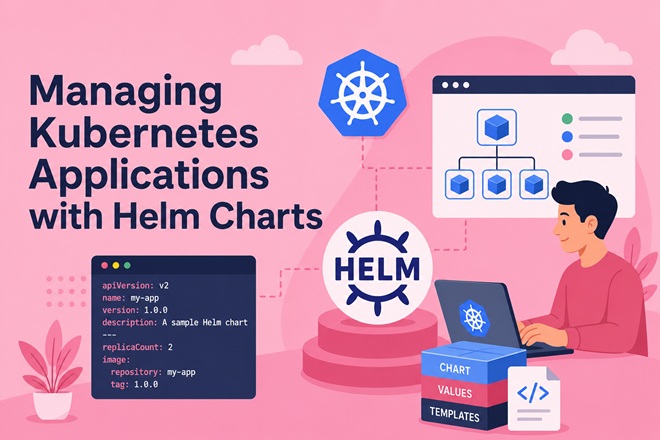
As a Kubernetes application grows past a handful of raw YAML manifests, managing Deployments, Services, ConfigMaps, and Secrets by hand becomes error-prone — especially across multiple environments (dev, staging, production). Helm solves this by packaging Kubernetes resources into versioned, parameterized charts, giving you a single install/upgrade/rollback workflow instead of a pile of kubectl apply commands.
This guide covers Helm from chart anatomy through production release management: templating, values overrides per environment, upgrade and rollback mechanics, and the operational practices that keep Helm releases predictable at scale.
Table of Contents
- Why Helm
- Core Concepts and Architecture
- Installing Helm
- Anatomy of a Helm Chart
- Creating Your First Chart
- Templating with Values
- Managing Multiple Environments
- Installing, Upgrading, and Rolling Back Releases
- Chart Dependencies (Subcharts)
- Helm Repositories and Packaging
- Comparison: Helm vs Kustomize vs Raw Manifests
- Troubleshooting
- FAQ
- Related Articles on bckinfo.com
1. Why Helm
Helm is often described as “the package manager for Kubernetes” — the same relationship apt has to Debian packages, or npm to Node modules. It solves three recurring problems:
- Templating — one chart, many environments, via values overrides instead of duplicated YAML
- Release lifecycle — install, upgrade, rollback, and uninstall as atomic, versioned operations
- Distribution — charts can be packaged, versioned, and shared through repositories, just like container images through registries
2. Core Concepts and Architecture
┌───────────────────────────────────────────────────────────────┐
│                         HELM ARCHITECTURE                       │
├───────────────────────────────────────────────────────────────┤
│  Chart Repository                                                │
│  (Helm repo, OCI registry)                                       │
│         │  helm pull / helm install                              │
│         ▼                                                        │
│  ┌───────────────┐                                                │
│  │  Chart          │  templates/ + values.yaml + Chart.yaml       │
│  │  (local or      │                                              │
│  │   remote)       │                                              │
│  └───────┬───────┘                                                │
│          │  helm template (renders manifests)                    │
│          ▼                                                        │
│  ┌───────────────┐                                                │
│  │  Rendered       │  Deployment, Service, ConfigMap, Secret...   │
│  │  Kubernetes     │                                              │
│  │  Manifests      │                                              │
│  └───────┬───────┘                                                │
│          │  helm install/upgrade (applies via kube-apiserver)    │
│          ▼                                                        │
│  ┌───────────────┐         ┌───────────────────────────────────┐ │
│  │  Kubernetes     │◄───────│  Release Object (stored as Secret) │ │
│  │  Cluster        │        │  — history of every revision       │ │
│  └───────────────┘         └───────────────────────────────────┘ │
└───────────────────────────────────────────────────────────────┘
Key terms:
- Chart — a packaged set of templated Kubernetes manifests plus metadata
- Release — a specific deployed instance of a chart, identified by a name (e.g.,
helm install my-app ./chart) - Values — the configuration passed into a chart’s templates (
values.yaml,--set, or-f custom-values.yaml) - Revision — each
install/upgradecreates a new numbered revision, enabling rollback
3. Installing Helm
# Linux/macOS via install script
curl https://raw.githubusercontent.com/helm/helm/main/scripts/get-helm-3 | bash

# Or via package manager
brew install helm          # macOS
choco install kubernetes-helm  # Windows

# Verify
helm version
Helm 3 talks directly to the Kubernetes API using your existing kubeconfig — there’s no server-side component (Tiller) to install, unlike Helm 2.
4. Anatomy of a Helm Chart
mychart/
├── Chart.yaml           # Chart metadata: name, version, appVersion
├── values.yaml           # Default configuration values
├── charts/                # Subcharts / dependencies
├── templates/             # Kubernetes manifest templates
│   ├── deployment.yaml
│   ├── service.yaml
│   ├── configmap.yaml
│   ├── ingress.yaml
│   ├── _helpers.tpl       # Reusable template snippets
│   └── NOTES.txt          # Post-install usage message
└── .helmignore # Files to exclude when packagingChart.yaml:
apiVersion: v2
name: mychart
description: A Helm chart for the mychart application
type: application
version: 0.1.0        # chart version
appVersion: "1.4.2"    # version of the app it deploys
5. Creating Your First Chart
helm create mychartThis scaffolds a working nginx-based chart. Edit templates/deployment.yaml to fit your application:
apiVersion: apps/v1
kind: Deployment
metadata:
  name: {{ include "mychart.fullname" . }}
  labels:
    {{- include "mychart.labels" . | nindent 4 }}
spec:
  replicas: {{ .Values.replicaCount }}
  selector:
    matchLabels:
      {{- include "mychart.selectorLabels" . | nindent 6 }}
  template:
    metadata:
      labels:
        {{- include "mychart.selectorLabels" . | nindent 8 }}
    spec:
      containers:
        - name: {{ .Chart.Name }}
          image: "{{ .Values.image.repository }}:{{ .Values.image.tag | default .Chart.AppVersion }}"
          ports:
            - containerPort: {{ .Values.service.port }}
          resources:
            {{- toYaml .Values.resources | nindent 12 }}
Render locally (without installing) to check output before applying:
helm template mychart ./mychart6. Templating with Values
values.yaml defines defaults; templates reference them with .Values:
# values.yaml
replicaCount: 2

image:
  repository: registry.example.com/app
  tag: ""
  pullPolicy: IfNotPresent

service:
  type: ClusterIP
  port: 8080

resources:
  requests:
    cpu: 250m
    memory: 128Mi
  limits:
    cpu: 500m
    memory: 256Mi

ingress:
  enabled: false
  host: app.example.com
Common template functions worth knowing:
{{ .Values.replicaCount }}                          # simple value lookup
{{ .Values.image.tag | default .Chart.AppVersion }}  # fallback default
{{- if .Values.ingress.enabled }}                    # conditional block
...
{{- end }}
{{- range .Values.env }}                             # loop over a list
  - name: {{ .name }}
    value: {{ .value }}
{{- end }}
{{ include "mychart.fullname" . }}                   # call a named template
7. Managing Multiple Environments
Keep a base values.yaml and layer environment-specific overrides:
mychart/
├── values.yaml              # shared defaults
├── values-dev.yaml           # dev overrides
├── values-staging.yaml       # staging overrides
└── values-production.yaml    # production overrides
# values-production.yaml
replicaCount: 5
resources:
requests:
cpu: 500m
memory: 512Mi
limits:
cpu: "1"
memory: 1Gi
ingress:
enabled: true
host: app.example.comDeploy per environment:
helm upgrade --install app-prod ./mychart \
  -f values.yaml -f values-production.yaml \
  --namespace production --create-namespace
Later files override earlier ones, so keep shared config in values.yaml and only the deltas in environment-specific files.
8. Installing, Upgrading, and Rolling Back Releases
# Install a new release
helm install app-prod ./mychart --namespace production --create-namespace

# Upgrade an existing release (or install if it doesn't exist yet)
helm upgrade --install app-prod ./mychart -f values-production.yaml -n production

# View release history
helm history app-prod -n production

# Roll back to a specific revision
helm rollback app-prod 3 -n production

# Uninstall
helm uninstall app-prod -n production
Dry-run any change before it touches the cluster:
helm upgrade app-prod ./mychart -f values-production.yaml -n production --dry-run --debugUseful safety flags for production upgrades:
helm upgrade --install app-prod ./mychart \
  -f values-production.yaml \
  --namespace production \
  --atomic \
  --timeout 5m \
  --wait
--atomic automatically rolls back on a failed upgrade; --wait blocks until resources report ready.
9. Chart Dependencies (Subcharts)
Declare dependent charts (e.g., a PostgreSQL subchart) in Chart.yaml:
# Chart.yaml
dependencies:
  - name: postgresql
    version: "13.2.0"
    repository: "https://charts.bitnami.com/bitnami"
    condition: postgresql.enabled
helm dependency update ./mychartReference subchart values under their own key in the parent values.yaml:
postgresql:
  enabled: true
  auth:
    database: myapp
    username: myapp_user
10. Helm Repositories and Packaging
# Add and search a repository
helm repo add bitnami https://charts.bitnami.com/bitnami
helm repo update
helm search repo bitnami/postgresql

# Package your own chart for distribution
helm package ./mychart
# produces mychart-0.1.0.tgz

# Push to an OCI-compliant registry (e.g., GHCR, Harbor)
helm push mychart-0.1.0.tgz oci://ghcr.io/myorg/charts
11. Comparison: Helm vs Kustomize vs Raw Manifests
| Approach | Templating | Release Tracking | Rollback | Best For |
|---|---|---|---|---|
| Raw manifests | None (copy/paste per env) | No | Manual (kubectl apply old file) | Tiny, single-environment setups |
| Kustomize | Overlay/patch based, no templating language | No (built into kubectl, no history) | Manual | GitOps-style declarative overlays |
| Helm | Full templating language (Go templates) | Yes (revisions, stored as Secrets) | helm rollback (one command) | Reusable, parameterized, multi-environment apps |
12. Troubleshooting
| Symptom | Likely Cause | Fix |
|---|---|---|
Error: INSTALLATION FAILED: cannot re-use a name | A release with that name already exists (possibly failed) | helm uninstall <name> then reinstall, or use helm upgrade --install |
| Upgrade hangs, never completes | --wait set but a pod never reaches Ready (bad image, failing probe) | kubectl describe pod on the failing pod; fix readiness probe or image |
| Values not taking effect | Wrong -f file order, or typo in value path | Confirm with helm template ... --debug, check indentation and key path |
helm rollback succeeds but app still broken | Rolled back Helm release, but a dependent resource (PVC, external DB migration) wasn’t reverted | Treat rollback as chart-only; verify stateful dependencies manually |
| Subchart values not applying | Not nested under the subchart’s name key in parent values.yaml | Nest overrides under <subchart-name>: |
Error: unable to build kubernetes objects... error validating | Rendered YAML has a schema error (wrong indentation, missing field) | Run helm template and inspect the exact output before install/upgrade |
Release stuck in pending-upgrade state | A previous upgrade was interrupted (e.g., network drop) | helm rollback <release> <last-good-revision> to clear the stuck state |
13. FAQ
Is Helm 2 still relevant in 2026?
No — Helm 2 reached end of life years ago and required the server-side Tiller component, which had known security issues. All current tooling and charts target Helm 3.
Should I commit rendered manifests or the chart itself to Git?
Commit the chart (templates + values files). Rendering happens at deploy time via helm template or helm upgrade, so committing already-rendered YAML defeats the purpose of templating — though some GitOps workflows do commit rendered output as a build artifact for auditability.
How is a Helm chart different from a Kustomize overlay?
Helm uses a full templating language and tracks release history/rollbacks natively. Kustomize uses patch-based overlays with no templating language and no built-in release tracking — it relies on kubectl apply and Git history for change tracking.
Can Helm be used with GitOps tools like ArgoCD or Flux?
Yes — both support Helm charts as a source type natively, rendering and applying them as part of the GitOps reconciliation loop.
Related posts:
 How to Install Helm on Ubuntu 26.04 LTS (Complete Guide 2026)
 How to Deploy Jenkins on Kubernetes
 How to Install Kubernetes (K8s) on Ubuntu 24.04: A Step-by-Step Guide
 What Is KubeKey? Complete Explanation for DevOps Beginners
 How to Install Kubernetes Dashboard on Ubuntu 26.04 with Secure Access
 How to Deploy NGINX Ingress Controller on Kubernetes Step-by-Step (2026 Guide)
 Kubernetes Troubleshooting: 50 kubectl Commands Every Administrator Should Know
 Kubernetes Security Best Practices (2026 Edition): The Complete Production Hardening Guide
