Kubernetes Security Best Practices (2026 Edition): The Complete Production Hardening Guide

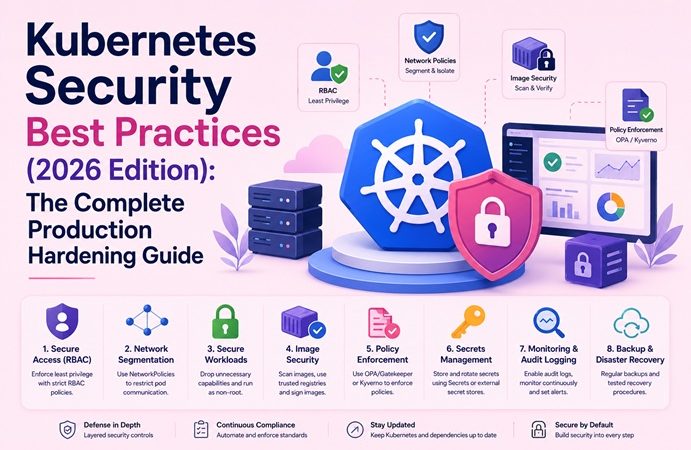
Kubernetes has become the default control plane for production workloads — and the default target for attackers. Misconfigured RBAC, permissive pod specs, unscanned images, and exposed dashboards remain the most common root causes of Kubernetes breaches year after year. This guide consolidates the current (2026) state of Kubernetes hardening into a single, production-ready reference: identity and access control, workload isolation, network segmentation, supply chain integrity, runtime detection, and audit/compliance.
This is not a theoretical checklist. Every section includes YAML you can apply directly, kubectl commands you can run today, and the reasoning behind each control so you can adapt it to your own cluster topology.
Table of Contents
- Kubernetes Threat Model in 2026
- Security Architecture Overview
- Cluster Hardening Baseline (CIS Benchmark)
- Authentication and RBAC
- Pod Security Admission and Workload Isolation
- Network Policies and Segmentation
- Secrets Management
- Supply Chain Security (Images, SBOM, Signing)
- Admission Control with OPA Gatekeeper / Kyverno
- Runtime Security and Threat Detection
- Audit Logging and Compliance
- Comparison: Kubernetes Security Tools
- Troubleshooting Common Security Misconfigurations
- FAQ
- Related Articles on bckinfo.com
1. Kubernetes Threat Model in 2026
Before applying controls, it helps to map where attackers actually enter a cluster. The most consistently exploited paths are:
- Exposed API server — anonymous or weakly authenticated access to the control plane
- Overly permissive RBAC —
cluster-adminbound to service accounts or CI/CD pipelines - Privileged/host-mounted pods — containers running as root with
hostPath,hostNetwork, orhostPIDaccess - Unscanned or unsigned images — pulling from public registries without provenance checks
- Lateral movement via flat networking — no NetworkPolicy, so a compromised pod can reach every other pod
- Secrets in plaintext — environment variables or unencrypted etcd storage
- Supply chain compromise — malicious dependencies injected into base images or Helm charts
┌─────────────────────────────────────────────────────────────────┐
│                     KUBERNETES ATTACK SURFACE                   │
├─────────────────────────────────────────────────────────────────┤
│  External Attacker                                              │
│        │                                                        │
│        ▼                                                        │
│  ┌───────────────┐   Weak auth / exposed API  ┌───────────────┐ │
│  │  API Server   │◄───────────────────────────│ kubeconfig    │ │
│  │  (Control     │                            │ leak / CI-CD  │ │
│  │   Plane)      │                            │ credentials   │ │
│  └───────┬───────┘                            └───────────────┘ │
│          │ RBAC over-privilege                                  │
│          ▼                                                      │
│  ┌───────────────┐   No NetworkPolicy   ┌─────────────────────┐ │
│  │  Compromised  │─────────────────────►│Lateral movement to  │ │
│  │ Pod (privileged,                     │other namespaces/pods│ │
│  │ root, hostPath)│                     └─────────────────────┘ │
│  └───────┬───────┘                                              │
│          │ Secrets mounted in plaintext                         │
│          ▼                                                      │
│  ┌───────────────┐                                              │
│  │ Cluster-wide  │  Node/etcd access → full cluster compromise  │
│  │ credential    │─────────────────────────────────────────────►│
│  │  exposure     │                                              │
│  └───────────────┘                                              │
└─────────────────────────────────────────────────────────────────┘
Every layer of the guide below closes one of these paths.
2. Security Architecture Overview
A hardened cluster applies defense-in-depth across four layers: cluster (API server, etcd, kubelet), workload (pod specs, containers), network (traffic policy), and application (secrets, code, dependencies).
┌────────────────────────────────────────────────────────────┐
│                   DEFENSE IN DEPTH LAYERS                  │
├────────────────────────────────────────────────────────────┤
│ Layer 4:Application → Secrets mgmt, dependency scanning    │
│ Layer 3:Network      → NetworkPolicy, mTLS (service mesh   │
│ Layer 2:Workload     → Pod Security Admission, seccomp,    │
│                        AppArmor, non-root, read-only FS    │
│ Layer 1:Cluster      → RBAC, API server flags, etcd        │
│                        encryption, audit logging           │
│ Layer 0:Supply Chain → Image scanning, SBOM, cosign signing│
└────────────────────────────────────────────────────────────┘
3. Cluster Hardening Baseline (CIS Benchmark)
Start with the CIS Kubernetes Benchmark as your baseline. Run kube-bench to audit your current posture:
# Run kube-bench as a Job against your cluster
kubectl apply -f https://raw.githubusercontent.com/aquasecurity/kube-bench/main/job.yaml
kubectl logs -f job/kube-bench
Key API server flags to verify on the control plane:
# /etc/kubernetes/manifests/kube-apiserver.yaml (excerpt)
spec:
  containers:
  - command:
    - kube-apiserver
    - --anonymous-auth=false
    - --authorization-mode=Node,RBAC
    - --enable-admission-plugins=NodeRestriction,PodSecurity,EventRateLimit
    - --audit-log-path=/var/log/kubernetes/audit.log
    - --audit-log-maxage=30
    - --audit-policy-file=/etc/kubernetes/audit-policy.yaml
    - --encryption-provider-config=/etc/kubernetes/enc/encryption-config.yaml
    - --tls-min-version=VersionTLS12
    - --profiling=false
Encrypt etcd data at rest:
# encryption-config.yaml
apiVersion: apiserver.config.k8s.io/v1
kind: EncryptionConfiguration
resources:
  - resources: ["secrets"]
    providers:
      - aescbc:
          keys:
            - name: key1
              secret: <base64-encoded-32-byte-key>
      - identity: {}
4. Authentication and RBAC
The single highest-leverage control in Kubernetes security is least-privilege RBAC. Avoid binding cluster-admin to anything other than break-glass human accounts.
# role-deploy-restricted.yaml — namespace-scoped, minimal verbs
apiVersion: rbac.authorization.k8s.io/v1
kind: Role
metadata:
  namespace: production
  name: deployment-manager
rules:
  - apiGroups: ["apps"]
    resources: ["deployments"]
    verbs: ["get", "list", "watch", "update", "patch"]
  - apiGroups: [""]
    resources: ["pods", "pods/log"]
    verbs: ["get", "list", "watch"]
---
apiVersion: rbac.authorization.k8s.io/v1
kind: RoleBinding
metadata:
  name: deployment-manager-binding
  namespace: production
subjects:
  - kind: ServiceAccount
    name: ci-deployer
    namespace: production
roleRef:
  kind: Role
  name: deployment-manager
  apiGroup: rbac.authorization.k8s.io
Audit existing over-permissive bindings regularly:
# Find every ClusterRoleBinding granting cluster-admin
kubectl get clusterrolebindings -o json | \
  jq '.items[] | select(.roleRef.name=="cluster-admin") | .metadata.name'

# List all service accounts with cluster-wide access
kubectl get clusterrolebinding -o wide | grep ServiceAccount
Disable auto-mounting of default service account tokens unless a workload explicitly needs API access:
apiVersion: v1
kind: ServiceAccount
metadata:
  name: default
  namespace: production
automountServiceAccountToken: false
5. Pod Security Admission and Workload Isolation
Pod Security Standards (PSS) replaced the deprecated PodSecurityPolicy. Enforce the restricted profile at the namespace level:
apiVersion: v1
kind: Namespace
metadata:
  name: production
  labels:
    pod-security.kubernetes.io/enforce: restricted
    pod-security.kubernetes.io/enforce-version: latest
    pod-security.kubernetes.io/audit: restricted
    pod-security.kubernetes.io/warn: restricted
A hardened pod spec that passes the restricted profile:
apiVersion: v1
kind: Pod
metadata:
  name: hardened-app
  namespace: production
spec:
  securityContext:
    runAsNonRoot: true
    runAsUser: 10001
    seccompProfile:
      type: RuntimeDefault
  containers:
    - name: app
      image: registry.example.com/app:1.4.2
      securityContext:
        allowPrivilegeEscalation: false
        readOnlyRootFilesystem: true
        capabilities:
          drop: ["ALL"]
      resources:
        limits:
          cpu: "500m"
          memory: "256Mi"
        requests:
          cpu: "250m"
          memory: "128Mi"
6. Network Policies and Segmentation
Kubernetes networking is flat by default — every pod can reach every other pod. Start with a default-deny policy per namespace, then explicitly allow required traffic.
# default-deny-all.yaml
apiVersion: networking.k8s.io/v1
kind: NetworkPolicy
metadata:
  name: default-deny-all
  namespace: production
spec:
  podSelector: {}
  policyTypes: ["Ingress", "Egress"]
---
# allow-frontend-to-backend.yaml
apiVersion: networking.k8s.io/v1
kind: NetworkPolicy
metadata:
  name: allow-frontend-to-backend
  namespace: production
spec:
  podSelector:
    matchLabels:
      app: backend
  policyTypes: ["Ingress"]
  ingress:
    - from:
        - podSelector:
            matchLabels:
              app: frontend
      ports:
        - protocol: TCP
          port: 8080
For deeper coverage of pod-to-pod segmentation, see the companion guide: Kubernetes Network Policies Explained: Secure Pod-to-Pod Communication.
7. Secrets Management
Native Kubernetes Secrets are only base64-encoded, not encrypted, unless etcd encryption is configured (Section 3). For production, prefer an external secrets manager with the External Secrets Operator:
apiVersion: external-secrets.io/v1beta1
kind: ExternalSecret
metadata:
  name: db-credentials
  namespace: production
spec:
  refreshInterval: 1h
  secretStoreRef:
    name: vault-backend
    kind: SecretStore
  target:
    name: db-credentials
  data:
    - secretKey: password
      remoteRef:
        key: production/db
        property: password
Never mount secrets as environment variables in high-sensitivity workloads — prefer volume mounts, which are less likely to leak via logs or crash dumps:
volumes:
  - name: db-creds
    secret:
      secretName: db-credentials
containers:
  - name: app
    volumeMounts:
      - name: db-creds
        mountPath: /etc/secrets
        readOnly: true
8. Supply Chain Security (Images, SBOM, Signing)
Scan every image before it reaches a cluster, generate an SBOM, and verify signatures at admission time.
# Scan an image with Trivy
trivy image --severity HIGH,CRITICAL registry.example.com/app:1.4.2

# Generate an SBOM
syft registry.example.com/app:1.4.2 -o spdx-json > app-sbom.json

# Sign the image with cosign (keyless, OIDC-based)
cosign sign registry.example.com/app:1.4.2

# Verify the signature before deployment
cosign verify registry.example.com/app:1.4.2 \
  --certificate-identity-regexp "https://github.com/org/repo" \
  --certificate-oidc-issuer "https://token.actions.githubusercontent.com"
Enforce signature verification cluster-wide with a policy controller (see Section 9) so unsigned images are rejected at admission, not discovered after the fact. For container-level hardening at the image build stage, cross-reference Docker Security Best Practices for Production.
9. Admission Control with OPA Gatekeeper / Kyverno
Policy-as-code engines enforce organizational rules the Pod Security Standards don’t cover — image provenance, required labels, registry allow-lists.
# Kyverno policy: block unsigned images and disallow :latest tag
apiVersion: kyverno.io/v1
kind: ClusterPolicy
metadata:
  name: verify-image-signature
spec:
  validationFailureAction: Enforce
  rules:
    - name: check-signature
      match:
        resources:
          kinds: ["Pod"]
      verifyImages:
        - imageReferences:
            - "registry.example.com/*"
          attestors:
            - entries:
                - keyless:
                    subject: "https://github.com/org/repo/*"
                    issuer: "https://token.actions.githubusercontent.com"
    - name: disallow-latest-tag
      match:
        resources:
          kinds: ["Pod"]
      validate:
        message: "Image tag ':latest' is not allowed."
        pattern:
          spec:
            containers:
              - image: "!*:latest"
10. Runtime Security and Threat Detection
Static controls prevent misconfiguration; runtime detection catches active compromise. Falco is the de facto standard for syscall-level anomaly detection.
# Example Falco rule: detect shell spawned inside a container
- rule: Shell Spawned in Container
  desc: Detect shell execution inside a running container
  condition: >
    spawned_process and container
    and shell_procs
    and not proc.pname in (allowed_shell_parents)
  output: >
    Shell spawned in container (user=%user.name container=%container.name
    shell=%proc.name parent=%proc.pname cmdline=%proc.cmdline)
  priority: WARNING
# Install Falco via Helm
helm repo add falcosecurity https://falcosecurity.github.io/charts
helm install falco falcosecurity/falco --namespace falco --create-namespace11. Audit Logging and Compliance
Enable API server audit logging with a policy that captures metadata for all requests and full request/response bodies for sensitive resources:
# audit-policy.yaml
apiVersion: audit.k8s.io/v1
kind: Policy
rules:
  - level: RequestResponse
    resources:
      - group: ""
        resources: ["secrets", "configmaps"]
  - level: Metadata
    resources:
      - group: ""
        resources: ["pods", "services"]
  - level: None
    resources:
      - group: ""
        resources: ["events"]
Ship audit logs to a SIEM (e.g., via Fluent Bit) for retention and alerting — do not rely solely on local node storage.
12. Comparison: Kubernetes Security Tools
| Tool | Category | Primary Use Case | Enforcement Point |
|---|---|---|---|
| kube-bench | Compliance scanning | CIS Benchmark audit | One-time / scheduled Job |
| Trivy | Image scanning | CVE detection in images | CI/CD, admission |
| OPA Gatekeeper | Policy-as-code | Custom admission policies | Admission webhook |
| Kyverno | Policy-as-code | Kubernetes-native policies, image verification | Admission webhook |
| Falco | Runtime detection | Syscall-level anomaly detection | Node (eBPF/kernel module) |
| cosign | Supply chain | Image signing and verification | CI/CD, admission |
| External Secrets Operator | Secrets management | Sync secrets from Vault/AWS/GCP | Controller |
| Cilium (with policies) | Network security | L3/L4/L7 NetworkPolicy, mTLS | CNI/eBPF |
13. Troubleshooting Common Security Misconfigurations
| Symptom | Likely Cause | Fix |
|---|---|---|
Pod stuck in Pending, event shows violates PodSecurity | Pod spec fails restricted PSS profile | Add runAsNonRoot, drop capabilities, set readOnlyRootFilesystem |
| Service account can access resources across namespaces unexpectedly | ClusterRoleBinding used instead of RoleBinding | Replace with namespace-scoped RoleBinding |
| NetworkPolicy applied but traffic still flows | CNI plugin does not support NetworkPolicy (e.g., default kubenet) | Switch to Calico, Cilium, or another policy-aware CNI |
Secrets visible in kubectl describe pod output | Secrets mounted as environment variables | Mount as read-only volume instead |
| Kyverno/Gatekeeper policy not blocking non-compliant pods | validationFailureAction set to Audit instead of Enforce | Change to Enforce after testing in Audit mode |
| Falco alerts flooding with false positives | Default ruleset too broad for workload | Tune rules with workload-specific exceptions, not blanket disablement |
| etcd snapshot contains plaintext secrets | Encryption-at-rest not configured before secrets were created | Enable EncryptionConfiguration, then re-write all existing secrets to trigger re-encryption |
14. FAQ
Is Pod Security Policy (PSP) still usable in 2026?
No. PSP was removed starting Kubernetes 1.25. Use Pod Security Admission (built-in) or a policy engine like Kyverno/OPA Gatekeeper for anything PSS doesn’t cover.
Do I need a service mesh for Kubernetes security?
Not strictly — NetworkPolicy plus TLS at the application layer covers most needs. A service mesh (Istio, Linkerd, Cilium mesh) adds automatic mTLS, fine-grained L7 policy, and observability, which becomes valuable at scale but adds operational complexity.
What’s the single highest-priority control to implement first?
Least-privilege RBAC and default-deny NetworkPolicy. These two controls limit blast radius more than any other single change and require no new tooling.
How often should images be rescanned?
Continuously in CI/CD at build time, plus a scheduled rescan (daily or weekly) of images already running in the cluster, since new CVEs are published against existing images regularly.
Related posts:
 How to Back Up and Restore Kubernetes Cluster Using Velero (2026 Guide)
 Kubernetes Network Policies Explained: Secure Pod-to-Pod Communication (2026 Guide)
 How to Install Kubernetes (K8s) on Ubuntu 24.04: A Step-by-Step Guide
 What Is KubeKey? Complete Explanation for DevOps Beginners
 How to Install Kubernetes Dashboard on Ubuntu 26.04 with Secure Access
 How to Deploy NGINX Ingress Controller on Kubernetes Step-by-Step (2026 Guide)
 How to Deploy Jenkins on Kubernetes
 Kubernetes Troubleshooting: 50 kubectl Commands Every Administrator Should Know
