How to Back Up and Restore Kubernetes Cluster Using Velero (2026 Guide)

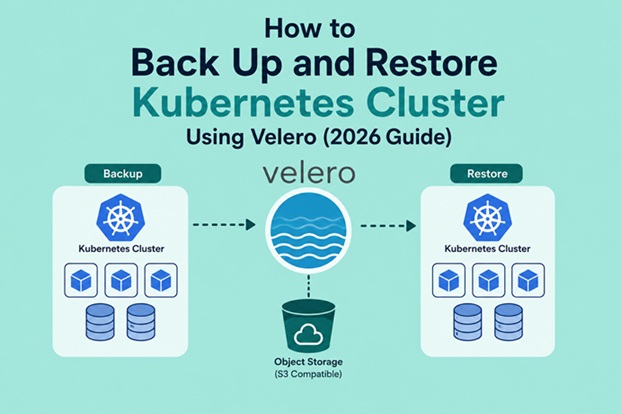
Table of Contents
- What is Velero?
- Why Kubernetes Needs Backups
- Velero Architecture
- Prerequisites
- Installing Velero CLI
- Preparing Object Storage
- Installing Velero Server
- Creating Your First Backup
- Viewing Backup Status
- Restoring a Cluster
- Scheduled Backups
- Backing Up Persistent Volumes
- Disaster Recovery Workflow
- Best Practices
- Troubleshooting
- Conclusion
What is Velero?
Velero is an open-source backup and disaster recovery tool specifically designed for Kubernetes.
It backs up:
- Deployments
- Services
- ConfigMaps
- Secrets
- Namespaces
- CRDs
- StatefulSets
- DaemonSets
- Persistent Volume snapshots
Velero stores backups inside an object storage service such as:
- Amazon S3
- Google Cloud Storage
- Azure Blob Storage
- MinIO
- DigitalOcean Spaces
- Ceph Object Storage
Why Kubernetes Needs Backups
Many administrators mistakenly assume Kubernetes is already fault tolerant.
Kubernetes only ensures workloads remain running.
It does not protect against:
- Human error
- Namespace deletion
- Failed upgrades
- Cloud account issues
- Storage corruption
- Malware
- Ransomware
- Accidental PVC deletion
A proper backup solution ensures business continuity.
Velero Architecture
++
| Kubernetes Cluster        |
|                           |
| Pods                      |
| Deployments               |
| Services                  |
| ConfigMaps                |
| Secrets                   |
| PVCs                      |
++--+
             |
             |
       Velero Server
             |
             |
+v--+
| Object Storage            |
| Amazon S3                 |
| MinIO                     |
| Azure Blob                |
| Google Cloud Storage      |
++
Velero continuously communicates with Kubernetes and uploads backup metadata to object storage.
Prerequisites
Before installing Velero, prepare the following:
- Kubernetes 1.25+
- kubectl
- Cluster Administrator access
- Object Storage
- Velero CLI
- Internet connectivity
Supported Kubernetes distributions include:
- Kubernetes
- EKS
- AKS
- GKE
- OpenShift
- Rancher
- K3s
- MicroK8s
Install Velero CLI
Download the latest release.
wget https://github.com/vmware-tanzu/velero/releases/latest/download/velero-linux-amd64.tar.gzExtract:
tar -xvf velero-linux-amd64.tar.gzMove the binary:
sudo mv velero-*/velero /usr/local/bin/Verify installation:
velero versionExample:
Client:
Version: v1.17
Prepare Object Storage
Velero requires object storage.
Example bucket:
Bucket Name:
k8s-backup
Example AWS credentials:
[default]
aws_access_key_id=YOUR_ACCESS_KEY
aws_secret_access_key=YOUR_SECRET_KEY
Install Velero
Example installation for AWS S3:
velero install \
--provider aws \
--plugins velero/velero-plugin-for-aws:v1.11.0 \
--bucket k8s-backup \
--secret-file ./credentials-velero \
--backup-location-config region=ap-southeast-1 \
--snapshot-location-config region=ap-southeast-1
Verify:
kubectl get pods -n veleroExpected:
velero-xxxxx RunningCreate Your First Backup
Backup the entire cluster:
velero backup create full-cluster-backupBackup a namespace:
velero backup create production-backup \
--include-namespaces production
Backup multiple namespaces:
velero backup create app-backup \
--include-namespaces app1,app2
Check Backup Status
List backups:
velero backup getOutput:
NAME                 STATUS
full-cluster         Completed
production-backup    Completed
Describe backup:
velero backup describe full-clusterView logs:
velero backup logs full-clusterRestore Kubernetes Cluster
Restore the latest backup:
velero restore create \
--from-backup full-cluster
Restore a specific namespace:
velero restore create \
--from-backup production-backup \
--include-namespaces production
Monitor progress:
velero restore getSchedule Automatic Backups
Production clusters should never rely on manual backups.
Create a daily backup schedule:
velero schedule create daily-backup \
--schedule="0 2 * * *"
This executes every day at 02:00 UTC.
Weekly backup:
velero schedule create weekly \
--schedule="0 1 * * 0"
List schedules:
velero schedule getBack Up Persistent Volumes
Velero supports:
- CSI snapshots
- Cloud snapshots
- Restic/File System Backup
Enable snapshot:
velero backup create pvc-backup \
--snapshot-volumes
For CSI:
--features=EnableCSIDisaster Recovery Example
Imagine an administrator accidentally deletes the production namespace.
kubectl delete namespace productionRecovery takes only minutes:
Restore:
velero restore create \
--from-backup production-backup
Verify:
kubectl get pods -n productionApplications return with:
- Deployments
- Services
- Secrets
- ConfigMaps
- PVCs
Production Backup Strategy
A recommended enterprise backup schedule is:
| Backup | Frequency | Retention |
| – | – | |
| Hourly | Every hour | 24 Hours |
| Daily | Every day | 30 Days |
| Weekly | Weekly | 3 Months |
| Monthly | Monthly | 1 Year |
Best Practices
To maximize the effectiveness of Velero in production environments:
- Encrypt backup storage buckets.
- Test restore procedures regularly.
- Enable immutable storage or object lock where supported.
- Use lifecycle policies to remove expired backups.
- Store backups in a separate cloud account or region.
- Protect credentials with Kubernetes Secrets or external secret managers.
- Monitor Velero jobs with Prometheus and Grafana.
- Schedule backups during low-traffic periods.
- Keep Velero and its plugins updated.
- Automate backup validation as part of your disaster recovery drills.
Common Troubleshooting
Backup Failed
Check backup logs:
velero backup logs backup-nameBucket Not Accessible
Verify credentials:
kubectl get secret -n veleroRestore Stuck
Check:
kubectl get events -ASnapshot Not Created
Verify CSI driver:
kubectl get volumesnapshotclassPlugin Issues
Check plugins:
velero plugin getAdvantages of Using Velero
- Open-source and actively maintained.
- Supports major cloud providers.
- Automates scheduled backups.
- Restores individual namespaces or full clusters.
- Migrates workloads between clusters.
- Integrates with CSI volume snapshots.
- Supports disaster recovery and business continuity.
- Lightweight deployment with minimal operational overhead.
Frequently Asked Questions (FAQ)
Does Velero back up application data?
Yes. With CSI snapshots or file system backup (Restic/Kopia), Velero can protect Persistent Volume data in addition to Kubernetes resources.
Can I migrate applications between Kubernetes clusters?
Yes. One of Velero’s strengths is cluster migration. You can back up resources from one cluster and restore them into another compatible cluster.
Is Velero free?
Yes. Velero is an open-source project released under the Apache 2.0 license. You only pay for the underlying object storage and infrastructure you use.
Which object storage providers are supported?
Velero supports Amazon S3, Google Cloud Storage, Azure Blob Storage, MinIO, Ceph Object Gateway, and other S3-compatible storage solutions.
Conclusion
Backing up a Kubernetes cluster is a critical part of any production-grade infrastructure. While Kubernetes provides excellent orchestration and self-healing capabilities, it does not replace a comprehensive backup and disaster recovery strategy.
Velero simplifies this process by enabling administrators to back up cluster resources, protect persistent storage, automate backup schedules, and restore workloads quickly after failures. Whether you’re managing a small development cluster or a large enterprise platform, integrating Velero into your Kubernetes operations can significantly reduce downtime and improve resilience.
By following the practices outlined in this guide—regular backups, tested restores, secure object storage, and automated scheduling—you can ensure your Kubernetes environment remains recoverable even in the face of unexpected incidents.
Related posts:
 Install and Configure K3s with NVIDIA GPU Operator on Ubuntu 22.04
 How to Install Kubernetes Cluster on Ubuntu 26.04 LTS Using kubeadm (2026 Guide)
 How to Install Kubernetes Dashboard on Ubuntu 26.04 with Secure Access
 Setting Up an Ubuntu Docker Container with SSH Access
 How To Install UrBackup on Ubuntu 22.04 LTS
 How to Use Restic Backup Software on Ubuntu 24.04
 How To Install Docker CE On Ubuntu 24.04 LTS
 KubeSphere and Kubernetes Security: Complete Hardening Guide for 2026
