Kubernetes Deployment vs StatefulSet vs DaemonSet: Complete Comparison with Examples

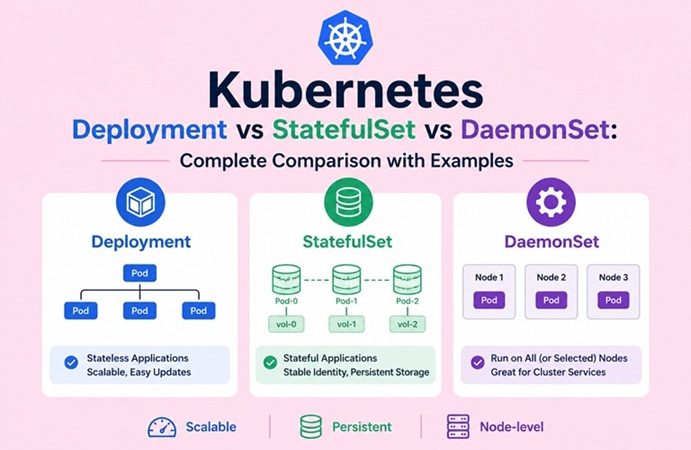
Table of Contents
- The Core Problem: Not All Workloads Are the Same
- Quick Decision Guide
- Kubernetes Deployment: Stateless Workloads
- Deployment YAML Example and Rolling Updates
- Deployment Scaling and Rollback
- Kubernetes StatefulSet: Stateful Workloads
- StatefulSet YAML Example with Persistent Storage
- StatefulSet Headless Service and DNS
- StatefulSet Ordered Startup and Shutdown
- Kubernetes DaemonSet: Node-Level Workloads
- DaemonSet YAML Example with Node Selector
- DaemonSet Updates and Tolerations
- Side-by-Side Comparison Table
- Real-World Architecture: Using All Three Together
- Common Mistakes and How to Avoid Them
- Frequently Asked Questions
- Next Steps
Three teams, three applications, three different problems. Team A builds an API — it needs to scale to handle traffic spikes, and any instance is identical to any other. Team B runs a database — it must remember which data belongs to which instance even after a restart. Team C deploys a log collector — it needs exactly one agent running on every node in the cluster, always.
Kubernetes has a dedicated workload controller for each scenario: Deployment, StatefulSet, and DaemonSet. Choosing the wrong one doesn’t always fail immediately — it fails quietly, in ways that are painful to debug later. This guide explains how each one works, with complete YAML examples and the reasoning behind every key decision.
The Core Problem: Not All Workloads Are the Same
StatefulSets are used to run stateful applications in Kubernetes, whereas Deployments support declarative updates for stateless Pods. DaemonSets are a third kind of Pod controller that ensures that all or some of the Nodes in your cluster are always running a replica of a Pod.
The fundamental distinction is between stateless, stateful, and node-level workloads:
Stateless workload (Deployment):
  Pod A = Pod B = Pod C = identical, interchangeable
  Any pod can handle any request
  Pods have no persistent identity
  Scale up by adding identical copies

Stateful workload (StatefulSet):
  Pod-0 ≠ Pod-1 ≠ Pod-2 — each has unique identity
  Pod-0 is always the primary DB replica
  Pod-1 always owns its specific data volume
  Pod-0 must start before Pod-1, which starts before Pod-2

Node-level workload (DaemonSet):
  Node 1 → exactly one pod
  Node 2 → exactly one pod
  Node 3 → exactly one pod
  New node added → pod auto-scheduled immediately
Quick Decision Guide
Before the deep dive, a fast decision tree:
Does your app store data that must survive pod restarts?
  YES → Does each replica need its own unique data?
          YES → StatefulSet
          NO  → Deployment + PersistentVolumeClaim
  NO  → Does it need to run on EVERY node?
          YES → DaemonSet
          NO  → Deployment
In practice:
| Workload | Controller |
|---|---|
| Web frontend, REST API, microservice | Deployment |
| MySQL, PostgreSQL, MongoDB, Redis cluster | StatefulSet |
| Elasticsearch, Kafka, Zookeeper | StatefulSet |
| Log collector (Fluentd, Filebeat, Alloy) | DaemonSet |
| Metrics collector (Node Exporter) | DaemonSet |
| Network plugin (Calico, Cilium, Flannel) | DaemonSet |
| Security scanner (Falco) | DaemonSet |
| Batch job, ML training (one-time) | Job / CronJob |
Kubernetes Deployment: Stateless Workloads
In a Kubernetes environment, frontend Pods are like “disposable actors” in a play — if one crashes, another steps in immediately, and nobody notices. That’s the Deployment controller in Kubernetes.
A Deployment manages a ReplicaSet — a set of identical, interchangeable pod replicas. The Deployment controller continuously reconciles the actual state with the desired state: if you ask for 5 replicas and one crashes, it immediately creates a replacement.
What makes a workload suitable for Deployment:
- Any instance can handle any request (no session affinity to data)
- Pods can start and stop in any order without affecting correctness
- Scaling means adding more identical copies
- No data needs to survive beyond the pod’s lifecycle
Core features:
- Rolling updates — replace pods one at a time with zero downtime
- Rollback — instantly revert to a previous version with one command
- Scaling — add or remove replicas with a single kubectl command
- Health checks — liveness and readiness probes gate traffic and replacements
Deployment YAML Example and Rolling Updates
# nginx-deployment.yaml
apiVersion: apps/v1
kind: Deployment
metadata:
  name: web-api
  namespace: production
  labels:
    app: web-api
    version: "1.2.3"
spec:
  replicas: 3

  selector:
    matchLabels:
      app: web-api

  # Rolling update strategy — the default
  strategy:
    type: RollingUpdate
    rollingUpdate:
      maxSurge: 1          # Allow 1 extra pod during update (4 pods max)
      maxUnavailable: 0    # Never go below 3 running pods during update

  template:
    metadata:
      labels:
        app: web-api
        version: "1.2.3"
    spec:
      # Security: never run as root
      securityContext:
        runAsNonRoot: true
        runAsUser: 1000

      containers:
        - name: web-api
          image: myregistry.com/web-api:1.2.3    # Always pin — never :latest
          ports:
            - containerPort: 8080

          # Resource limits — always required in production
          resources:
            requests:
              cpu: "100m"
              memory: "128Mi"
            limits:
              cpu: "500m"
              memory: "512Mi"

          # Liveness probe — restart if unhealthy
          livenessProbe:
            httpGet:
              path: /health
              port: 8080
            initialDelaySeconds: 30
            periodSeconds: 10
            failureThreshold: 3

          # Readiness probe — only send traffic when ready
          readinessProbe:
            httpGet:
              path: /ready
              port: 8080
            initialDelaySeconds: 10
            periodSeconds: 5

          # Environment from ConfigMap and Secret
          envFrom:
            - configMapRef:
                name: web-api-config
          env:
            - name: DB_PASSWORD
              valueFrom:
                secretKeyRef:
                  name: db-credentials
                  key: password

      # Spread pods across nodes for high availability
      topologySpreadConstraints:
        - maxSkew: 1
          topologyKey: kubernetes.io/hostname
          whenUnsatisfiable: DoNotSchedule
          labelSelector:
            matchLabels:
              app: web-api
Expose the Deployment with a Service:
# web-api-service.yaml
apiVersion: v1
kind: Service
metadata:
  name: web-api
  namespace: production
spec:
  selector:
    app: web-api        # Routes to any pod with this label
  ports:
    - port: 80
      targetPort: 8080
  type: ClusterIP       # Internal only — expose via Ingress for external access
Perform a rolling update:
# Update the image — triggers a rolling update automatically
kubectl set image deployment/web-api \
  web-api=myregistry.com/web-api:1.2.4 \
  -n production

# Watch the rollout in real time
kubectl rollout status deployment/web-api -n production
# Waiting for deployment "web-api" rollout to finish: 1 out of 3 new replicas updated...
# Waiting for deployment "web-api" rollout to finish: 2 out of 3 new replicas updated...
# Waiting for deployment "web-api" rollout to finish: 1 old replicas are pending termination...
# deployment "web-api" successfully rolled out
Deployment Scaling and Rollback
# Scale up for a traffic spike
kubectl scale deployment/web-api --replicas=10 -n production

# Scale back down
kubectl scale deployment/web-api --replicas=3 -n production

# View rollout history
kubectl rollout history deployment/web-api -n production
# REVISION  CHANGE-CAUSE
# 1         Initial deployment v1.2.3
# 2         Updated to v1.2.4

# Rollback to previous version (if v1.2.4 has a bug)
kubectl rollout undo deployment/web-api -n production

# Rollback to a specific revision
kubectl rollout undo deployment/web-api --to-revision=1 -n production
The Recreate strategy (alternative to RollingUpdate):
strategy:
  type: Recreate    # Kill ALL old pods first, then create new ones
Use Recreate when your application cannot run two versions simultaneously — for example, if it holds a database lock that only one version understands. The tradeoff: brief downtime during the update.
Kubernetes StatefulSet: Stateful Workloads
StatefulSets are a great choice for assigning unique resources to containers and maintaining application state. Use cases for StatefulSets typically involve stateful apps that need access to persistent storage resources. StatefulSets let a container access the same data storage volume even if the container restarts or moves to another node. With a standard deployment, this wouldn’t be possible.
A StatefulSet provides three guarantees that a Deployment cannot:
1. Stable, unique network identity:
Each pod gets a predictable, permanent name: db-0, db-1, db-2. Even after a pod restarts, it comes back with the same name and DNS entry — not a random suffix like Deployment pods (db-7d9f4b-x8k2p).
2. Stable, persistent storage:
Each pod gets its own PersistentVolumeClaim, and that PVC is reattached to the same pod when it restarts — regardless of which physical node it lands on.
3. Ordered, graceful deployment and scaling:
Pods start in order (db-0 first, then db-1, then db-2) and terminate in reverse order (db-2 first). No pod starts until all previous pods are Running and Ready.
Why databases need StatefulSets:
A database cluster (PostgreSQL, MongoDB, Redis Sentinel) has a primary node that accepts writes and secondaries that replicate from it. If pods had random names and random storage assignments:
- The primary might get
db-7d9f4b-x8k2pone restart anddb-7d9f4b-r3n9qthe next - Secondaries wouldn’t know which pod to replicate from
- Volumes would be assigned to the wrong pods, corrupting data
StatefulSets solve all of this with stable identities.
StatefulSet YAML Example with Persistent Storage
# mongodb-statefulset.yaml
apiVersion: apps/v1
kind: StatefulSet
metadata:
  name: mongodb
  namespace: production
spec:
  serviceName: "mongodb-headless"    # Must reference the headless service below
  replicas: 3
  selector:
    matchLabels:
      app: mongodb

  template:
    metadata:
      labels:
        app: mongodb
    spec:
      # Terminate in order: pod-2 before pod-1 before pod-0
      terminationGracePeriodSeconds: 60

      containers:
        - name: mongodb
          image: mongo:7.0
          ports:
            - containerPort: 27017
              name: mongodb

          command:
            - mongod
            - "--replSet"
            - "rs0"
            - "--bind_ip_all"
            - "--keyFile"
            - "/etc/mongodb-keyfile"

          resources:
            requests:
              cpu: "500m"
              memory: "1Gi"
            limits:
              cpu: "2"
              memory: "4Gi"

          # Mount persistent volume at /data/db
          volumeMounts:
            - name: mongodb-data
              mountPath: /data/db
            - name: mongodb-keyfile
              mountPath: /etc/mongodb-keyfile
              subPath: keyfile
              readOnly: true

          livenessProbe:
            exec:
              command:
                - mongosh
                - "--eval"
                - "db.adminCommand('ping')"
            initialDelaySeconds: 30
            periodSeconds: 10

      volumes:
        - name: mongodb-keyfile
          secret:
            secretName: mongodb-keyfile
            defaultMode: 0400    # Keyfile must be 400 — MongoDB rejects anything looser

  # VolumeClaimTemplates: each pod gets its OWN PVC
  # mongodb-data-mongodb-0, mongodb-data-mongodb-1, mongodb-data-mongodb-2
  volumeClaimTemplates:
    - metadata:
        name: mongodb-data
      spec:
        accessModes: ["ReadWriteOnce"]
        storageClassName: "fast-ssd"
        resources:
          requests:
            storage: 50Gi
The volumeClaimTemplates section is what makes StatefulSets unique — it creates a separate PersistentVolumeClaim for each pod automatically. When mongodb-0 restarts, it gets mongodb-data-mongodb-0 — always. When mongodb-1 restarts, it gets mongodb-data-mongodb-1 — always. The data never gets mixed up.
For a complete MongoDB setup with Docker Compose (non-Kubernetes), see our MongoDB with Docker Compose guide — the replica set concepts are identical.
StatefulSet Headless Service and DNS
A StatefulSet requires a headless service — a Service with clusterIP: None. Instead of load balancing across pods, it creates individual DNS entries for each pod:
# mongodb-headless-service.yaml
apiVersion: v1
kind: Service
metadata:
  name: mongodb-headless
  namespace: production
spec:
  clusterIP: None      # This is what makes it "headless"
  selector:
    app: mongodb
  ports:
    - port: 27017
      targetPort: 27017
With the headless service, each pod gets a predictable DNS entry:
mongodb-0.mongodb-headless.production.svc.cluster.local → Pod-0 IP
mongodb-1.mongodb-headless.production.svc.cluster.local → Pod-1 IP
mongodb-2.mongodb-headless.production.svc.cluster.local → Pod-2 IP
This is how MongoDB replica set members find each other after restarts — they connect by DNS name, not IP address. IPs change; DNS names don’t.
Also create a regular Service for the primary (write endpoint):
# mongodb-primary-service.yaml
apiVersion: v1
kind: Service
metadata:
  name: mongodb-primary
  namespace: production
spec:
  selector:
    app: mongodb
    role: primary     # Label set by the replica set initialization process
  ports:
    - port: 27017
Application connection string:
mongodb://app:password@mongodb-0.mongodb-headless.production.svc.cluster.local:27017,mongodb-1.mongodb-headless.production.svc.cluster.local:27017,mongodb-2.mongodb-headless.production.svc.cluster.local:27017/mydb?replicaSet=rs0StatefulSet Ordered Startup and Shutdown
Unlike Deployments, where Pods are treated as interchangeable units, StatefulSets provide each Pod with a unique and stable identity. StatefulSets guarantee ordered deployment — Pod-0 must be Running and Ready before Pod-1 starts, which must be Running and Ready before Pod-2 starts.
# Scale up a StatefulSet — watch ordered startup
kubectl scale statefulset/mongodb --replicas=5 -n production
# mongodb-0 → Running → Ready
# mongodb-1 → (waits for mongodb-0 Ready) → Running → Ready
# mongodb-2 → (waits for mongodb-1 Ready) → Running → Ready
# ...

# Scale down — reverse order termination
kubectl scale statefulset/mongodb --replicas=2 -n production
# mongodb-4 → Terminating → Deleted
# mongodb-3 → (waits for mongodb-4 Deleted) → Terminating → Deleted
# ...

# View StatefulSet status
kubectl get statefulset mongodb -n production
# NAME      READY   AGE
# mongodb   3/3     5m

# Describe a specific pod identity
kubectl get pods -l app=mongodb -n production
# NAME          READY   STATUS    RESTARTS
# mongodb-0     1/1     Running   0
# mongodb-1     1/1     Running   0
# mongodb-2     1/1     Running   0
Update strategy for StatefulSets:
spec:
  updateStrategy:
    type: RollingUpdate
    rollingUpdate:
      partition: 1    # Only update pods with ordinal >= 1 (canary rollout)
                      # Set partition: 0 to update all pods
The partition setting enables canary rollouts on StatefulSets: update mongodb-2 first, verify it works, then update mongodb-1, then mongodb-0 (the primary) — a controlled rolling update for stateful systems.
Kubernetes DaemonSet: Node-Level Workloads
A DaemonSet ensures that a single instance of a pod is running on each node in a cluster. While the earlier controller types ensure that a specific number of replicas are running across the cluster, DaemonSets are intended to run exactly one pod per node. This is particularly useful for running pods as system daemons or background processes that need to run on every node.
The key behavior that distinguishes DaemonSet:
- When a new node joins the cluster, a DaemonSet pod is automatically scheduled on it
- When a node is removed, its DaemonSet pod is garbage collected
- You never set
replicas— the count is always equal to the number of matching nodes
DaemonSets are like security guards at a party — they make sure a critical task runs at every entrance. You run a weather app with 10 replicas in a Deployment (Kubernetes might place 3 pods on Node A, 5 on Node B, 2 on Node C). But you deploy a security scanner as a DaemonSet — exactly 1 pod on Node A, 1 on Node B, 1 on Node C, always.
Why node-level agents need DaemonSets, not Deployments:
Consider a log collector like Grafana Alloy. It needs to read log files from /var/log on each node. If you deploy it as a Deployment with 3 replicas on a 10-node cluster:
- 7 nodes have no log collector — their logs are never collected
- 3 nodes might each have a log collector, but Kubernetes could schedule all 3 on the same node
A DaemonSet guarantees exactly one collector on every node, always.
DaemonSet YAML Example with Node Selector
# node-exporter-daemonset.yaml
apiVersion: apps/v1
kind: DaemonSet
metadata:
  name: node-exporter
  namespace: monitoring
  labels:
    app: node-exporter
spec:
  selector:
    matchLabels:
      app: node-exporter

  updateStrategy:
    type: RollingUpdate
    rollingUpdate:
      maxUnavailable: 1    # Update one node at a time

  template:
    metadata:
      labels:
        app: node-exporter
      annotations:
        prometheus.io/scrape: "true"
        prometheus.io/port: "9100"
    spec:
      # Run on the host network (required for node-level metrics)
      hostNetwork: true
      hostPID: true

      # Don't mount service account token (not needed)
      automountServiceAccountToken: false

      # Tolerate all taints — run on every node including control plane
      tolerations:
        - operator: Exists    # Match any taint key/value

      # Optional: run only on specific nodes
      # nodeSelector:
      #   node-role: worker

      containers:
        - name: node-exporter
          image: prom/node-exporter:latest
          args:
            - "--path.procfs=/host/proc"
            - "--path.sysfs=/host/sys"
            - "--path.rootfs=/rootfs"
            - "--collector.filesystem.mount-points-exclude=^/(sys|proc|dev|host|etc)($$|/)"
          ports:
            - containerPort: 9100
              hostPort: 9100      # Expose on host port — bypasses kube-proxy
          resources:
            requests:
              cpu: "100m"
              memory: "64Mi"
            limits:
              cpu: "250m"
              memory: "128Mi"
          securityContext:
            readOnlyRootFilesystem: true
            runAsNonRoot: true
            runAsUser: 65534    # nobody user
          # Mount host filesystem for node-level access
          volumeMounts:
            - name: proc
              mountPath: /host/proc
              readOnly: true
            - name: sys
              mountPath: /host/sys
              readOnly: true
            - name: root
              mountPath: /rootfs
              readOnly: true

      volumes:
        - name: proc
          hostPath:
            path: /proc
        - name: sys
          hostPath:
            path: /sys
        - name: root
          hostPath:
            path: /
This is the exact Node Exporter DaemonSet pattern used in the Prometheus + Grafana monitoring stack — here running natively inside Kubernetes instead of Docker Compose, but the configuration principles are identical.
Log collection DaemonSet (Grafana Alloy):
# alloy-daemonset.yaml — ships pod logs to Grafana Loki
apiVersion: apps/v1
kind: DaemonSet
metadata:
  name: grafana-alloy
  namespace: monitoring
spec:
  selector:
    matchLabels:
      app: grafana-alloy
  template:
    metadata:
      labels:
        app: grafana-alloy
    spec:
      serviceAccountName: grafana-alloy   # Needs API access to discover pod metadata
      tolerations:
        - operator: Exists
      containers:
        - name: grafana-alloy
          image: grafana/alloy:v1.16.3
          args:
            - run
            - /etc/alloy/config.alloy
            - --server.http.listen-addr=0.0.0.0:12345
          volumeMounts:
            - name: config
              mountPath: /etc/alloy
            - name: varlog
              mountPath: /var/log
              readOnly: true
            - name: varlibdockercontainers
              mountPath: /var/lib/docker/containers
              readOnly: true
      volumes:
        - name: config
          configMap:
            name: alloy-config
        - name: varlog
          hostPath:
            path: /var/log
        - name: varlibdockercontainers
          hostPath:
            path: /var/lib/docker/containers
For the complete Loki + Alloy log aggregation setup, see our Grafana Loki with Docker Compose guide — the Alloy configuration is identical whether it runs as a DaemonSet in Kubernetes or as a container in Docker Compose.
DaemonSet Updates and Tolerations
# Check DaemonSet status
kubectl get daemonset node-exporter -n monitoring
# NAME            DESIRED   CURRENT   READY   UP-TO-DATE   AVAILABLE
# node-exporter   3         3         3       3            3

# Desired = number of cluster nodes
# All other numbers should match Desired when healthy

# Trigger a rolling update by changing the image
kubectl set image daemonset/node-exporter \
  node-exporter=prom/node-exporter:v1.9.1 \
  -n monitoring

# Watch the update
kubectl rollout status daemonset/node-exporter -n monitoring
Tolerations explained:
By default, DaemonSet pods don’t run on the control plane node (which has a node-role.kubernetes.io/control-plane:NoSchedule taint). For infrastructure tools like monitoring agents or network plugins that must run on all nodes including the control plane:
tolerations:
  - operator: Exists    # Tolerate any taint — run on all nodes

# Or be more specific:
tolerations:
  - key: "node-role.kubernetes.io/control-plane"
    operator: "Exists"
    effect: "NoSchedule"
Run DaemonSet only on specific nodes:
nodeSelector:
  disk: ssd             # Only nodes with this label

# Or more powerful — use nodeAffinity:
affinity:
  nodeAffinity:
    requiredDuringSchedulingIgnoredDuringExecution:
      nodeSelectorTerms:
        - matchExpressions:
            - key: node-type
              operator: In
              values:
                - worker
                - edge
Side-by-Side Comparison Table
Understanding the difference between each controller type is useful to understand which one to use in which scenario.
| Feature | Deployment | StatefulSet | DaemonSet |
|---|---|---|---|
| Pod identity | Random suffix (pod-7d9f4b) | Ordinal index (pod-0, pod-1) | One per node |
| Pod count | Any number you specify | Any number you specify | = Number of matching nodes |
| Scaling | Instant, any order | Ordered (one at a time) | Auto with node count |
| Storage | Shared or ephemeral | Dedicated PVC per pod | Node filesystem access |
| DNS | Single Service endpoint | Per-pod DNS via headless svc | Per-node hostPort |
| Startup order | Parallel, any order | Sequential (0 → 1 → 2) | Per node, unordered |
| Shutdown order | Any order | Reverse ordinal (2 → 1 → 0) | Per node |
| Rolling update | maxSurge/maxUnavailable | Ordinal partition | maxUnavailable |
| Rollback | kubectl rollout undo | Manual (complex) | kubectl rollout undo |
| Typical use cases | APIs, frontends, workers | Databases, message queues | Agents, plugins, daemons |
replicas field | ✅ Required | ✅ Required | ❌ Not used |
| Headless Service | Not required | ✅ Required | Not required |
| VolumeClaimTemplate | ❌ Not available | ✅ Yes | ❌ Not available |
Real-World Architecture: Using All Three Together
A production e-commerce platform typically uses all three controllers simultaneously:
┌─────────────────────────────────────────────────────────────────┐
│  DAEMONSET (on every node)                                      │
│  ├── node-exporter (Prometheus metrics)                         │
│  ├── grafana-alloy (log collection → Loki)                      │
│  ├── calico-node (network plugin)                               │
│  └── falco (runtime security scanner)                           │
├─────────────────────────────────────────────────────────────────┤
│  DEPLOYMENT (stateless, scalable)                               │
│  ├── web-frontend (React app) — 3-10 replicas                   │
│  ├── api-gateway — 3-5 replicas                                 │
│  ├── order-service — 2-8 replicas                               │
│  ├── payment-service — 2 replicas (cost-sensitive)              │
│  └── notification-worker — 3 replicas                           │
├─────────────────────────────────────────────────────────────────┤
│  STATEFULSET (stateful, identity-sensitive)                     │
│  ├── postgresql (primary + 2 replicas) — 3 pods                 │
│  ├── redis-cluster — 6 pods (3 primary + 3 replica)             │
│  ├── kafka — 3 pods                                             │
│  └── elasticsearch — 3 pods                                     │
└─────────────────────────────────────────────────────────────────┘
The traffic flow:
User Request
  → NGINX Ingress Controller (Deployment)
      → api-gateway (Deployment)
          → order-service (Deployment)
              → postgresql (StatefulSet)  — write order to DB
              → redis-cluster (StatefulSet) — cache session
              → kafka (StatefulSet) — emit order-placed event
          → notification-worker (Deployment)  — consume Kafka event, send email

Simultaneously on every node:
  node-exporter (DaemonSet) → Prometheus → Grafana dashboard
  grafana-alloy (DaemonSet) → Loki → Grafana logs
Common Mistakes and How to Avoid Them
1. Using Deployment for a database:
# ❌ Wrong — Deployment for PostgreSQL
apiVersion: apps/v1
kind: Deployment
metadata:
  name: postgresql    # This will lose data on reschedule!
spec:
  replicas: 1         # Even with 1 replica, volume reattachment is not guaranteed
  template:
    spec:
      volumes:
        - name: data
          persistentVolumeClaim:
            claimName: postgresql-pvc    # Shared PVC — dangerous with >1 replica
The risk: if the pod is rescheduled to a different node, and the PVC uses a node-local storage class, the pod can’t start on the new node because the data is on the old one. A StatefulSet handles this correctly.
# ✅ Correct — StatefulSet for PostgreSQL
apiVersion: apps/v1
kind: StatefulSet
metadata:
  name: postgresql
spec:
  serviceName: postgresql-headless
  replicas: 1          # Single node, but now properly managed
  volumeClaimTemplates:
    - metadata:
        name: data
      spec:
        storageClassName: "standard"   # Must be a storage class that supports the node
        resources:
          requests:
            storage: 50Gi
2. Using DaemonSet when you just want wide distribution:
# ❌ Wrong — DaemonSet for a web service
apiVersion: apps/v1
kind: DaemonSet
metadata:
  name: web-api    # Bad idea — one pod per node, can't scale independently
DaemonSets exist for node-level functionality, not for distributing application load. For wide distribution with Deployments, use topologySpreadConstraints instead.
3. Forgetting the headless Service for a StatefulSet:
# ❌ StatefulSet applied without headless service
# Pods come up but can't discover each other — replica set init fails

# ✅ Always apply the headless service first
kubectl apply -f mongodb-headless-service.yaml
kubectl apply -f mongodb-statefulset.yaml
4. Scaling a StatefulSet down too aggressively:
# ❌ Scaling MongoDB from 3 to 1 while writes are happening
kubectl scale statefulset/mongodb --replicas=1
# This terminates pod-2 and pod-1 immediately
# If pod-0 wasn't the primary, the cluster loses quorum during termination

# ✅ Scale down one replica at a time, verifying replica set health between steps
kubectl scale statefulset/mongodb --replicas=2
kubectl exec mongodb-0 -- mongosh --eval "rs.status()"  # Verify still healthy
kubectl scale statefulset/mongodb --replicas=1
5. Not setting terminationGracePeriodSeconds on StatefulSets:
spec:
  template:
    spec:
      # Default is 30 seconds — often too short for databases
      # Set to enough time for graceful shutdown + checkpoint flushing
      terminationGracePeriodSeconds: 60    # Or longer for large databases
Frequently Asked Questions
Can I convert a Deployment to a StatefulSet?
Not directly — they use different APIs and different storage models. The typical migration path: create the StatefulSet, migrate data to the new persistent volumes (using a backup/restore procedure), then delete the old Deployment. For databases like Redis or MongoDB, this usually means taking a snapshot and restoring it into the StatefulSet-managed pods.
Can a StatefulSet have zero replicas?
Yes — kubectl scale statefulset/mongodb --replicas=0 terminates all pods in reverse order and is the correct way to “pause” a StatefulSet without deleting it or its PVCs. Useful for maintenance.
What happens to DaemonSet pods when a node is cordoned?
Cordoning (kubectl cordon node-1) prevents new pods from being scheduled but does not evict existing pods — existing DaemonSet pods keep running. Draining (kubectl drain) with --ignore-daemonsets flag is required to move DaemonSet pods, and they’re immediately recreated on the node when it’s uncordoned.
Can a Deployment use persistent storage?
Yes, but only shared volumes that all replicas access together (e.g., a shared NFS mount with ReadWriteMany access mode), or each pod gets the same PVC (which only works with ReadWriteMany storage). StatefulSets are the right choice when each replica needs its own dedicated storage.
Why does my StatefulSet pod have -0 in its name?
That’s the ordinal index — pod-name-0 is the first pod, pod-name-1 is the second. This is intentional and permanent. The name persists across restarts, which is what gives the pod its stable DNS identity.
When does a DaemonSet make sense with nodeSelector?
When you have heterogeneous nodes and some pods should only run on specific hardware — for example, a GPU monitoring agent that only makes sense on GPU-enabled nodes: nodeSelector: accelerator: nvidia-tesla.
Next Steps
With a solid understanding of Kubernetes workload controllers:
- Set up your cluster — if you don’t have a running Kubernetes cluster yet, our Install Kubernetes Cluster on Ubuntu 26.04 LTS guide covers the full kubeadm setup from scratch.
- Add monitoring — deploy Node Exporter as a DaemonSet and Prometheus + Grafana as Deployments using the patterns in our Prometheus + Grafana Monitoring Stack guide.
- Add log collection — deploy Grafana Alloy as a DaemonSet to collect logs from all pods and ship them to Loki — see our Grafana Loki guide for the Loki setup.
- Harden your workloads — apply Pod Security Standards (Restricted profile), network policies, and RBAC to all three controller types — the KubeSphere and Kubernetes Security guide covers the full hardening checklist.
- Try Redis or MongoDB — if you’re running Redis or MongoDB in Docker Compose today, the StatefulSet patterns in this article are the Kubernetes equivalent — see our Redis with Docker Compose and MongoDB with Docker Compose guides for the Docker-based version of the same concepts.
Related posts:
 Install and Configure K3s with NVIDIA GPU Operator on Ubuntu 22.04
 How to Install Kubernetes (K8s) on Ubuntu 24.04: A Step-by-Step Guide
 What Is KubeKey? Complete Explanation for DevOps Beginners
 How to Install Kubernetes Cluster on Ubuntu 26.04 LTS Using kubeadm (2026 Guide)
 KubeSphere and Kubernetes Security: Complete Hardening Guide for 2026
 How to Install Kubernetes Dashboard on Ubuntu 26.04 with Secure Access
 How to Deploy NGINX Ingress Controller on Kubernetes Step-by-Step (2026 Guide)
 How to Install MetalLB on Bare Metal Kubernetes Cluster (L2 and BGP Guide)
