MongoDB with Docker Compose: Authentication, Replica Set, and Production-Ready Setup

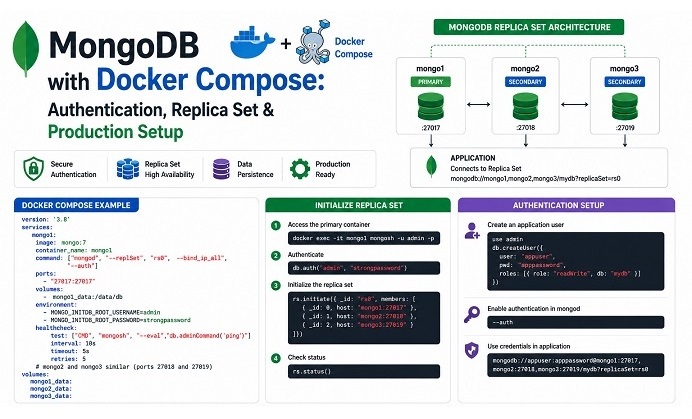
Table of Contents
- Why a Standalone Container Isn’t Enough
- Basic Setup: Single Container with Persistence
- Enabling Authentication
- Single-Node Replica Set for Transactions
- Keyfile Authentication for Replica Sets
- Full 3-Node Replica Set for High Availability
- Health Checks and Auto-Initialization
- Connection String Patterns
- Backup Considerations
- Common Issues and Quick Fixes
- Closing Notes
MongoDB is straightforward to start in Docker — pull the image, mount a volume, and you have a working database in under a minute. The complexity shows up the moment your application needs something a single standalone instance can’t provide: multi-document transactions, change streams, or basic high availability. All three require a replica set, and setting one up correctly inside Docker Compose has a few sharp edges worth knowing before you hit them in production.
Why a Standalone Container Isn’t Enough
A default MongoDB container — just image: mongo with no extra flags — runs as a standalone instance. That’s fine for simple CRUD prototyping, but it silently blocks two things many applications eventually need:
- Multi-document transactions — MongoDB only supports ACID transactions across a replica set, even a single-node one.
- Change streams — real-time data pipelines, cache invalidation, or event-driven architectures built on
watch()require replication to function at all.
If you’ve ever seen an ORM or driver (Prisma is a common example) throw an error demanding a replica set, this is why. The fix isn’t complicated, but it does mean a standalone container is rarely the right default for anything beyond a quick prototype.
Basic Setup: Single Container with Persistence
Start with the foundation — a container that keeps its data after a restart:
version: '3.8'
services:
  mongo:
    image: mongo:7.0
    container_name: mongodb
    restart: always
    ports:
      - "27017:27017"
    volumes:
      - mongo-data:/data/db

volumes:
  mongo-data:
    driver: local
The official MongoDB image stores its database files at /data/db. As with Redis, a named volume is preferable to a bind mount here — Docker manages its lifecycle, and it stays portable across hosts.
Enabling Authentication
Authentication is not enabled by default on the official MongoDB image. The first time you run it, set a root user through environment variables:
services:
  mongo:
    image: mongo:7.0
    container_name: mongodb
    restart: always
    environment:
      MONGO_INITDB_ROOT_USERNAME: root
      MONGO_INITDB_ROOT_PASSWORD: ${MONGO_ROOT_PASSWORD}
    ports:
      - "27017:27017"
    volumes:
      - mongo-data:/data/db

volumes:
  mongo-data:
    driver: local
These variables only take effect on first initialization of an empty data directory — changing them later won’t update an existing user. Keep the password in a .env file excluded from version control rather than hardcoded in the compose file.
Connect to verify:
mongosh --port 27017 --username root --password --authenticationDatabase adminSingle-Node Replica Set for Transactions
The fastest way to unlock transactions and change streams in development is converting your single container into a one-member replica set — no extra containers required:
services:
  mongo:
    image: mongo:7.0
    container_name: mongodb
    restart: always
    command: ["--replSet", "rs0", "--bind_ip_all"]
    environment:
      MONGO_INITDB_ROOT_USERNAME: root
      MONGO_INITDB_ROOT_PASSWORD: ${MONGO_ROOT_PASSWORD}
    ports:
      - "27017:27017"
    volumes:
      - mongo-data:/data/db
    healthcheck:
      test: >
        echo "try { rs.status() } catch (err) { rs.initiate({_id:'rs0',members:[{_id:0,host:'127.0.0.1:27017'}]}) }"
        | mongosh --port 27017 -u root -p ${MONGO_ROOT_PASSWORD} --authenticationDatabase admin --quiet
      interval: 5s
      timeout: 15s
      start_period: 15s
      retries: 10

volumes:
  mongo-data:
    driver: local
The health check does double duty here: it both verifies MongoDB is responsive and initializes the replica set automatically on first boot if it hasn’t been configured yet. This is a convenient pattern for local development and staging — for production, see the dedicated initialization service further down.
Keyfile Authentication for Replica Sets
Here’s the edge that catches people off guard: once you combine authentication with replication, MongoDB requires internal cluster members to authenticate with each other using a shared keyfile — separate from the root user’s password. Without it, replica set members can’t establish trust between themselves.
Generate a keyfile and mount it:
openssl rand -base64 756 > mongo-keyfile
chmod 400 mongo-keyfile
services:
mongo:
image: mongo:7.0
command: ["--replSet", "rs0", "--keyFile", "/etc/mongo-keyfile", "--bind_ip_all"]
volumes:
- mongo-data:/data/db
- ./mongo-keyfile:/etc/mongo-keyfile:ro
environment:
MONGO_INITDB_ROOT_USERNAME: root
MONGO_INITDB_ROOT_PASSWORD: ${MONGO_ROOT_PASSWORD}A common permissions trap: the official image runs as the mongodb user internally, and a keyfile mounted with the wrong ownership or overly permissive mode (anything looser than 400) will be silently rejected at startup with a generic authentication error. If replication fails to establish after adding a keyfile, check permissions first.
Full 3-Node Replica Set for High Availability
For an environment that actually needs failover — not just transaction support — run three MongoDB instances on a shared network:
version: '3.8'
services:
  mongo1:
    image: mongo:7.0
    container_name: mongo1
    hostname: mongo1
    command: ["mongod", "--replSet", "rs0", "--keyFile", "/etc/mongo-keyfile", "--bind_ip_all"]
    volumes:
      - mongo1-data:/data/db
      - ./mongo-keyfile:/etc/mongo-keyfile:ro
    networks:
      - mongo-net
    healthcheck:
      test: ["CMD", "mongosh", "--eval", "db.adminCommand('ping').ok", "--quiet"]
      interval: 10s
      timeout: 5s
      retries: 5

  mongo2:
    image: mongo:7.0
    container_name: mongo2
    hostname: mongo2
    command: ["mongod", "--replSet", "rs0", "--keyFile", "/etc/mongo-keyfile", "--bind_ip_all"]
    volumes:
      - mongo2-data:/data/db
      - ./mongo-keyfile:/etc/mongo-keyfile:ro
    networks:
      - mongo-net

  mongo3:
    image: mongo:7.0
    container_name: mongo3
    hostname: mongo3
    command: ["mongod", "--replSet", "rs0", "--keyFile", "/etc/mongo-keyfile", "--bind_ip_all"]
    volumes:
      - mongo3-data:/data/db
      - ./mongo-keyfile:/etc/mongo-keyfile:ro
    networks:
      - mongo-net

  mongo-init:
    image: mongo:7.0
    depends_on:
      mongo1:
        condition: service_healthy
    networks:
      - mongo-net
    entrypoint: >
      bash -c "
        mongosh --host mongo1 -u root -p ${MONGO_ROOT_PASSWORD} --authenticationDatabase admin --eval '
        rs.initiate({
          _id: \"rs0\",
          members: [
            { _id: 0, host: \"mongo1:27017\" },
            { _id: 1, host: \"mongo2:27017\" },
            { _id: 2, host: \"mongo3:27017\" }
          ]
        })'
      "

volumes:
  mongo1-data:
  mongo2-data:
  mongo3-data:

networks:
  mongo-net:
    driver: bridge
Each node uses its service name as hostname within the mongo-net network — mongo1, mongo2, mongo3 — and the replica set configuration references those names directly rather than IP addresses, which would break the moment containers restart and get reassigned. This is the same hostname-based service discovery pattern used in any multi-container Compose stack, and it’s worth pairing with the network segmentation approach in our Docker Container Security Best Practices guide if this stack is internet-facing in any way.
Health Checks and Auto-Initialization
A dedicated mongo-init service — as shown above — is the cleanest way to handle replica set initialization in a repeatable, automated way, rather than running rs.initiate() manually after every fresh deployment. The pattern:
mongo-initwaits formongo1to report healthy viadepends_on.condition: service_healthy.- It runs
rs.initiate()exactly once, targeting all three members. - The container exits after running — it’s a one-shot initialization job, not a long-running service.
If you re-run docker compose up on an already-initialized cluster, rs.initiate() will simply fail harmlessly since the replica set already exists — safe to leave in place for idempotent deployments.
Connection String Patterns
Once authentication and replication are both in place, your application’s connection string needs two extra parameters compared to a standalone setup:
mongodb://appuser:apppassword@mongo1:27017,mongo2:27017,mongo3:27017/myapp?replicaSet=rs0&authSource=admin- Multiple hosts in the connection string let the driver discover the current primary even after a failover.
replicaSet=rs0must match the_idused inrs.initiate().authSource=admintells the driver which database the user’s credentials are stored in — almost alwaysadminfor a root-style user, even when connecting to a different application database.
For local development against the single-node setup, the equivalent is simpler:
mongodb://root:password@localhost:27017/?replicaSet=rs0&authSource=adminBackup Considerations
A replica set doesn’t replace backups — replication protects against node failure, not against an accidental deleteMany() or application bug that corrupts data across all members simultaneously. The backup approach is the same regardless of whether you’re running standalone or a replica set: mongodump against a secondary node to avoid load on the primary, archived on a schedule outside the container. Our existing MongoDB Backup guide covers the full scripted approach, including restore testing — worth pairing with this setup once your replica set is running.
If your stack also runs Redis alongside MongoDB, the volume-and-backup discipline described in our Redis with Docker Compose guide follows the same underlying pattern — named volumes, scheduled snapshots, and a tested restore procedure for each.
Common Issues and Quick Fixes
| Symptom | Likely Cause | Fix |
|---|---|---|
| Driver throws “Transaction numbers are only allowed on a replica set” | Standalone instance with no replication configured | Convert the deployment to a single-node or multi-node replica set. |
| Replica set members can’t authenticate with each other | Missing or incorrectly configured keyfile | Generate a keyfile, mount it correctly, set permissions to chmod 400, and verify file ownership. |
rs.initiate() hangs or times out | Replica set members cannot resolve each other’s hostnames | Ensure all nodes are connected to the same Docker network and use service names instead of localhost. |
| Application can’t find the primary node after failover | Connection string references only one host | Include all replica set members in the MongoDB connection string. |
MONGO_INITDB_ROOT_USERNAME has no effect | Environment variables only apply during first initialization of an empty volume | Delete and recreate the volume, or manually create the user using mongosh. |
Conclusion
Running MongoDB in Docker Compose is simple for a prototype and only slightly more involved once production requirements show up: authentication from the start, a replica set the moment transactions or change streams enter the picture, a keyfile the moment authentication and replication combine, and health checks that make initialization repeatable instead of a manual one-off step.
From here, pair this setup with our MongoDB Backup guide for the operational side, and our Redis with Docker Compose guide if your stack runs both databases side by side — the persistence and security patterns carry over directly between the two.
Related posts:
 Docker Compose Security: Complete Hardening Guide for 2026
 Redis with Docker Compose: Persistence, Security, and Production-Ready Configuration
 How To Install Docker On CentOS 7
 Setting Up an Ubuntu Docker Container with SSH Access
 How To Install Docker On Fedora 38
How To Install Docker CE On Ubuntu 24.04 LTS
How To Install Docker On Fedora 38
How To Install Docker CE On Ubuntu 24.04 LTS
 MongoDB Troubleshooting Guide: Common Issues and How to Fix Them
 Trivy Docker Security: How to Scan and Fix Container Vulnerabilities
