Vector Databases Compared: Milvus, Qdrant, Weaviate, Chroma

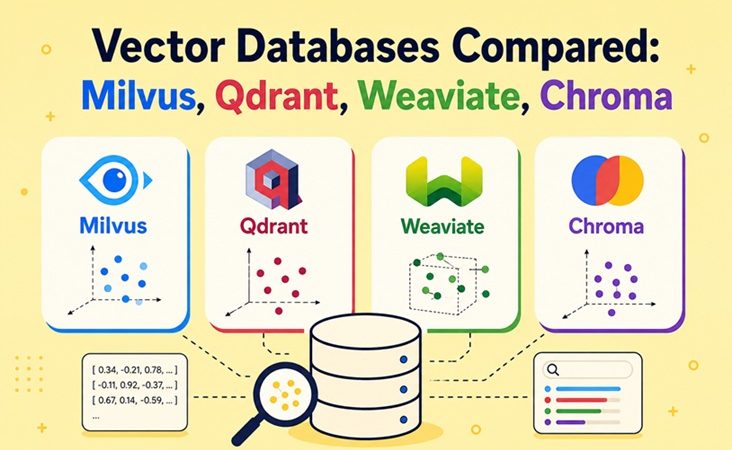
Every serious AI application eventually needs to answer one question: which stored items are most similar in meaning to this query? Chatbots that read your company documents, product recommendations, image search and AI agents with long-term memory all depend on that capability, and the tool that provides it is the vector database.
Five names dominate the conversation: Pinecone, Milvus, Weaviate, Qdrant and Chroma. They solve the same core problem but differ in architecture, operating model and ecosystem. This guide explains what a vector database does, compares the five side by side, lists the frameworks and applications each one works with, and gives you a practical way to choose.
Table of Contents
- What Is a Vector Database?
- How Vector Search Works
- Meet the Five Contenders
- Side-by-Side Comparison
- Supported Applications and Integrations
- Which One Should You Choose?
- Common Selection Mistakes
- FAQ
- Conclusion
1. What Is a Vector Database?
A traditional database finds rows that match a condition: WHERE country = 'ID'. A vector database finds items that are similar to a query, even when they share no words at all.
It works with embeddings: lists of numbers (commonly 384 to 3072 values) produced by an AI model. The model places items with similar meaning close together in a high-dimensional space. “How do I reset my password?” and “I forgot my login credentials” end up near each other, although they share almost no keywords.
A vector database stores these embeddings together with the original content and metadata, and answers nearest-neighbour queries quickly, even with hundreds of millions of items. Unlike a plain array in memory, it also provides persistence, filtering, access control and, in most cases, scaling and replication.
2. How Vector Search Works
Comparing a query against every stored vector is exact but slow at scale. Vector databases use approximate nearest neighbour (ANN) indexes instead, trading a tiny amount of accuracy for large speed gains. The most common index families are:
| Index | Idea | Typical trade-off |
|---|---|---|
| HNSW | Layered graph of neighbours | Very fast and accurate, memory hungry |
| IVF | Clusters vectors, searches only the closest clusters | Lower memory, needs tuning |
| DiskANN-style | Graph index designed to live on SSD | Handles datasets larger than RAM |
| Quantization (scalar, product, binary) | Compresses vectors | Cuts memory sharply, small accuracy loss |
A typical retrieval-augmented generation (RAG) pipeline looks like this:
    ┌──────────────┐    chunks     ┌───────────────┐   vectors   ┌──────────────────┐
  │  Documents   │ ────────────► │  Embedding    │ ──────────► │  VECTOR DATABASE │
  │ (PDF, wiki,  │               │  model        │             │  + metadata      │
  │  tickets)    │               └───────────────┘             └────────┬─────────┘
  └──────────────┘                                                      │ top-k
                                                                        │ similar chunks
  ┌──────────────┐   question    ┌───────────────┐    query vector      │
  │    User      │ ────────────► │  Embedding    │  ────────────────────┘
  │              │               │  model        │
  │              │ ◄──────────── ┌───────────────┐ ◄── question + retrieved context
  └──────────────┘    answer     │     LLM       │
                                 └───────────────┘
Most production systems also combine vector similarity with metadata filters (for example, only documents from 2026 in the “finance” category) and keyword search (hybrid search), because pure semantic search can miss exact terms such as product codes or error numbers.
3. Meet the Five Contenders
Pinecone: the managed service
Pinecone is a fully managed, closed-source service. You create an index through an API or console and Pinecone handles infrastructure, scaling and upgrades. Its serverless model separates storage from compute and bills by usage. Key concepts include namespaces for multi-tenant data separation and optional built-in inference for generating embeddings. The trade-off is that you cannot self-host it, so your data lives in Pinecone’s cloud regions.
Best known for: the lowest operational effort and a polished developer experience.
Milvus: built for very large scale
Milvus is an open-source project (Apache 2.0, hosted under the LF AI & Data Foundation) designed for large and distributed deployments. Its architecture separates storage, compute and metadata into independent components, so each can scale on its own. It supports a wide range of index types, including GPU-accelerated ones, along with multiple vector fields per record and hybrid search. Managed hosting is available as Zilliz Cloud, and a lighter “Milvus Lite” mode exists for local development.
Best known for: billion-scale workloads and the richest set of index and tuning options. The price is more moving parts to operate.
Weaviate: schema-rich with built-in modules
Weaviate is an open-source database written in Go. It stands out for its object-oriented data model, native hybrid search (BM25 keyword plus vector) and a module system that can call embedding or generative models for you at import and query time. It supports multi-tenancy, replication and sharding, and is also offered as a managed Weaviate Cloud.
Best known for: hybrid search, flexible schemas and an “AI-native” feature set beyond plain similarity lookup.
Qdrant: fast, filter-friendly and lean
Qdrant is an open-source engine written in Rust. It emphasizes performance, low memory use and payload filtering: attaching structured JSON metadata to each vector and filtering on it during the search itself, not afterwards. It offers several quantization options, sparse vector support for hybrid retrieval, and both self-hosted and managed cloud options. A single node is simple to run, and distributed mode is available when you outgrow it.
Best known for: efficiency per dollar and strong filtered search on modest infrastructure.
Chroma: the developer-first starter
Chroma is an open-source database focused on simplicity. It can run embedded inside your Python or JavaScript process, as a standalone server, or as Chroma Cloud. The API is deliberately small, and it is a common default in tutorials and notebooks. It is less focused on huge, distributed deployments than Milvus or Qdrant.
Best known for: the fastest path from idea to a working prototype.
4. Side-by-Side Comparison
Core characteristics
| Feature | Pinecone | Milvus | Weaviate | Qdrant | Chroma |
|---|---|---|---|---|---|
| License / model | Proprietary SaaS | Apache 2.0 | BSD-3 | Apache 2.0 | Apache 2.0 |
| Self-hostable | No | Yes | Yes | Yes | Yes |
| Managed cloud | Yes (only option) | Zilliz Cloud | Weaviate Cloud | Qdrant Cloud | Chroma Cloud |
| Core language | Not public | Go / C++ | Go | Rust | Rust / Python |
| Embedded / in-process mode | No | Milvus Lite | Embedded option | Local mode in client | Yes (primary use) |
| Operational complexity | Very low | High | Medium | Low | Very low |
Search and data features
| Feature | Pinecone | Milvus | Weaviate | Qdrant | Chroma |
|---|---|---|---|---|---|
| Metadata filtering | Yes | Yes | Yes | Yes (a core strength) | Yes |
| Hybrid (keyword + vector) | Yes (sparse-dense) | Yes | Yes (native BM25) | Yes (sparse vectors) | Limited, evolving |
| Multi-tenancy | Namespaces | Partitions / databases | Native tenants | Payload or collection based | Collections / tenants |
| Built-in embedding generation | Optional inference | Via integrations | Modules | Via client libraries | Via embedding functions |
| Multiple vectors per record | Limited | Yes | Yes (named vectors) | Yes (named vectors) | Limited |
| Quantization / compression | Managed internally | Extensive | Yes | Extensive | Basic |
Scale and operations
| Aspect | Pinecone | Milvus | Weaviate | Qdrant | Chroma |
|---|---|---|---|---|---|
| Scaling model | Automatic | Distributed, components scale independently | Sharding + replication | Sharding + replication | Mostly vertical for self-hosting |
| Sweet spot | Any size if budget allows | Hundreds of millions to billions | Millions to hundreds of millions | Millions to hundreds of millions | Thousands to a few million |
| Team skill needed | Low | High (platform team) | Medium | Low to medium | Low |
| Data residency control | Limited to provider regions | Full | Full | Full | Full |
Sweet-spot ranges are rules of thumb, not guarantees. Hardware, dimensions, index type and filter complexity change the picture. Benchmark with your own embeddings before committing.
5. Supported Applications and Integrations
The database is only one layer of an AI stack. In practice, what matters is whether your framework, no-code tool or agent platform can talk to it. All five databases are widely supported, but depth of support varies.
Frameworks and libraries
| Framework | Pinecone | Milvus | Weaviate | Qdrant | Chroma |
|---|---|---|---|---|---|
| LangChain | ✅ | ✅ | ✅ | ✅ | ✅ |
| LlamaIndex | ✅ | ✅ | ✅ | ✅ | ✅ |
| Haystack | ✅ | ✅ | ✅ | ✅ | ✅ |
| Semantic Kernel | ✅ | ✅ | ✅ | ✅ | ✅ |
| Spring AI (Java) | ✅ | ✅ | ✅ | ✅ | ✅ |
| Agent memory layers (e.g. Mem0) | ✅ | ✅ | ✅ | ✅ | ✅ |
Low-code and workflow tools
| Tool type | Examples | What to know |
|---|---|---|
| Workflow automation | n8n | Vector store nodes cover several of these databases, so RAG workflows can be built visually. Check the current node list for exact coverage. |
| LLM app builders | Dify, Flowise, Langflow | Most offer selectable vector store backends. Qdrant, Milvus, Weaviate and Chroma are commonly listed; confirm Pinecone support per tool and version. |
| Chat UIs with RAG | Open WebUI and similar | Often default to a bundled store such as Chroma, with options to switch to others. |
If you already automate with n8n, see n8n AI Agent Node Explained: LangChain, MCP Client Tool & Production Patterns for how agents consume tools and retrieval.
Cloud, data platforms and agent protocols
| Area | Coverage |
|---|---|
| Cloud marketplaces | Pinecone, Zilliz Cloud, Weaviate Cloud and Qdrant Cloud are available through the major cloud providers’ marketplaces or regions; Chroma Cloud is a direct service. |
| Embedding providers | OpenAI, Cohere, Google, Voyage and open models via Hugging Face or Ollama all produce vectors that any of the five can store. |
| Data pipelines | Milvus and Weaviate list connectors for Spark and Kafka-style ingestion; Pinecone, Qdrant and others provide connectors through partner tools. |
| Model Context Protocol (MCP) | Community or official MCP servers exist for several of these databases, letting AI assistants query them as tools. Availability changes quickly, so check each project’s repository. |
Client languages
| Language | Pinecone | Milvus | Weaviate | Qdrant | Chroma |
|---|---|---|---|---|---|
| Python | ✅ | ✅ | ✅ | ✅ | ✅ |
| JavaScript / TypeScript | ✅ | ✅ | ✅ | ✅ | ✅ |
| Go | ✅ | ✅ | ✅ | ✅ | Community |
| Java | ✅ | ✅ | ✅ | ✅ | Community |
| Rust | Community | Community | Community | ✅ | Community |
What the code looks like
Thanks to framework abstractions, switching databases often means changing a few lines. This LangChain-style pattern is the same idea whichever backend you pick:
# Pseudocode: only the vector store class and its connection settings change
store = VectorStoreClass(          # Qdrant, Milvus, Weaviate, Chroma, Pinecone...
    embedding=embeddings,
    collection_name="company_docs",
    **connection_settings,
)
store.add_documents(chunks)

retriever = store.as_retriever(search_kwargs={"k": 4})
docs = retriever.invoke("What is our refund policy?")
This portability is valuable: prototype in Chroma, then move to Qdrant or Milvus when volume grows, without rewriting your whole application.
6. Which One Should You Choose?
                         Do you want to run servers yourself?
                                   │
                  ┌────────────────┴────────────────┐
                 NO                                 YES
                  │                                  │
              PINECONE                     How big will the data get?
        (or a managed cloud of             │
         Qdrant / Weaviate / Zilliz)  ┌────┴─────────────┬───────────────────┐
                                  Prototype        Millions to        Hundreds of millions
                                  / small          ~hundreds of       to billions
                                      │            millions               │
                                   CHROMA              │                 MILVUS
                                                 ┌─────┴──────┐
                                              Filters &     Hybrid search
                                              efficiency    + built-in modules
                                                 │              │
                                              QDRANT        WEAVIATE
| If your priority is… | Pick |
|---|---|
| Zero infrastructure work and predictable managed service | Pinecone |
| Fast prototype, notebook, local demo | Chroma |
| Best performance per server dollar, heavy metadata filtering | Qdrant |
| Native keyword + vector hybrid search and flexible schema | Weaviate |
| Massive scale, GPU indexes, dedicated platform team | Milvus |
| Strict data residency or on-premise compliance | Qdrant, Milvus or Weaviate |
| Already running PostgreSQL with modest data | Consider pgvector before adding a new system |
7. Common Selection Mistakes
| Mistake | Why it hurts | Better approach |
|---|---|---|
| Choosing by a single benchmark chart | Results depend on dataset, dimensions and filters | Test with your own data and query patterns |
| Starting with Milvus for a 50,000-document project | Operational overhead outweighs the benefit | Start with Qdrant or Chroma; migrate if needed |
| Running Chroma embedded in a multi-service production app | Shared access and scaling become awkward | Use server mode, or move to a server-first database |
| Ignoring hybrid search | Exact terms (SKUs, error codes, names) get missed | Pick a database with solid keyword + vector support |
| Forgetting embedding lock-in | Changing the embedding model means re-embedding everything | Record the model and version, and budget for re-indexing |
| Treating the vector DB as the source of truth | Indexes can be rebuilt, original data cannot | Keep source documents in object storage or a relational database |
| Skipping access control | Sensitive text can leak through similarity search | Use API keys, tenant isolation and network restrictions |
For securing whichever database you run, the principles in Docker Security Best Practices (verify slug) apply directly.
8. FAQ
What is the difference between a vector database and a regular database?
A regular database matches exact values or ranges. A vector database ranks items by semantic similarity using embeddings. Many regular databases, such as PostgreSQL with pgvector, now offer vector features too, but dedicated systems usually offer more tuning and scale.
Is Pinecone better than open-source options?
Pinecone is easier to operate because it is fully managed. Open-source options give you control over cost, location and customization. “Better” depends on whether your team values convenience or control.
Which vector database is best for RAG?
All five work well. Chroma suits prototypes, Qdrant and Weaviate suit most production RAG systems, Milvus suits very large corpora, and Pinecone suits teams that want a managed service.
Can I switch databases later?
Yes, if you keep your source documents and embedding model information. Re-uploading vectors is straightforward, and frameworks like LangChain and LlamaIndex reduce code changes.
Do I need a GPU for a vector database?
Usually not. GPUs matter mainly for generating embeddings, and Milvus offers optional GPU indexes for very large workloads.
Are vector databases only for text?
No. Any data that can be embedded works: images, audio, code, product catalogs and user behaviour.
9. Conclusion
There is no single winner. Pinecone removes operational work, Chroma gets you prototyping in minutes, Qdrant offers an excellent balance of speed, cost and filtering, Weaviate shines with hybrid search and built-in modules, and Milvus is the heavyweight for massive, distributed workloads.
A sensible path for most teams: prototype with Chroma, validate on a real dataset with Qdrant or Weaviate, and revisit Milvus or a managed service only when scale or staffing demands it. Keep your embeddings reproducible and your source data safe, and switching later stays cheap.
Related posts:
 Installing Apache Cassandra on Ubuntu 20.04 Step by Step
 Installing InfluxDB on Ubuntu 20.04 LTS Step by Step
 How to Install Apache Cassandra 5.x on Debian 11 & 12 (Updated 2026 Guide)
The Ultimate Guide to Apache Cassandra: Features and Use Cases
How to Install Apache Cassandra 5.x on Debian 11 & 12 (Updated 2026 Guide)
The Ultimate Guide to Apache Cassandra: Features and Use Cases
 Apache CouchDB vs MongoDB: Which NoSQL Database is Right for You?
 How To Drop Database on MongoDB: A Complete Beginner’s Guide
 MongoDB Backup: Complete Guide to Backing Up and Restoring Your Database in 2026
 How to Install Apache Cassandra on Rocky Linux 10
