What is VMware? Complete Guide to Virtualization, vSphere, ESXi, and Cloud Solutions

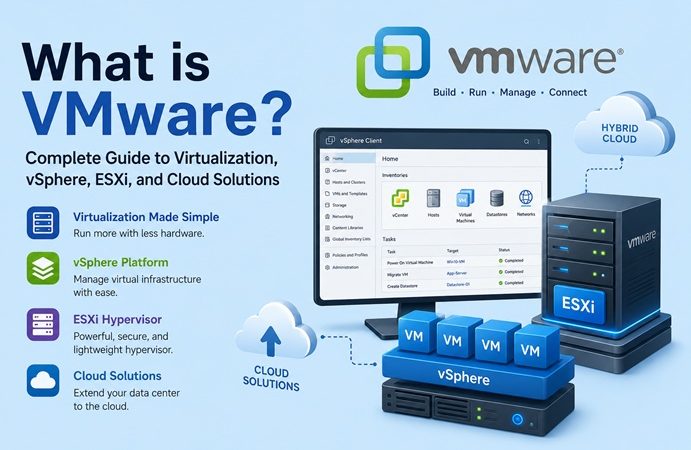
VMware is one of the most recognized names in the field of virtualization and cloud computing. Founded in 1998, VMware pioneered the concept of running multiple operating systems on a single physical server using virtualization technology.
Table of Contents
- Introduction to VMware
- Key VMware Products and Solutions
- VMware vSphere
- VMware ESXi
- VMware Workstation and Fusion
- VMware Horizon
- VMware NSX
- VMware vSAN
- How VMware Virtualization Works
- The Concept of Hypervisors
- Resource Allocation and Management
- Virtual Networking
- Benefits of Using VMware
- Cost Savings
- Scalability and Flexibility
- Improved Disaster Recovery
- Enhanced Security
- VMware in the Cloud Era
- VMware Cloud Foundation
- VMware on AWS
- Multi-Cloud Strategy
- Common Use Cases of VMware
- Data Center Virtualization
- Desktop Virtualization (VDI)
- Test and Development Environments
- Network Virtualization
- VMware vs Competitors (Hyper-V, Proxmox, KVM)
- Challenges and Considerations with VMware
- Future of VMware and Virtualization Technology
- Conclusion
1. Introduction to VMware
Today, VMware solutions power enterprises, data centers, and cloud infrastructures worldwide, enabling organizations to optimize resources, improve scalability, and modernize their IT strategy.
In today’s digital age, IT infrastructure needs to be efficient, flexible, and secure. Traditional physical servers often lead to resource underutilization and higher costs. VMware addresses these challenges by allowing multiple virtual machines (VMs) to run on a single physical server, maximizing hardware utilization while reducing costs. This capability has made VMware a core technology in enterprise IT, cloud platforms, and managed service providers.
2. Key VMware Products and Solutions
VMware vSphere
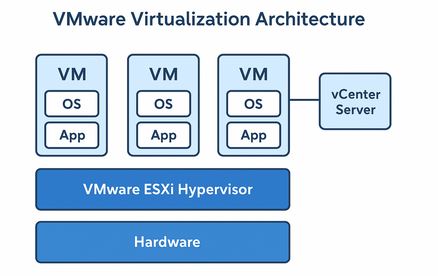
vSphere is VMware’s flagship server virtualization platform. It includes ESXi, a bare-metal hypervisor, and vCenter Server, which provides centralized management for virtualized environments.
VMware ESXi
ESXi is a lightweight hypervisor installed directly on physical servers, enabling efficient VM creation and management.
VMware Workstation and Fusion
These are desktop virtualization tools—VMware Workstation for Windows/Linux and Fusion for macOS—allowing IT professionals and developers to run multiple OS instances on their personal machines. If you’re running CentOS Stream, our guide on how to install VMware Workstation on CentOS Stream 10 walks through the full setup process.
VMware Horizon
Horizon delivers Virtual Desktop Infrastructure (VDI), providing users with secure access to virtual desktops and apps from any device.
VMware NSX
A network virtualization platform that enables micro-segmentation, advanced security, and software-defined networking across hybrid environments.
VMware vSAN
A hyperconverged storage solution integrated into vSphere, enabling organizations to pool storage resources for virtual machines without dedicated storage arrays.
3. How VMware Virtualization Works
The Concept of Hypervisors
VMware’s hypervisors abstract hardware resources and allow multiple operating systems to run simultaneously.
Resource Allocation and Management
CPU, memory, and storage resources are dynamically allocated to virtual machines based on workload demand.
Virtual Networking
VMware provides virtual switches and routers that enable secure, scalable, and isolated network configurations within the virtual environment.
4. Benefits of Using VMware
- Cost Savings: Consolidating multiple workloads on fewer physical servers reduces hardware and energy costs.
- Scalability and Flexibility: Organizations can quickly deploy new workloads and scale resources.
- Improved Disaster Recovery: Built-in features like vMotion and Site Recovery Manager help maintain business continuity.
- Enhanced Security: Solutions like NSX provide micro-segmentation and zero-trust networking.
5. VMware in the Cloud Era
VMware Cloud Foundation
An integrated solution combining vSphere, vSAN, and NSX, providing a unified platform for private and hybrid cloud.
VMware on AWS
A partnership between VMware and Amazon Web Services that enables enterprises to run VMware workloads natively on AWS infrastructure.
Multi-Cloud Strategy
VMware empowers businesses to run workloads seamlessly across private, public, and hybrid clouds, reducing vendor lock-in.
6. Common Use Cases of VMware
- Data Center Virtualization: Reducing hardware sprawl by consolidating servers.
- Desktop Virtualization (VDI): Enabling secure, remote access for employees.
- Test and Development Environments: Developers can spin up isolated environments for testing without dedicated hardware.
- Network Virtualization: Using NSX to build secure and programmable networks.
- For a hands-on walkthrough, see our step-by-step guide on installing VMware Workstation on CentOS Stream 10.
- For teams running VMware alongside containerized workloads, see our guide on installing Docker and Docker Compose on Ubuntu 26.04 LTS.
7. VMware vs Competitors (Hyper-V, Proxmox, KVM)
VMware leads in enterprise adoption but faces competition:
- Hyper-V (Microsoft): Integrated into Windows Server, often chosen for Microsoft-centric environments.
- Proxmox VE: Open-source alternative, popular among small businesses and labs.
- KVM: A Linux-based hypervisor favored by many cloud providers due to its open-source nature.
8. Challenges and Considerations with VMware
While VMware is powerful, it comes with licensing costs that may be expensive for smaller businesses. Additionally, administrators require training to fully leverage VMware’s features. Organizations must also carefully plan resource allocation to avoid VM sprawl.
9. Future of VMware and Virtualization Technology
With the rise of containers and Kubernetes, VMware is evolving by integrating Tanzu, its Kubernetes platform, into vSphere. This allows enterprises to manage both virtual machines and containers from a single platform, ensuring VMware remains relevant in the cloud-native era.
10. Conclusion
VMware continues to be a cornerstone of enterprise IT, offering robust virtualization, networking, storage, and cloud solutions. While the competition is growing, VMware’s mature ecosystem and innovations in hybrid and multi-cloud environments ensure its long-standing position as a leader in virtualization technology. For businesses looking to modernize their infrastructure, VMware remains one of the best options available.
For managing reverse proxy easily with a web interface, you can follow our complete guide to Nginx Proxy Manager, which explains installation, configuration, and best practices.
Related posts:
 How To Install KVM On CentOS Stream 10
 How to Install VMware ESXi: Step-by-Step Bare-Metal Setup Guide
 Introduction to VirtualBox: A Versatile Virtualization Solution
 Introduction to Vagrant: Simplifying Development Environments
How to Install VirtualBox 7 on Ubuntu 22.04 : A Step-by-Step Guide
Installing Vagrant on Ubuntu: Step-by-Step Guide
Introduction to Vagrant: Simplifying Development Environments
How to Install VirtualBox 7 on Ubuntu 22.04 : A Step-by-Step Guide
Installing Vagrant on Ubuntu: Step-by-Step Guide
 What Is Microsoft Hyper-V ? The Complete Virtualization Guide
 Proxmox VE: The Complete Guide to Open-Source Virtualization for IT Professionals
