Linear Tape-Open (LTO) Explained: Generations, Capacity, Compatibility & Backup Use Cases

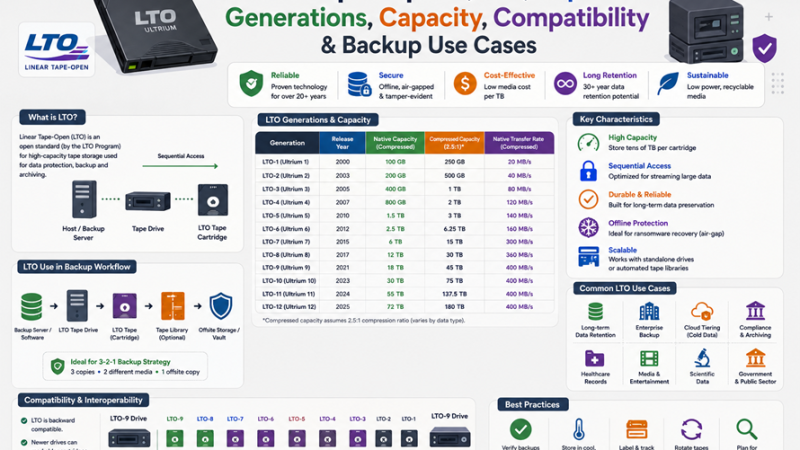
Magnetic tape sounds like a relic, yet it remains one of the most economical ways to store very large amounts of data for a long time. The dominant open standard is Linear Tape-Open, usually shortened to LTO. It is used by data centers, broadcasters, research institutions, hospitals, and cloud providers for backup, archive, and ransomware-resistant copies of critical data.
This guide explains what LTO is, how the generations compare (including the 40 TB LTO-10 cartridge), what compatibility rules apply, which features matter (WORM, encryption, LTFS), how to use tape from Linux, and when tape is the right tool.
Table of Contents
- What is Linear Tape-Open?
- How an LTO system is built
- LTO generations at a glance
- Native vs compressed capacity
- LTO-10: 30 TB and 40 TB cartridges
- Backward compatibility rules
- The LTO roadmap
- Key features: encryption, WORM and LTFS
- Tape vs disk vs cloud
- When tape is the right choice
- Using tape from Linux
- Best practices for tape backup
- Troubleshooting
- FAQ
1. What is Linear Tape-Open?
Linear Tape-Open (LTO) is an open magnetic tape storage format created in the late 1990s by HPE, IBM, and Quantum as an alternative to proprietary tape formats. The three companies form the LTO Program (the Technology Provider Companies), which publishes the specification and roadmap. Several manufacturers build drives and cartridges, which gives buyers a multi-vendor ecosystem.
Key ideas:
- Open format: any vendor may build compatible drives and media.
- Generations: a new generation (LTO-1 up to the current LTO-10) arrives every few years with more capacity per cartridge.
- Cartridge: a sealed Ultrium cartridge holds a spool of tape; the same physical size has been used since LTO-1.
- Sequential access: data is written and read in order along the tape, which suits large backup and archive streams but not random access.
2. How an LTO system is built
  Backup server / application
        (Bacula, Bareos, Veeam, Commvault, tar, ...)
                     |
                     |  SAS or Fibre Channel
                     v
   +--------------------------------+          +---------------------------+
   |  Tape drive (LTO-n)            |          |  Tape library / autoloader|
   |   read/write heads, encryption |  <-----  |   robot arm, barcode      |
   |   compression engine           |  moves   |   reader, many slots,     |
   +----------------+---------------+  tapes   |   one or more drives      |
                    |                           +---------------------------+
                    v
   +--------------------------------+
   |  Ultrium cartridge             |  --> stored offline in a vault
   |   tape + cartridge memory chip |      (air-gapped from the network)
+--------------------------------+| Component | Role |
|---|---|
| Drive | Reads and writes tape; handles hardware compression and encryption |
| Cartridge | The removable medium; contains a small memory chip with metadata |
| Autoloader | Small device with one drive and a handful of slots |
| Library | Larger system with a robot, many slots, and several drives |
| Backup software | Schedules jobs, tracks tapes with a catalog, restores files |
3. LTO generations at a glance
| Generation | Native capacity | Compressed capacity (typical 2.5:1 from LTO-6 on; earlier 2:1) | Native speed (approx.) |
|---|---|---|---|
| LTO-1 | 100 GB | 200 GB | 20 MB/s |
| LTO-2 | 200 GB | 400 GB | 40 MB/s |
| LTO-3 | 400 GB | 800 GB | 80 MB/s |
| LTO-4 | 800 GB | 1.6 TB | 120 MB/s |
| LTO-5 | 1.5 TB | 3 TB | 140 MB/s |
| LTO-6 | 2.5 TB | 6.25 TB | 160 MB/s |
| LTO-7 | 6 TB | 15 TB | 300 MB/s |
| LTO-7 Type M (M8) | 9 TB | 22.5 TB | Used only in LTO-8 drives |
| LTO-8 | 12 TB | 30 TB | 360 MB/s |
| LTO-9 | 18 TB | 45 TB | 400 MB/s |
| LTO-10 | 30 TB or 40 TB | 75 TB or 100 TB | 400 MB/s |
Speeds are maximum native transfer rates for full-height drives; real throughput depends on your data, your network, and whether your backup server can keep the drive streaming.
4. Native vs compressed capacity
Vendors advertise two numbers:
- Native capacity: the raw amount of data the cartridge holds without compression. This is the number to plan with.
- Compressed capacity: the marketing figure assuming a 2.5:1 compression ratio on recent generations.
Compression depends entirely on the data:
| Data type | Typical compression |
|---|---|
| Text, logs, databases, source code | Good (can approach or exceed 2:1) |
| Virtual machine images | Moderate |
| Already compressed media (H.264/H.265, JPEG, ZIP, encrypted data) | Close to 1:1 |
Encrypt after compressing (the drive does this in the right order for hardware encryption), because encrypted data does not compress. For video archives, plan with native capacity.
5. LTO-10: 30 TB and 40 TB cartridges
LTO-10 launched in 2025 with 30 TB native capacity per cartridge, which was a smaller step up from LTO-9’s 18 TB than many buyers hoped for. In November 2025 the LTO Program announced a second media type: a 40 TB native (up to 100 TB compressed at 2.5:1) cartridge, enabled by a thinner, smoother aramid base film that allows more tape length in the same cartridge shell. Commercial availability of the 40 TB cartridge was expected from early 2026.
| LTO-10 fact | Detail |
|---|---|
| Native capacity | 30 TB or 40 TB, chosen by media type |
| Compressed capacity | Up to 75 TB or 100 TB at 2.5:1 |
| Native transfer rate | Up to 400 MB/s |
| Same drive for both media? | Yes, 40 TB cartridges work in LTO-10 drives |
| Other features | Hardware encryption, WORM media, LTFS support |
| Backward compatibility | None (see below) |
Two different cartridge types in one generation means you must label and inventory media carefully so that a 30 TB and a 40 TB tape are not confused in your library.
6. Backward compatibility rules
LTO has historically offered a clear rule: a drive reads the previous generations and writes the one before it. The rule changed in recent generations, so check the exact matrix for your drive.
| Drive | Typically reads | Typically writes |
|---|---|---|
| LTO-7 | LTO-5, LTO-6, LTO-7 | LTO-6, LTO-7 |
| LTO-8 | LTO-7 and LTO-7 Type M (not LTO-6 or older) | LTO-7, LTO-7 Type M, LTO-8 |
| LTO-9 | LTO-8 and LTO-9 | LTO-8 and LTO-9 |
| LTO-10 | LTO-10 only | LTO-10 only |
Practical consequences:
- LTO-10 drives cannot read LTO-9 or older tapes. If you move to LTO-10, keep at least one older drive (or a service contract) for as long as you must restore old archives.
- Plan two generations of read access for compliance archives, or migrate archives to new media on a schedule.
- Always confirm the compatibility chart from the drive vendor before buying hardware.
7. The LTO roadmap
The LTO Program publishes a roadmap through LTO-14. It was revised in late 2025: future capacities were lowered compared with the 2022 plan, as the consortium prioritizes reliability, cost per terabyte, and manageable backup and restore times over doubling capacity each generation.
| Generation | Planned native capacity (2025 roadmap) |
|---|---|
| LTO-10 | 30 TB / 40 TB |
| LTO-11 | 70 TB |
| LTO-12 | 120 TB |
| LTO-13 | 210 TB |
| LTO-14 | 365 TB (up to 913 TB compressed) |
The roadmap states growth of about 75% per generation. No release dates are published. Roadmaps are plans, not promises; build your capacity planning on the media you can buy today.
8. Key features: encryption, WORM and LTFS
| Feature | What it does | Why it matters |
|---|---|---|
| Hardware encryption (AES-256) | The drive encrypts data at line speed | Lost or stolen cartridges stay unreadable. Manage keys carefully; lost keys mean lost data |
| WORM (Write Once, Read Many) | Special cartridges that cannot be overwritten or erased | Compliance retention and protection against tampering or ransomware |
| LTFS (Linear Tape File System) | Presents a tape as a file system you can mount and browse | Easy exchange of archives without backup software; common in media workflows |
| Cartridge memory (CM) | Chip on the cartridge stores metadata and usage statistics | Helps libraries and software track media |
| Partitioning | Dedicated index partition for LTFS | Fast directory listing without reading the whole tape |
LTFS is excellent for archive and hand-off use but is not a replacement for a backup catalog; random reads still require winding the tape.
9. Tape vs disk vs cloud
| LTO tape | Disk (HDD/SSD, NAS) | Cloud archive tiers | |
|---|---|---|---|
| Cost per TB (media) | Lowest at scale | Higher | Per-GB monthly fees plus retrieval charges |
| Cost to keep data for years | Low (offline cartridges use no power) | Power, cooling, replacement cycles | Ongoing fees |
| Restore speed | Minutes to hours (load and wind), high streaming speed once running | Fast, random access | Hours or days for deep archive, plus egress fees |
| Ransomware resistance | Excellent when cartridges are offline (air gap) | Online disks can be encrypted or deleted | Depends on immutability features and account security |
| Random access | Poor | Excellent | Varies |
| Shelf life | Manufacturers rate archival life around 30 years under proper storage | Disks are replaced every few years | Provider-managed |
| Skills and gear | Drive, library, software | Common | Common |
| Best for | Large, cold, long-term data | Fast restores, active backups | Off-site copy without owning hardware |
Compare total cost of ownership, not only media price: drive and library purchase, backup software licenses, vault space, handling, and refresh cycles. Compute cost per TB-year for each option using your own quotes. Tape normally wins as data volumes grow into hundreds of terabytes and retention stretches past several years.
10. When tape is the right choice
Tape makes sense when:
- You store tens or hundreds of terabytes or more that you rarely read.
- You must keep data for years or decades (media, medical, legal, scientific, financial).
- You need an offline, air-gapped copy that ransomware cannot reach.
- Your restore need is “recover everything” or “retrieve a known archive,” not “browse files all day.”
- You want predictable, low ongoing cost and low power use.
Tape is a poor fit when:
- Data is small (a few terabytes) and the hardware cost is hard to justify.
- You need frequent, small, random restores with a tight recovery time.
- You have no one to handle media, vaulting, and drive maintenance.
A solid design combines tiers, following the 3-2-1 rule (three copies, two media types, one off-site/offline): fast disk backups for everyday restores, and tape or immutable cloud storage for the cold, off-site copy. For database backups feeding that process, see PostgreSQL Backup with pgBackRest, and for virtual machines see How to Create and Configure a VM in VMware ESXi for the host side.
11. Using tape from Linux
Linux presents tape drives through the st and nst devices (/dev/st0 rewinds after each operation, /dev/nst0 does not rewind, which is what you normally want for multi-file work). Libraries appear as SCSI generic devices (/dev/sgN) with a changer.
# Tools on Rocky Linux / RHEL family (EPEL not required for these, but verify availability)
sudo dnf install -y mt-st mtx lsscsi sg3_utils

# Discover tape drives and changers
lsscsi -g
# [4:0:1:0] tape   IBM  ULTRIUM-HH9 ...  /dev/st0  /dev/sg3
# [4:0:1:1] mediumx IBM 3573-TL ...      -         /dev/sg4
Basic drive operations:
mt -f /dev/nst0 status         # drive and tape state
mt -f /dev/nst0 rewind

# Write a directory to tape with tar (variable block size)
sudo tar --blocking-factor=2048 -cvf /dev/nst0 /data/archive
mt -f /dev/nst0 rewind

# List and restore
tar --blocking-factor=2048 -tvf /dev/nst0
mt -f /dev/nst0 rewind
sudo tar --blocking-factor=2048 -xvf /dev/nst0 -C /restore

mt -f /dev/nst0 eject
tar to tape is fine for learning and small archives. It has no catalog and no verification, so for real backups use software that tracks tapes and files.
Control a library (changer):
mtx -f /dev/sg4 status            # slots, drives, barcodes
mtx -f /dev/sg4 load 3 0          # load slot 3 into drive 0
mtx -f /dev/sg4 unload 3 0        # return the tape to slot 3
LTFS requires an LTFS implementation for your drive vendor (check the vendor’s software), after which a tape can be formatted and mounted like a file system for drag-and-drop archives.
Backup software choices: Bacula and Bareos (open source), Amanda, commercial products such as Veeam and Commvault, and vendor tools. All keep a catalog so restores can locate the right tape and offset.
Linux permissions: tape and changer device nodes are usually owned by the tape group; add your backup user to that group and, if SELinux blocks access for a custom service, follow the approach in the SELinux troubleshooting guide.
12. Best practices for tape backup
| Practice | Why |
|---|---|
| Label every cartridge with a barcode and keep an inventory | Prevents lost or confused media, especially with 30 TB and 40 TB LTO-10 tapes |
| Keep one copy off-site and offline | Protects against fire, flood, and ransomware |
| Encrypt, and escrow the keys separately | Encrypted tape without keys is unreadable by anyone |
| Test restores regularly | A backup you never restored is a hope, not a plan |
| Keep streaming | A drive that constantly stops and starts (“shoe-shining”) wears out and slows down; use a fast disk staging area |
| Store in controlled conditions | Moderate temperature and humidity, away from magnetic fields and dust |
| Track tape usage and retire old media | Cartridges have a limited number of full passes |
| Plan format migrations | Move archives to new generations before the old drives disappear |
| Document procedures | Someone else must be able to run a restore at 3 a.m. |
13. Troubleshooting
| Symptom | Likely cause | Fix |
|---|---|---|
| Drive not visible in Linux | Driver, cabling, or HBA issue | lsscsi -g; check dmesg, cables, SAS/FC zoning |
/dev/nst0 missing | st module not loaded or no tape device | sudo modprobe st; recheck hardware |
mt: ... Input/output error | No tape loaded, tape not ready, or drive fault | Load a cartridge, wait for ready, check drive logs |
| Very slow backups | Source cannot feed the drive fast enough, so it stops and repositions | Stage data on fast disk, use larger blocks, increase concurrency |
| Tape will not read in a newer drive | Generation compatibility limit | Check the matrix; use an older drive for old media |
| Cannot write: write-protect | Tab set or WORM media already written | Check the cartridge switch; WORM cannot be rewritten |
| Restore finds no data | Wrong tape or wrong file position | Use the backup catalog; do not rely on memory |
| Encrypted tape unreadable | Missing or wrong encryption key | Restore the key from escrow; there is no workaround |
| Library cannot load a cartridge | Misaligned slot, dirty drive, or bad label | Inventory the library; run the drive cleaning procedure |
| Frequent drive cleaning requests | Dirty heads or old media | Use the cleaning cartridge as instructed; replace damaged tapes |
14. FAQ
What does LTO stand for?
Linear Tape-Open, an open magnetic tape format developed by HPE, IBM, and Quantum.
How much data fits on an LTO-9 tape?
18 TB native, and up to 45 TB compressed at the advertised 2.5:1 ratio, depending on how well your data compresses.
What is the capacity of LTO-10?
30 TB native for the original cartridge and 40 TB native for the later aramid-based cartridge, which is up to 75 TB or 100 TB compressed.
Can an LTO-10 drive read LTO-9 tapes?
No. LTO-10 does not offer backward compatibility, so you need an older drive to read older generations.
Is tape backup still worth it?
For large, cold, long-retention data and for offline ransomware-resistant copies, yes. For small data sets or frequent random restores, disk and cloud are simpler.
What is the difference between LTO and LTFS?
LTO is the tape format and hardware. LTFS is a file system layered on top of LTO that lets you mount a tape and browse files.
How long do LTO tapes last?
Manufacturers rate archival life at around 30 years when stored correctly, but you should still verify tapes periodically and migrate to new media well before your drives become obsolete.
Does tape protect against ransomware?
Cartridges stored offline cannot be reached by malware on the network, which is why tape is a popular air-gapped copy. Tapes left mounted in an online library are less protected, so eject and vault critical copies.
Related posts:
 How To Install Gradle on Ubuntu 20.04
 How To Install Atom Text Editor on Ubuntu 18.04
 How To Install Sublime Text 4 On Rocky Linux 8
 Introduction to Terraform: Infrastructure as Code Made Easy
 How To Install R Language On CentOS 8
 Installing MediaWiki On Ubuntu 22.04
 How To Install Git On OpenSUSE Tumbleweed
 Exploring Trino with Apache Iceberg: My Hands-On Experiment
