SELinux Troubleshooting on Rocky Linux 10: audit2why, semanage & Common Denials

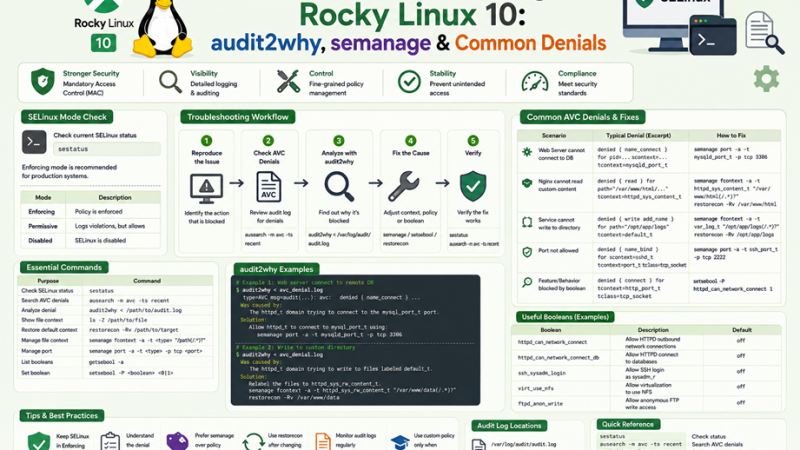
“Permission denied” while the file permissions look perfect is the classic sign of SELinux. The most common reaction is to run setenforce 0 or edit /etc/selinux/config to disable it. That fixes the symptom and removes a security layer that limits what a compromised web server, database, or container can do.
SELinux is not hard to troubleshoot once you know the four-step routine: find the denial, understand it, choose the narrowest fix, and verify. This guide teaches that routine on Rocky Linux 10 (it applies equally to AlmaLinux and RHEL), with a table of the denials you will actually meet.
Table of Contents
- How SELinux decides
- Check the current state
- The troubleshooting workflow
- Install the tools
- Step 1: Find the denial
- Step 2: Understand it with audit2why and sealert
- Step 3: Choose the narrowest fix
- Booleans worth knowing
- Fix file labels: semanage fcontext and restorecon
- Fix ports
- Containers and bind mounts
- Custom policy modules with audit2allow
- Permissive domains and temporary testing
- Common denials cheat sheet
- Troubleshooting the troubleshooting
- FAQ
1. How SELinux decides
SELinux adds a second access check on top of ordinary Linux permissions. Every process and every file carries a label (a security context). Policy rules say which process types may do what to which file or port types.
  Process: nginx                    Target: /srv/www/index.html
  context: system_u:system_r:httpd_t:s0     context: unconfined_u:object_r:default_t:s0
                      \                         /
                       \                       /
                   +-----v---------------------v-----+
                   | Policy: may httpd_t read        |
                   | default_t files?   --> NO       |
                   +-----------------+---------------+
                                     |
              Classic permissions OK, but SELinux logs an AVC denial
              and the read fails: "Permission denied"
A context has four fields: user:role:type:level. In day-to-day troubleshooting you almost always work with the type (for example httpd_t, httpd_sys_content_t, postgresql_db_t).
2. Check the current state
getenforce                  # Enforcing | Permissive | Disabled
sestatus                    # policy name, mode, config file mode
ls -Z /var/www/html         # file contexts
ps -eZ | grep -E 'nginx|httpd|postgres'   # process contexts
id -Z # your own context| Mode | Meaning |
|---|---|
| Enforcing | Policy is applied; violations are blocked and logged |
| Permissive | Violations are logged but not blocked (useful for diagnosis) |
| Disabled | SELinux off; re-enabling later forces a full relabel |
Rocky Linux installs in Enforcing mode with the targeted policy. Keep it that way.
3. The troubleshooting workflow
  App fails with "Permission denied" / 502 / won't start
                    |
                    v
   1. Is it SELinux?  -->  ausearch -m AVC,USER_AVC -ts recent
                    |
          no denial |  denial found
                    |       |
    (check classic  |       v
    perms, firewall)|   2. Understand  -->  audit2why / sealert
                            |
                            v
                  3. Pick the narrowest fix
           +--------+---------+----------+-------------+
           |        |         |          |             |
        boolean   relabel   port label  container     custom module
        setsebool  restorecon semanage   :Z / :z       audit2allow
                           semanage fcontext             (last resort)
                            |
                            v
                   4. Verify: repeat the action, check logs, keep Enforcing
4. Install the tools
sudo dnf install -y policycoreutils-python-utils setroubleshoot-server setools-console audit
sudo systemctl enable --now auditd| Package | Gives you |
|---|---|
policycoreutils-python-utils | semanage, audit2allow, audit2why |
setroubleshoot-server | sealert: human-readable explanations and suggested fixes |
setools-console | sesearch, seinfo to query the policy |
audit | ausearch, aureport, and the audit log itself |
5. Step 1: Find the denial
Denials are recorded as AVC (Access Vector Cache) messages in /var/log/audit/audit.log.
# Recent denials
sudo ausearch -m AVC,USER_AVC,SELINUX_ERR -ts recent

# Today only, interpreted into readable form
sudo ausearch -m AVC -ts today -i

# Filter by program
sudo ausearch -m AVC -c nginx -ts today -i

# Summary report
sudo aureport -a --summary
A typical record looks like this:
type=AVC msg=audit(1793600000.123:456): avc:  denied  { name_connect } for  pid=2345 comm="nginx"
dest=5678 scontext=system_u:system_r:httpd_t:s0 tcontext=system_u:object_r:unreserved_port_t:s0
tclass=tcp_socket permissive=0
How to read it:
| Field | Meaning |
|---|---|
denied { name_connect } | The action attempted (connect to a port) |
comm="nginx" | The program |
scontext=...httpd_t | Source: the process type |
tcontext=...unreserved_port_t | Target: the port or file type |
tclass=tcp_socket | Object class |
permissive=0 | Enforced, so the action was really blocked |
If you find no AVC, SELinux is probably not the cause. Check classic permissions, the firewall (firewalld guide), and the application log. Also remember that some denials are hidden by dontaudit rules (see section 15).
6. Step 2: Understand it
audit2why translates a denial into a probable cause and fix:
sudo ausearch -m AVC -ts recent | audit2whyTypical output:
type=AVC ... denied { name_connect } ... scontext=...httpd_t tcontext=...unreserved_port_t
	Was caused by:
	One of the following booleans was set incorrectly.
	Description:
	Allow HTTPD scripts and modules to connect to the network using TCP.

	Allow access by executing:
	# setsebool -P httpd_can_network_connect 1
sealert gives a fuller explanation with a confidence rating:
sudo sealert -a /var/log/audit/audit.log | lessRead the “If you believe that …” sections. Choose a fix that matches your intent, not just the one listed first.
7. Step 3: Choose the narrowest fix
Work down this list and stop at the first fix that applies:
| Order | Fix | When |
|---|---|---|
| 1 | Boolean | The policy already has a switch for this behavior |
| 2 | Correct the file label | Files are in a non-standard location or were moved (not copied) |
| 3 | Label the port | A service uses a non-default port |
| 4 | Container volume flag | A container needs host files (:Z or :z) |
| 5 | Custom policy module | Genuinely new behavior with no boolean; review carefully |
| Never | Disable SELinux | Not a fix |
8. Booleans worth knowing
Booleans are policy switches you can flip without writing policy.
getsebool -a | grep httpd                 # list web-related booleans
sudo semanage boolean -l | grep httpd_can_network   # with descriptions
sudo setsebool -P httpd_can_network_connect on # -P makes it persistent| Boolean | Allows | Typical symptom |
|---|---|---|
httpd_can_network_connect | Web server processes connect to any TCP port | Nginx/Apache reverse proxy returns 502 |
httpd_can_network_connect_db | Web apps connect to database ports | PHP cannot reach MariaDB/PostgreSQL |
httpd_can_sendmail | Web apps send mail | Form mail fails silently |
httpd_use_nfs / httpd_use_cifs | Serve content from NFS or SMB | 403 on mounted content |
httpd_unified and httpd_enable_homedirs | Per-user web directories | 403 under ~user |
use_nfs_home_dirs | Home directories on NFS | Login or file access problems |
samba_enable_home_dirs, samba_export_all_rw | Samba share access | Shares appear empty or read-only |
container_manage_cgroup | Containers managing cgroups | Systemd-in-container issues |
selinuxuser_* family | Confined-user capabilities | Restricted users blocked |
Only enable what you need. httpd_can_network_connect is acceptable for a reverse proxy, but you can also label the specific upstream port instead (section 10), which is narrower.
9. Fix file labels
New files inherit the label of their directory. Files moved with mv keep their old label, which is why “I copied the site and it stopped working” happens.
# See what label a path should have according to policy
matchpathcon /var/www/html/index.html
ls -Z /var/www/html/index.html

# Reset to the policy default
sudo restorecon -Rv /var/www/html
For a non-standard location, add a rule first and then apply it:
# Serve content from /srv/mysite instead of /var/www
sudo semanage fcontext -a -t httpd_sys_content_t "/srv/mysite(/.*)?"
sudo restorecon -Rv /srv/mysite

# Writable directory for an app (uploads)
sudo semanage fcontext -a -t httpd_sys_rw_content_t "/srv/mysite/uploads(/.*)?"
sudo restorecon -Rv /srv/mysite/uploads

# PostgreSQL data on a dedicated disk
sudo semanage fcontext -a -t postgresql_db_t "/data/pgsql(/.*)?"
sudo restorecon -Rv /data/pgsql

# Review what you added
sudo semanage fcontext -l -C
chcon changes a label temporarily and is lost on a relabel; use semanage fcontext plus restorecon for anything permanent.
| Common file type | Use for |
|---|---|
httpd_sys_content_t | Read-only web content |
httpd_sys_rw_content_t | Web content apps may write |
httpd_log_t | Web server logs |
postgresql_db_t | PostgreSQL data directories |
mysqld_db_t | MariaDB/MySQL data directories |
var_log_t, var_lib_t | Generic log and state files |
bin_t | Executables a service may run |
container_file_t | Files containers may use |
Full relabel after major label damage (slow; plan downtime):
sudo touch /.autorelabel && sudo reboot10. Fix ports
Services may only bind or connect to ports labeled for them.
# What is allowed for a type
sudo semanage port -l | grep -E 'http_port_t|ssh_port_t|postgresql_port_t'

# Allow nginx to listen on 8088
sudo semanage port -a -t http_port_t -p tcp 8088

# Allow SSH on 2222
sudo semanage port -a -t ssh_port_t -p tcp 2222

# PostgreSQL on 5433
sudo semanage port -a -t postgresql_port_t -p tcp 5433

# If the port is already defined for another type, modify instead
sudo semanage port -m -t http_port_t -p tcp 8088
Also open the port in the firewall (firewalld guide); SELinux and firewalld are independent layers.
11. Containers and bind mounts
Container processes run as container_t and may only touch files labeled for containers. Bind-mounting a host directory needs a relabel flag:
volumes:
  - ./redis/redis.conf:/usr/local/etc/redis/redis.conf:ro,Z   # private to this container
- ./shared-data:/data:z # shared among containers| Flag | Meaning |
|---|---|
:Z | Relabel with a private label for this container only |
:z | Relabel with a shared label usable by several containers |
Warning: never use :Z on system directories such as /home, /etc, or /var; it would relabel them. Mount specific project directories. More in Docker on Rocky Linux 10 with SELinux and the Docker Redis Compose guide.
12. Custom policy modules with audit2allow
When no boolean, label, or port fix applies and you have confirmed the behavior is legitimate, generate a small module:
# 1. Reproduce the failure so the denial is in the log
# 2. Build a module from recent denials of one program
sudo ausearch -m AVC -c myapp -ts recent | audit2allow -M myapp_local

# 3. READ the generated rules before installing
cat myapp_local.te

# 4. Install
sudo semodule -i myapp_local.pp
sudo semodule -l | grep myapp_local

# Remove it later if you fix the root cause
sudo semodule -r myapp_local
Review rules carefully. If the .te file allows something broad (for example, a web server process writing to arbitrary types or unconfined access), find a narrower solution. audit2allow happily allows anything it saw denied, including attacker behavior.
13. Permissive domains and temporary testing
To test whether SELinux is the cause without loosening the whole system:
# Make only one domain permissive (log, but allow)
sudo semanage permissive -a httpd_t
# ... reproduce the problem and collect ALL denials in one pass ...
sudo ausearch -m AVC -ts recent | audit2why
# Put it back
sudo semanage permissive -d httpd_t
Permissive mode shows every denial the action would trigger, while enforcing mode stops at the first one. That helps when several separate fixes are needed.
For a quick whole-system test, sudo setenforce 0 switches to permissive until reboot, and sudo setenforce 1 restores enforcing. Use this only for diagnosis on a short timeline, then fix the real cause.
14. Common denials cheat sheet
| Symptom | Likely cause | Fix |
|---|---|---|
| Nginx/Apache reverse proxy returns 502 | httpd_t cannot connect to the upstream port | setsebool -P httpd_can_network_connect on, or label the upstream port |
| 403 on files you copied to a new web root | Wrong type (default_t, user_home_t) | semanage fcontext -a -t httpd_sys_content_t ... then restorecon -Rv |
| Web app cannot write uploads | Content type is read-only | Label upload dir httpd_sys_rw_content_t |
| Service will not start on a custom port | Port not labeled | semanage port -a -t <type> -p tcp <port> |
| PostgreSQL fails after moving the data directory | Wrong label on new location | semanage fcontext -a -t postgresql_db_t ...; restorecon -Rv |
| Container: “permission denied” on a bind mount | Host files lack container label | Add :Z (or :z) to the volume |
systemd service cannot run a script in /opt or /home | Script labeled usr_t or user_home_t | Label the script bin_t or move it to a standard path; restorecon |
| Cron job fails, works manually | Script label or the crond_t domain | Check with ausearch; fix label |
SSH key login fails after editing authorized_keys as root | Wrong context on ~/.ssh | restorecon -Rv ~/.ssh |
| Samba or NFS share inaccessible | Missing boolean | Enable the relevant samba_* or use_nfs_* boolean |
| FreeRADIUS or another daemon cannot read a custom certificate path | File label does not match | Move files to the service’s standard directory or label correctly |
| Backup tool cannot read some files | Confined domain | Check denials; run the tool in an appropriate domain or adjust labels |
15. Troubleshooting the troubleshooting
| Problem | Explanation | What to do |
|---|---|---|
| No AVC in the log, but SELinux is suspected | Some denials are hidden by dontaudit rules | sudo semodule -DB disables dontaudit; reproduce; re-enable with sudo semodule -B |
ausearch returns nothing | auditd not running or logs rotated | systemctl status auditd; check /var/log/audit/ |
sealert not installed or silent | setroubleshoot missing | Install setroubleshoot-server, or use ausearch + audit2why |
| Fix works until reboot | Used chcon or setsebool without -P | Use semanage fcontext + restorecon, and setsebool -P |
semanage: command not found | Package missing | dnf install policycoreutils-python-utils |
| Label looks correct but still denied | Parent directory or mount-point label wrong | Check every path component with namei -Z and ls -Zd |
| NFS or network filesystem labels cannot change | Labeled by mount option | Use a context= mount option or the appropriate boolean |
| After relabel the system is slow to boot | Full relabel in progress | Wait; it is a one-time operation |
| Application works in permissive, fails in enforcing, no denial found | Hidden denial | Use semodule -DB, test, then semodule -B |
Namei is underused: namei -Z /srv/mysite/uploads/file.txt prints the context of every directory along the path, showing the one label that blocks traversal.
16. FAQ
Is it safe to disable SELinux on a server?
It removes a protection layer that limits the damage from a compromised service. Almost every problem has a narrow fix, so disabling is rarely justified, and re-enabling later requires a full filesystem relabel.
What is the difference between setenforce 0 and disabling in the config file?setenforce 0 switches to permissive until the next reboot. Setting SELINUX=disabled in /etc/selinux/config turns it off at boot and takes effect after a reboot.
What does restorecon do?
It resets files to the label that policy says they should have, based on semanage fcontext rules.
When should I use audit2allow?
As a last resort, after you have ruled out booleans, labels, and port labels, and after you have read the rules it generates.
Does SELinux replace the firewall?
No. SELinux controls what processes may do. firewalld controls network traffic. A request can be blocked by either layer, so check both.
How do I know which boolean I need?audit2why and sealert usually name it. You can also search: sudo semanage boolean -l | grep -i <keyword>.
Does this guide apply to AlmaLinux and RHEL?
Yes. The tools, policy, and commands are the same across the RHEL family.
Related posts:
 How To Install Apache ActiveMQ On CentOS 8
 How to Install OpenJDK 8, 11, 17 and 18 on Ubuntu 22.04
 How To Install SonarQube on Ubuntu 20.04 LTS
 How To Install Gparted on CentOS 8
 Top 10 Penetration Testing Tools in 2025: Essential Tools for Ethical Hackers
 Asterisk: The Open-Source PBX Powerhouse and How to Install It on Ubuntu 22.04
 How to Install Figma on Ubuntu 24.04: The Complete Guide for UI/UX Designers
 How to Install Ollama and Open WebUI on Ubuntu 26.04 LTS with Docker Compose
