Docker Image Vulnerability Scanning with Trivy: Safe Install & CI/CD Integration Guide (2026)

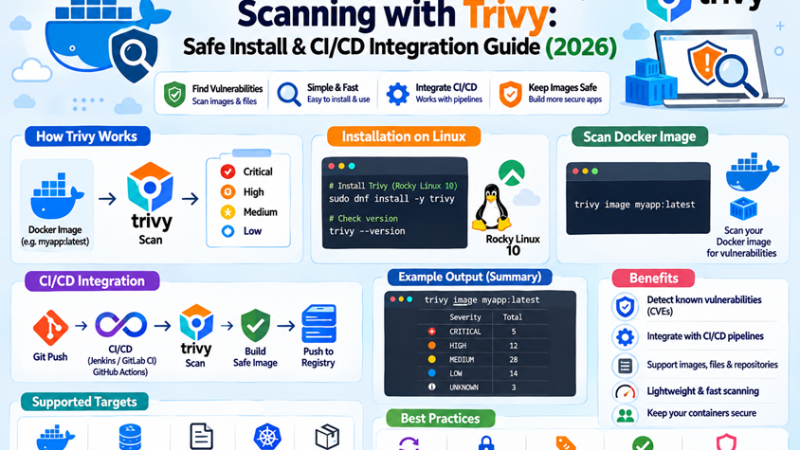
Trivy is one of the most popular open-source scanners for container images, file systems, Git repositories, Kubernetes clusters, and infrastructure-as-code. It finds known vulnerabilities (CVEs) in OS packages and language dependencies, flags misconfigurations in Dockerfiles and manifests, detects hard-coded secrets, and produces SBOMs.
In March 2026, Trivy itself became the target of a supply-chain attack. That does not mean you should stop scanning. It means the way you install and call a security tool deserves the same discipline as anything else in your pipeline. This guide covers the incident, a verified install, practical scans, CI/CD integration with pinned versions, and troubleshooting.
Table of Contents
- Read this first: the March 2026 Trivy incident
- What Trivy scans
- Install Trivy safely on Rocky Linux 10
- Your first scans
- Gates: severity, exit codes and unfixed CVEs
- Managing false positives and exceptions
- Scan Dockerfiles, Compose files and Kubernetes manifests
- SBOMs and secrets
- CI/CD: GitHub Actions
- CI/CD: GitLab CI
- Fixing what Trivy finds
- Offline and air-gapped scanning
- Hardening checklist for your scanning pipeline
- Alternatives
- Troubleshooting
- FAQ
1. Read this first: the March 2026 Trivy incident
| Date (2026) | What happened |
|---|---|
| 28 Feb | An earlier compromise of the Trivy repository; release artifacts from a range of older versions were deleted during the response |
| 19 Mar | A malicious Trivy v0.69.4 was published to GitHub Releases, container registries (Docker Hub, GHCR, ECR Public), and the deb/rpm repositories. At the same time, 76 of 77 version tags of the aquasecurity/trivy-action GitHub Action and all tags of aquasecurity/setup-trivy were force-pushed to malicious commits that stole CI secrets |
| 20-21 Mar | Remediation: malicious artifacts removed, safe versions published |
| 22 Mar | Malicious Docker Hub images 0.69.5 and 0.69.6 appeared, published with separately compromised Docker Hub credentials, with no matching GitHub release |
The incident is tracked as CVE-2026-33634 (GitHub advisory GHSA-69fq-xp46-6×23). Credentials stolen in this wave were reportedly used to attack other ecosystems days later.
Per the advisory, you were NOT affected if you used:
- Trivy binary or image v0.69.3 or earlier, or images referenced by digest, or binaries built from source.
trivy-actionv0.35.0 (protected by immutable releases) or a commit SHA from after 9 April 2025 that predates the tag hijack.
You may have been affected if you used:
- Trivy v0.69.4 (or “latest” during the exposure window), or Docker Hub images 0.69.5 / 0.69.6.
trivy-actionby a version tag other than v0.35.0 (the original tags 0.0.1 to 0.34.2 were deleted during remediation), orsetup-trivyby tag.- Workflows that run
trivy-actionwithversion: latestduring the exposure windows.
If you ran affected versions: treat CI secrets as compromised, rotate every secret that was available to those jobs (cloud keys, registry tokens, deploy keys, npm/PyPI tokens), review workflow runs from 19 to 20 March 2026 for unexpected steps or network calls, and look for unexpected public repositories named like tpcp-docs in your GitHub account. Follow the current guidance in the official advisory.
Lessons that apply to every tool in your pipeline:
- Pin by immutable identifier (commit SHA for Actions, image digest for containers), never by moving tag or
latest. - Verify what you download (checksums and signatures from the vendor’s documented process).
- Give scan jobs minimal permissions and no unnecessary secrets.
- Keep an inventory of which pipelines call which third-party actions.
2. What Trivy scans
| Target | Command | Finds |
|---|---|---|
| Container image | trivy image | OS package and language dependency CVEs, secrets, licenses |
| Local directory / repo | trivy fs | Dependency CVEs in lockfiles, secrets, misconfigurations |
| Remote Git repo | trivy repo | Same as fs for a repository |
| IaC and configs | trivy config | Dockerfile, Compose, Kubernetes, Terraform misconfigurations |
| Kubernetes cluster | trivy k8s | Workload vulnerabilities and misconfigurations |
| SBOM | trivy sbom | CVEs in an existing SBOM (CycloneDX, SPDX) |
   Your image / repo / manifest
              |
              v
   +---------------------+      +---------------------------+
   |  Trivy scanner      | <--- | Vulnerability DB          |
   |  (analyzers:        |      | (downloaded and cached;   |
   |   OS pkgs, libs,    |      |  updated regularly)       |
   |   configs, secrets) |      +---------------------------+
   +----------+----------+
              |
              v
   Report (table / JSON / SARIF / SBOM)  -->  gate in CI (exit code)  -->  fix and rebuild
3. Install Trivy safely on Rocky Linux 10
Prefer a version you have explicitly chosen and verified. Below are two approaches; both avoid “install whatever is newest.”
Option A: release binary with checksum verification
# 1. Choose a version after checking the official releases page and security advisory.
#    The v0.70 line was current when this guide was written; confirm yourself.
TRIVY_VERSION=0.70.0

cd /tmp
curl -fsSLO "https://github.com/aquasecurity/trivy/releases/download/v${TRIVY_VERSION}/trivy_${TRIVY_VERSION}_Linux-64bit.tar.gz"
curl -fsSLO "https://github.com/aquasecurity/trivy/releases/download/v${TRIVY_VERSION}/trivy_${TRIVY_VERSION}_checksums.txt"

# 2. Verify the checksum
grep "trivy_${TRIVY_VERSION}_Linux-64bit.tar.gz" "trivy_${TRIVY_VERSION}_checksums.txt" | sha256sum -c -

# 3. Install
tar xzf "trivy_${TRIVY_VERSION}_Linux-64bit.tar.gz" trivy
sudo install -m 0755 trivy /usr/local/bin/trivy
trivy --version
A checksum file downloaded from the same place as the archive proves integrity, not authenticity. For stronger assurance, also verify the signature or attestation using the method documented in the project’s current release notes and advisory, and compare the checksum with a second trusted source where possible.
Option B: run Trivy as a container pinned by digest
# Pull once, then record the digest
docker pull ghcr.io/aquasecurity/trivy:0.70.0
docker image inspect ghcr.io/aquasecurity/trivy:0.70.0 --format '{{index .RepoDigests 0}}'
# ghcr.io/aquasecurity/trivy@sha256:<digest>

# From now on, call it by digest
docker run --rm \
  -v /var/run/docker.sock:/var/run/docker.sock:ro \
  -v trivy-cache:/root/.cache \
  ghcr.io/aquasecurity/trivy@sha256:<digest> image redis:8-alpine
Mounting the Docker socket gives the scanner container control over the host Docker daemon. Avoid it in shared CI runners; export the image to a tar file and scan that instead:
docker save redis:8-alpine -o /tmp/redis.tar
trivy image --input /tmp/redis.tar
What about the package repositories?
Trivy publishes deb and rpm packages, and those channels were part of the March incident. If you use a package repository, pin the exact version, review the project’s current signing guidance, and do not let automatic updates pull a new Trivy version unattended.
4. Your first scans
# Scan an image (downloads the vulnerability DB on first run)
trivy image redis:8-alpine

# Only serious findings
trivy image --severity HIGH,CRITICAL redis:8-alpine

# Ignore vulnerabilities with no available fix yet
trivy image --severity HIGH,CRITICAL --ignore-unfixed redis:8-alpine

# JSON for tooling, SARIF for GitHub code scanning
trivy image --format json  --output result.json  redis:8-alpine
trivy image --format sarif --output result.sarif redis:8-alpine

# Scan a local project directory (lockfiles, secrets, misconfig)
trivy fs --scanners vuln,secret,misconfig .
How to read a result row:
| Column | Meaning |
|---|---|
| Library | Package with the vulnerability |
| Vulnerability | CVE or advisory ID |
| Severity | LOW, MEDIUM, HIGH, CRITICAL |
| Installed Version | What your image has |
| Fixed Version | The version that contains the fix (empty means no fix yet) |
| Title | Short description and link |
The OS and base image appear as separate targets at the top of the report, because most findings come from the base layer.
5. Gates: severity, exit codes and unfixed CVEs
By default Trivy exits with 0 even when it finds problems. For a pipeline gate, set an exit code.
trivy image \
  --severity HIGH,CRITICAL \
  --ignore-unfixed \
  --exit-code 1 \
  myapp:1.4.2
echo "exit status: $?"
A sensible starting policy:
| Environment | Policy |
|---|---|
| Pull request builds | Fail on CRITICAL with a fix available; report HIGH |
| Release builds | Fail on HIGH and CRITICAL with a fix available |
| Scheduled scans of deployed images | Report all, open tickets, do not break deployments |
Failing on every unfixed CVE usually blocks teams for issues they cannot resolve. Use --ignore-unfixed for gates and track unfixed items on a schedule.
6. Managing false positives and exceptions
Create a .trivyignore.yaml so every exception has a reason and an expiry date:
# .trivyignore.yaml
vulnerabilities:
  - id: CVE-2026-12345
    statement: "Not reachable: library used only in build stage; fix scheduled for next base image update"
    expired_at: 2026-12-31
trivy image --ignorefile .trivyignore.yaml --severity HIGH,CRITICAL myapp:1.4.2The simpler .trivyignore text file (one ID per line) also works, but it has no expiry. Expiry dates stop temporary exceptions from becoming permanent. Review the file in code review like any other security decision.
7. Scan Dockerfiles, Compose files and Kubernetes manifests
# Misconfigurations in everything under the current directory
trivy config .

# A single file, high severity only
trivy config --severity HIGH,CRITICAL docker-compose.yml
trivy config Dockerfile
Typical findings: running as root, latest tags, missing HEALTHCHECK, privileged containers, host path mounts, missing resource limits, and secrets in environment variables. Use the results alongside the hardening patterns in our Docker Redis Compose guide and the Kubernetes Security Best Practices.
Scan a live cluster (read-only credentials recommended):
trivy k8s --report summary cluster8. SBOMs and secrets
Generate an SBOM to know exactly what ships in an image, and re-scan it later without pulling the image again:
trivy image --format cyclonedx --output sbom.cdx.json myapp:1.4.2
trivy sbom sbom.cdx.json --severity HIGH,CRITICAL
Find secrets committed to a repository or baked into an image:
trivy fs --scanners secret .
trivy image --scanners secret myapp:1.4.2
If Trivy finds a real secret, rotating it matters more than deleting the file; the value remains in Git history and image layers. See Kubernetes Secrets Management for safer patterns.
9. CI/CD: GitHub Actions
Two patterns, from safest to most convenient.
Pattern 1: run the Trivy container by digest (no third-party action)
# .github/workflows/scan.yml
name: image-scan
on:
  pull_request:
  push:
    branches: [main]

permissions:
  contents: read          # nothing else unless you need it

jobs:
  scan:
    runs-on: ubuntu-latest
    steps:
      - uses: actions/checkout@<FULL_40_CHAR_COMMIT_SHA>   # pin by SHA, note the version in a comment

      - name: Build image
        run: docker build -t myapp:${{ github.sha }} .

      - name: Scan with Trivy (pinned by digest)
        run: |
          docker run --rm \
            -v /var/run/docker.sock:/var/run/docker.sock:ro \
            ghcr.io/aquasecurity/trivy@sha256:<PINNED_DIGEST> \
            image --severity HIGH,CRITICAL --ignore-unfixed --exit-code 1 \
            myapp:${{ github.sha }}
Pattern 2: use the official action, pinned to a full commit SHA
      - name: Scan with Trivy
        uses: aquasecurity/trivy-action@<FULL_40_CHAR_COMMIT_SHA>   # v0.36.0
        with:
          image-ref: myapp:${{ github.sha }}
          severity: HIGH,CRITICAL
          ignore-unfixed: true
          exit-code: '1'
Look up the full commit SHA of the release you reviewed (the release page shows it) and write the version number in a comment next to it. Never write @master, @main, @latest, or a bare tag. Add Dependabot for the github-actions ecosystem so SHA bumps arrive as reviewable pull requests.
In your repository settings, you can require that all actions be pinned to a full commit SHA, which makes tag-based references fail instead of silently trusting them.
10. CI/CD: GitLab CI
# .gitlab-ci.yml
trivy-scan:
  stage: test
  image:
    name: ghcr.io/aquasecurity/trivy@sha256:<PINNED_DIGEST>
    entrypoint: [""]
  variables:
    TRIVY_CACHE_DIR: "$CI_PROJECT_DIR/.trivycache"
    TRIVY_NO_PROGRESS: "true"
  cache:
    key: trivy-db
    paths: [.trivycache/]
  script:
    - trivy image --severity HIGH,CRITICAL --ignore-unfixed --exit-code 1 "$CI_REGISTRY_IMAGE:$CI_COMMIT_SHA"
  rules:
    - if: $CI_PIPELINE_SOURCE == "merge_request_event"
    - if: $CI_COMMIT_BRANCH == $CI_DEFAULT_BRANCH
For deployments driven by GitOps, run the scan before the image tag is promoted in Git; see Argo CD on Kubernetes.
11. Fixing what Trivy finds
| Finding source | Typical fix |
|---|---|
| Base image OS packages | Rebuild on a newer base tag; switch to a slimmer base (Alpine, distroless, or minimal images) |
| Language dependencies | Update to the “Fixed Version” in your lockfile and rebuild |
| Build tools in the final image | Use multi-stage builds so compilers and package managers never ship |
| Unfixed CVE | Check reachability, document an expiry-dated exception, monitor upstream |
| Misconfiguration | Add USER, drop capabilities, set read_only, add a HEALTHCHECK |
Rebuild and re-scan regularly, not only when code changes. A clean image today gains new CVEs next month as the database grows. A weekly scheduled scan of your deployed tags catches that drift.
12. Offline and air-gapped scanning
Trivy downloads its vulnerability database from a container registry at scan time. Behind a firewall or without internet:
# On a connected machine: download the DB and copy the cache directory to the target
trivy image --download-db-only --cache-dir /tmp/trivy-cache
# Transfer /tmp/trivy-cache, then on the isolated host:
trivy image --skip-db-update --offline-scan --cache-dir /opt/trivy-cache myapp:1.4.2
Alternatively, mirror the database to an internal registry and point Trivy at it with --db-repository. Consult the current Trivy documentation for the exact repository names and flags in your version.
13. Hardening checklist for your scanning pipeline
| Check | Why |
|---|---|
| Trivy pinned to a specific version and verified | Prevents surprise upgrades to compromised or broken releases |
| Containers called by digest, Actions by commit SHA | Tags can be rewritten; hashes cannot |
permissions: contents: read on scan jobs | A compromised step cannot push code or tokens |
| No deployment secrets in the scan job | The scanner needs none |
| Dependabot or Renovate for actions and images | Updates become reviewable diffs |
| Org-level rule requiring SHA pinning | Enforces the policy for every repo |
| Scan job egress logged or restricted where possible | Detects unexpected exfiltration |
| Exceptions expire | Temporary does not become permanent |
| Periodic scan of running images | Catches newly published CVEs |
| Host and daemon audited | See Docker Bench for Security |
14. Alternatives
| Tool | Notes |
|---|---|
| Grype (Anchore) | Focused vulnerability scanner, often used with Syft for SBOMs |
| Docker Scout | Integrated with Docker Desktop and Docker Hub |
| Clair | Registry-integrated scanner used by Quay |
| Snyk Container | Commercial, with developer workflow integrations |
Running two scanners on critical images is reasonable; their databases and matching logic differ.
15. Troubleshooting
| Symptom | Likely cause | Fix |
|---|---|---|
failed to download vulnerability DB / TOOMANYREQUESTS | Registry rate limit or network block | Retry later, authenticate to the registry, cache the DB in CI, or mirror the DB |
| First scan is slow | DB download | Cache ~/.cache/trivy (or TRIVY_CACHE_DIR) between runs |
unable to find the specified image | Image not in the local daemon or registry | Pull or build it first, or use --input image.tar |
permission denied on /var/run/docker.sock | User not in the docker group, or SELinux | Use a tar export, or check group and SELinux; see Docker on Rocky Linux 10 with SELinux |
| Pipeline passes although CVEs exist | --exit-code not set | Add --exit-code 1 |
| Pipeline fails on CVEs nobody can fix | Unfixed findings counted | Add --ignore-unfixed, track separately |
| Output full of OS CVEs from a huge base image | Large base | Move to a minimal base and a multi-stage build |
| Timeouts on large images | Default timeout | Increase --timeout, scan in a stronger runner |
| Duplicate or confusing results | Multiple layers/targets | Scan the final image, review per-target sections |
| Exception ignored | Wrong ID format or file path | Use --ignorefile with the correct path; check the expiry date |
| Action fails to resolve after the incident | Old tag deleted | Reference a reviewed commit SHA, or use a tag the project still publishes |
| Unsure whether you ran a bad version | History unclear | Check workflow logs from 19 to 22 March 2026 and image digests in use; rotate secrets if in doubt |
16. FAQ
Is Trivy still safe to use?
The malicious releases were removed and safe versions were published. Using a verified version, pinned by digest or commit SHA, is the recommended approach, as it is for any dependency.
How do I know whether I was affected by the March 2026 incident?
Compare the versions and tags your pipelines used against the lists in the advisory (section 1), and review workflow logs for 19 to 22 March 2026. If in doubt, rotate the secrets those jobs could access.
Should I use the official GitHub Action?
It is fine when pinned to a full commit SHA that you have reviewed. Running the container by digest avoids a third-party action layer entirely.
How often should I scan?
On every build, and at least weekly for images already running in production.
What severity should break the build?
Start with CRITICAL (and HIGH for releases) with fixes available, then tighten as your team clears the backlog.
Does Trivy replace host and runtime security?
No. It finds known vulnerabilities and misconfigurations before deployment. Combine it with host hardening, network policies, and runtime monitoring.
Can Trivy scan images without pulling them to Docker?
Yes. It can pull directly from registries, or scan an image tar file with --input.
Related posts:
 Run Redis in Docker: Complete Setup Guide 2026
 Install GitLab on Docker: Step-by-Step Guide for DevOps and IT Operations
 Trivy Docker Security: How to Scan and Fix Container Vulnerabilities
 How to Install n8n on Rocky Linux 10.2: Native, Docker & Systemd Setup Guide
 Jenkins Installation on CentOS 8 : Step-by-Step Guide
 How To Install Puppet On CentOS 8
 How to Install MQTT on Docker (Step-by-Step Tutorial for Beginners)
 How to Install CouchDB 3.5 on Rocky Linux 10.2: Docker, Source Build & Production Setup
