How to Install Apache Spark on Ubuntu 26.04 LTS (Standalone & Cluster Mode)

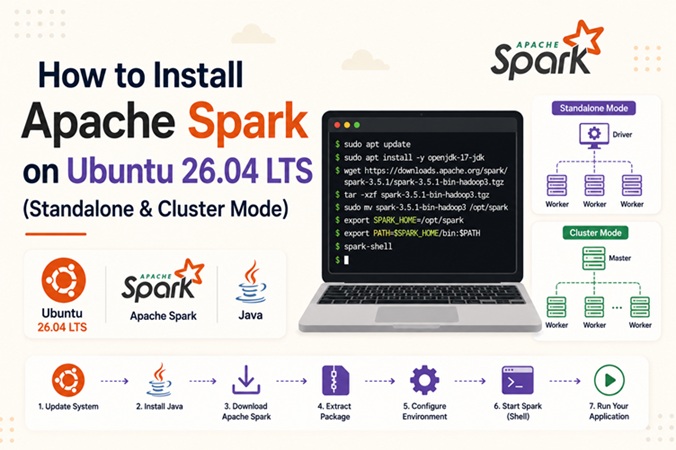
Apache Spark remains one of the most widely used distributed data processing engines for batch analytics, streaming, and machine learning workloads. This guide walks through a complete, production-oriented installation of Apache Spark 3.5 on Ubuntu 26.04 LTS, covering single-node standalone setup, multi-node cluster configuration, systemd service management, PySpark, and common troubleshooting scenarios.
Table of Contents
- What Is Apache Spark
- Prerequisites
- Spark Architecture Overview
- Deployment Mode Comparison
- Step 1: Update System and Install Java
- Step 2: Create a Dedicated Spark User
- Step 3: Download and Install Apache Spark
- Step 4: Configure Environment Variables
- Step 5: Verify the Installation
- Step 6: Configure Standalone Cluster Mode
- Step 7: Run Spark Master and Worker as systemd Services
- Step 8: Configure the Firewall (UFW)
- Step 9: Submit a Sample Job
- Step 10: Set Up PySpark
- Spark vs Hadoop MapReduce vs Flink
- Performance Tuning Notes
- Troubleshooting
- FAQ
- Conclusion
- Related Articles
What Is Apache Spark
Apache Spark is an open-source, in-memory distributed computing engine designed for large-scale data processing. Compared to traditional disk-based MapReduce, Spark keeps intermediate data in memory across a Directed Acyclic Graph (DAG) of transformations, which typically yields significantly faster iterative workloads such as machine learning training, graph processing, and interactive SQL analytics. Spark ships with four core libraries: Spark SQL, Spark Streaming (Structured Streaming), MLlib, and GraphX, all built on top of the same core execution engine.
Prerequisites
| Requirement | Minimum Spec | Recommended |
|---|---|---|
| OS | Ubuntu 26.04 LTS (server or desktop) | Ubuntu 26.04 LTS, updated |
| CPU | 2 vCPU | 4+ vCPU per node |
| RAM | 4 GB | 16 GB+ per worker node |
| Disk | 20 GB free | SSD, 50 GB+ |
| Java | OpenJDK 17 | OpenJDK 17 (LTS) |
| Network | Static IP recommended for cluster nodes | Static IP + DNS resolution |
| Access | sudo/root privileges | sudo/root privileges |
Scala and Python are optional depending on which API you plan to use — Spark bundles a Scala runtime, and PySpark installs via pip separately (covered in Step 10).
Spark Architecture Overview
                        +-----------------------------+
                        |      Client / Driver        |
                        |(SparkContext / SparkSession)|
                        +--------------+--------------+
                                       |
                                       | submits job / DAG
                                       v
                        +-----------------------------+
                        |      Cluster Manager        |
                        |  (Standalone / YARN / K8s)  |
                        +--------------+--------------+
                                       |
                 +---------------------+---------------------+
                 |                     |                     |
                 v                     v                     v
        +----------------+   +----------------+      +----------------+
        |  Worker Node 1 |   |   Worker Node 2 |     |   Worker Node N |
        | +-----------+  |   |  +-----------+  |     |  +-----------+  |
        | | Executor  |  |   |  | Executor  |  |     |  | Executor  |  |
        | | (Tasks)   |  |   |  | (Tasks)   |  |     |  | (Tasks)   |  |
        | +-----------+  |   |  +-----------+  |     |  +-----------+  |
        +----------------+   +----------------+      +----------------+
The Driver builds the execution DAG and requests resources from the Cluster Manager. Each Worker Node runs one or more Executors, which execute tasks and cache data in memory for the duration of the application.
Deployment Mode Comparison
| Mode | Best For | Resource Manager | Setup Complexity |
|---|---|---|---|
| Local | Development, testing, single-machine jobs | None (in-process) | Very low |
| Standalone | Small-to-medium dedicated clusters | Spark’s built-in manager | Low |
| YARN | Existing Hadoop ecosystem | Hadoop YARN | Medium |
| Kubernetes | Cloud-native, elastic, containerized workloads | Kubernetes API | Medium-High |
This guide focuses on Local mode for quick verification and Standalone cluster mode for a self-managed production deployment, since it does not require an existing Hadoop or Kubernetes stack.
Step 1: Update System and Install Java
Spark 3.5 runs on OpenJDK 17.
sudo apt update && sudo apt upgrade -y
sudo apt install -y openjdk-17-jdk wget curl

java -version
Expected output should show openjdk version "17...".
Step 2: Create a Dedicated Spark User
Running Spark under a dedicated system user isolates its processes and file permissions from other services.
sudo adduser --system --group --home /opt/spark spark
sudo mkdir -p /opt/spark
sudo chown -R spark:spark /opt/spark
Step 3: Download and Install Apache Spark
Always verify the current release on the official Apache Spark downloads page before running this step, since version numbers change.
cd /tmp
wget https://downloads.apache.org/spark/spark-3.5.3/spark-3.5.3-bin-hadoop3.tgz

tar -xzf spark-3.5.3-bin-hadoop3.tgz
sudo mv spark-3.5.3-bin-hadoop3 /opt/spark/spark-3.5.3
sudo ln -s /opt/spark/spark-3.5.3 /opt/spark/current
sudo chown -R spark:spark /opt/spark
The symlink /opt/spark/current makes future version upgrades a one-line change instead of a full reconfiguration.
Step 4: Configure Environment Variables
sudo tee /etc/profile.d/spark.sh <<'EOF'
export SPARK_HOME=/opt/spark/current
export PATH=$PATH:$SPARK_HOME/bin:$SPARK_HOME/sbin
export JAVA_HOME=/usr/lib/jvm/java-17-openjdk-amd64
EOF

sudo chmod +x /etc/profile.d/spark.sh
source /etc/profile.d/spark.sh
Confirm JAVA_HOME matches your actual installation path with update-alternatives --list java if it differs.
Step 5: Verify the Installation
spark-shell --versionYou should see the Spark version banner along with the Scala and Java versions it was built against. Exit with :quit or Ctrl+D.
Quick local-mode smoke test:
run-example SparkPi 100This calculates an approximation of Pi using 100 partitions and confirms the local execution engine works end-to-end.
Step 6: Configure Standalone Cluster Mode
On the master node, define which hosts act as workers:
sudo -u spark cp $SPARK_HOME/conf/workers.template $SPARK_HOME/conf/workers
sudo -u spark nano $SPARK_HOME/conf/workers
Add one worker hostname or IP per line, for example:
worker1.internal
worker2.internal
worker3.internal
Create spark-env.sh on all nodes:
sudo -u spark cp $SPARK_HOME/conf/spark-env.sh.template $SPARK_HOME/conf/spark-env.shAppend the following:
export SPARK_MASTER_HOST=master.internal
export SPARK_WORKER_CORES=4
export SPARK_WORKER_MEMORY=8g
export SPARK_MASTER_PORT=7077
export SPARK_MASTER_WEBUI_PORT=8080
Adjust SPARK_WORKER_CORES and SPARK_WORKER_MEMORY based on each node’s actual capacity, leaving headroom for the OS.
Ensure passwordless SSH from the master to each worker (required only if you plan to use start-all.sh for orchestration; the systemd approach in Step 7 avoids this dependency):
sudo -u spark ssh-keygen -t ed25519 -N ""
sudo -u spark ssh-copy-id spark@worker1.internal
Step 7: Run Spark Master and Worker as systemd Services
Managing Spark via systemd is more reliable in production than the bundled shell scripts, since it gives you automatic restarts and standard logging.
Master service (/etc/systemd/system/spark-master.service):
[Unit]
Description=Apache Spark Master
After=network.target

[Service]
Type=forking
User=spark
Group=spark
Environment="JAVA_HOME=/usr/lib/jvm/java-17-openjdk-amd64"
Environment="SPARK_HOME=/opt/spark/current"
ExecStart=/opt/spark/current/sbin/start-master.sh
ExecStop=/opt/spark/current/sbin/stop-master.sh
Restart=on-failure

[Install]
WantedBy=multi-user.target
Worker service (/etc/systemd/system/spark-worker.service), deployed on each worker node:
[Unit]
Description=Apache Spark Worker
After=network.target

[Service]
Type=forking
User=spark
Group=spark
Environment="JAVA_HOME=/usr/lib/jvm/java-17-openjdk-amd64"
Environment="SPARK_HOME=/opt/spark/current"
ExecStart=/opt/spark/current/sbin/start-worker.sh spark://master.internal:7077
ExecStop=/opt/spark/current/sbin/stop-worker.sh
Restart=on-failure

[Install]
WantedBy=multi-user.target
Enable and start:
sudo systemctl daemon-reload
sudo systemctl enable --now spark-master.service   # on master
sudo systemctl enable --now spark-worker.service    # on each worker
Check the cluster web UI at http://master.internal:8080 to confirm registered workers.
Step 8: Configure the Firewall (UFW)
sudo ufw allow 7077/tcp    # Master RPC
sudo ufw allow 8080/tcp    # Master web UI
sudo ufw allow 8081/tcp    # Worker web UI
sudo ufw allow 4040/tcp    # Application/job UI
sudo ufw reload
Restrict these ports to your internal subnet in production, e.g. sudo ufw allow from 10.0.0.0/24 to any port 7077.
Step 9: Submit a Sample Job
spark-submit \
  --master spark://master.internal:7077 \
  --deploy-mode client \
  --executor-memory 4g \
  --total-executor-cores 8 \
  $SPARK_HOME/examples/src/main/python/pi.py 1000
Track job progress via the application UI at http://<driver-host>:4040 while it runs.
Step 10: Set Up PySpark
sudo apt install -y python3-pip python3-venv
python3 -m venv ~/pyspark-env
source ~/pyspark-env/bin/activate
pip install pyspark==3.5.3
Test with a minimal script:
from pyspark.sql import SparkSession

spark = SparkSession.builder \
    .appName("SparkOnUbuntu2604") \
    .master("spark://master.internal:7077") \
    .getOrCreate()

df = spark.range(1000000).toDF("id")
print(df.count())

spark.stop()
python3 pyspark_test.pySpark vs Hadoop MapReduce vs Flink
| Feature | Apache Spark | Hadoop MapReduce | Apache Flink |
|---|---|---|---|
| Processing model | In-memory, DAG-based | Disk-based, two-stage | True streaming, in-memory |
| Latency | Low (batch/micro-batch) | High | Very low (native streaming) |
| Best fit | Batch + iterative ML | Legacy batch ETL | Real-time event processing |
| Fault tolerance | RDD lineage recomputation | Task re-execution | Distributed snapshots (checkpointing) |
| Ecosystem | Spark SQL, MLlib, GraphX | Hive, Pig | Flink SQL, Table API, CEP |
For a deeper hands-on comparison on the streaming side, see the companion Apache Flink installation guide linked below.
Performance Tuning Notes
- Set
spark.executor.memoryandspark.executor.coresexplicitly rather than relying on defaults; unset values often under-utilize larger nodes. - Enable
spark.sql.shuffle.partitionstuning for Spark SQL workloads — the default of 200 partitions is rarely optimal for small or very large datasets. - Use
spark.serializer=org.apache.spark.serializer.KryoSerializerfor better serialization throughput on RDD-heavy jobs. - Monitor GC pauses via the executor logs; excessive full GCs usually indicate under-provisioned executor memory relative to cached data size.
Troubleshooting
| Symptom | Likely Cause | Fix |
|---|---|---|
JAVA_HOME is not set on startup | Environment variable not exported for the spark user’s shell | Confirm /etc/profile.d/spark.sh is sourced; set JAVA_HOME directly in spark-env.sh |
| Worker not appearing in Master UI | Firewall blocking port 7077, or wrong SPARK_MASTER_HOST | Check ufw status, verify DNS/hosts resolution between nodes |
Address already in use on master start | Previous Spark process not fully stopped | sudo systemctl stop spark-master, then check ps aux | grep spark, kill stray PID |
Job stuck in ACCEPTED state indefinitely | Insufficient cluster resources for requested executors | Lower --executor-memory / --total-executor-cores, or add worker capacity |
Permission denied writing logs | Spark directories not owned by the spark user | sudo chown -R spark:spark /opt/spark |
PySpark ModuleNotFoundError: pyspark | Virtual environment not activated, or version mismatch with cluster | Activate venv, ensure PyPI pyspark version matches cluster’s Spark version |
| Slow shuffle stages | Too many/few shuffle partitions, disk-bound shuffle | Tune spark.sql.shuffle.partitions, use SSD-backed spark.local.dir |
FAQ
Does Apache Spark require Hadoop to run on Ubuntu 26.04?
No. The hadoop3 prebuilt binary bundles the Hadoop client libraries needed to talk to HDFS or S3-compatible storage, but a full standalone Spark cluster with local or NFS-backed storage does not need a running Hadoop cluster.
Can Spark run in standalone mode alongside Docker containers already on the host?
Yes, as long as the configured ports (7077, 8080, 8081, 4040) don’t conflict with existing container port mappings. Running Spark itself inside containers is also supported via the official Spark Docker images.
How do I upgrade Spark without breaking existing configs?
Download the new version to a separate directory under /opt/spark/, then repoint the /opt/spark/current symlink after copying over your spark-env.sh and workers files.
Is Java 17 mandatory, or can I use Java 11?
Spark 3.5 supports both Java 8 (deprecated), 11, and 17. Java 17 is recommended for Ubuntu 26.04 since it’s the LTS version shipped in the default repositories.
Conclusion
Apache Spark on Ubuntu 26.04 LTS can be deployed as a lightweight local instance for development or scaled into a multi-node standalone cluster managed by systemd for production batch and ML workloads. The setup shown here — dedicated system user, symlinked versioned installs, systemd-managed master/worker services, and UFW-restricted ports — gives a maintainable baseline that’s straightforward to extend toward YARN or Kubernetes-based deployments as workload requirements grow.
Related posts:
 Installing Apache Groovy On Ubuntu 20.04 LTS Step by Step
 How To Install Apache ANT on Ubuntu 20.04 LTS
 How To Install Apache Airflow 2.1 On Ubuntu 20.04 LTS Step by Step Guide
 Guide to Installing Apache Flink on Ubuntu 20.04
 How To Uninstall Apache Web Server from Ubuntu 22.04 (A Step-by-Step Guide)
 How To Install Apache Maven On Ubuntu 22.04 LTS
 How To Install Apache Solr 8.9 On Ubuntu 20.04 LTS Step by Step
 How to Install Apache Atlas on Ubuntu 24.04 LTS — A Complete Guide
