n8n Queue Mode: Scale Self-Hosted Workflows with Redis, PostgreSQL & Workers

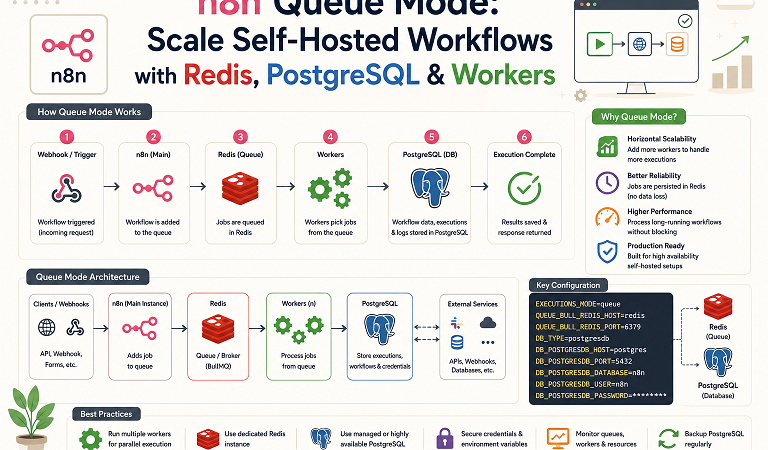
A default self-hosted n8n instance runs everything in one process: the editor, webhook reception, scheduling, and every workflow execution. That is fine until a few heavy workflows start competing with your webhooks for CPU. Then the editor lags and incoming webhooks time out.
Queue mode splits n8n into a main process and one or more workers. The main instance accepts triggers and writes jobs to Redis, and workers pull those jobs and execute them. PostgreSQL holds workflows, credentials, and execution data for everyone.
This guide builds a complete queue-mode stack with Docker Compose, scales workers, adds optional webhook processors, routes traffic through Nginx, and shows how to test, monitor, upgrade, and troubleshoot it.
Table of Contents
- When do you need queue mode?
- How queue mode works
- Prerequisites
- Step 1: Project files and secrets
- Step 2: docker-compose.yml
- Step 3: Start the stack
- Step 4: Test that workers execute jobs
- Step 5: Scale workers and tune concurrency
- Step 6: Add webhook processors and Nginx routing
- Rocky Linux 10 specifics
- Migrating an existing instance
- Monitoring and upgrades
- Troubleshooting
- FAQ
1. When do you need queue mode?
| Situation | Regular mode | Queue mode |
|---|---|---|
| A few personal automations | Fine | Overkill |
| Dozens of workflows, some long-running | Editor and webhooks slow down | Workers absorb the load |
| Webhooks must stay responsive during heavy jobs | Risky | Use webhook processors |
| Need to add capacity without redesigning | Vertical scaling only | Add workers horizontally |
| Need resilience if one execution process crashes | Whole instance affected | Other workers keep running |
The trade-off: two more moving parts (Redis and PostgreSQL as a hard requirement) and more configuration to keep consistent. If you are still deciding whether n8n is the right tool, read n8n vs Zapier vs Make (2026) first.
2. How queue mode works
                 Internet
                    |
             +------v------+
             |  Nginx      |  :443  (TLS, routing)
             +--+-------+--+
   /webhook/*   |       |  everything else + /webhook-test/*
        +-------v--+  +-v--------------+
        | webhook  |  |  n8n main      |   editor UI, schedules/triggers,
        | processor|  |  (EXECUTIONS_  |   enqueues jobs
        | (optional)  |   MODE=queue)  |
        +-----+----+  +-------+--------+
              |               |
              +-------+-------+
                      |  push jobs
               +------v------+
               |   Redis     |  job queue (Bull)
               +------+------+
            pull jobs |
      +---------------+---------------+
      |               |               |
 +----v----+    +-----v---+     +-----v---+
 | worker 1|    | worker 2|     | worker N|   run workflows,
 +----+----+    +----+----+     +----+----+   write results
      |              |               |
      +--------------+---------------+
                     |
              +------v------+
              | PostgreSQL  |  workflows, credentials,
              +-------------+  executions (shared)
Key rules:
- Every n8n process (main, workers, webhook processors) must use the same PostgreSQL database, the same Redis, the same
N8N_ENCRYPTION_KEY, and the same n8n version. - Queue mode needs PostgreSQL; SQLite is not recommended for it.
- If Redis is down, no new executions start, so treat Redis as a critical dependency and enable persistence.
3. Prerequisites
| Requirement | Detail |
|---|---|
| Host | Rocky Linux 10.2 (or any Linux with Docker Engine and the Compose plugin) |
| Resources | 4 vCPU and 8 GB RAM is a comfortable start for 2 workers |
| Software | Docker Engine + Docker Compose v2. See Docker on Rocky Linux 10 with SELinux |
| DNS | A hostname such as n8n.example.com pointing to the host (for production webhooks and TLS) |
| Reverse proxy | Nginx with a certificate; see Nginx with Let’s Encrypt on Rocky Linux 10 |
4. Step 1: Project files and secrets
mkdir -p ~/n8n-queue && cd ~/n8n-queue
touch docker-compose.yml .env
chmod 600 .env
Generate strong secrets once and store them in a password manager. Losing N8N_ENCRYPTION_KEY makes saved credentials unreadable, so back it up separately.
cat > .env <<EOF
# Pin the exact n8n version from the official releases page; all containers must match
N8N_VERSION=REPLACE_WITH_CURRENT_STABLE_VERSION

N8N_HOST=n8n.example.com
WEBHOOK_URL=https://n8n.example.com/
GENERIC_TIMEZONE=Asia/Jakarta

POSTGRES_PASSWORD=$(openssl rand -hex 24)
REDIS_PASSWORD=$(openssl rand -hex 24)
N8N_ENCRYPTION_KEY=$(openssl rand -hex 32)
EOF
Replace N8N_VERSION with the version you have tested. Avoid latest for production; an unplanned upgrade across all workers at once is how queue deployments break.
5. Step 2: docker-compose.yml
name: n8n-queue

# Settings shared by main, workers and webhook processors
x-n8n-env: &n8n-env
  DB_TYPE: postgresdb
  DB_POSTGRESDB_HOST: postgres
  DB_POSTGRESDB_PORT: "5432"
  DB_POSTGRESDB_DATABASE: n8n
  DB_POSTGRESDB_USER: n8n
  DB_POSTGRESDB_PASSWORD: ${POSTGRES_PASSWORD}

  N8N_ENCRYPTION_KEY: ${N8N_ENCRYPTION_KEY}

  EXECUTIONS_MODE: queue
  QUEUE_BULL_REDIS_HOST: redis
  QUEUE_BULL_REDIS_PORT: "6379"
  QUEUE_BULL_REDIS_PASSWORD: ${REDIS_PASSWORD}

  N8N_RUNNERS_ENABLED: "true"      # task runners for Code nodes
  GENERIC_TIMEZONE: ${GENERIC_TIMEZONE}
  TZ: ${GENERIC_TIMEZONE}

services:
  postgres:
    image: postgres:17-alpine
    restart: unless-stopped
    environment:
      POSTGRES_USER: n8n
      POSTGRES_PASSWORD: ${POSTGRES_PASSWORD}
      POSTGRES_DB: n8n
    volumes:
      - postgres-data:/var/lib/postgresql/data
    healthcheck:
      test: ["CMD-SHELL", "pg_isready -U n8n -d n8n"]
      interval: 10s
      timeout: 5s
      retries: 10
    networks: [backend]

  redis:
    image: redis:8-alpine
    restart: unless-stopped
    command: ["redis-server", "--requirepass", "${REDIS_PASSWORD}", "--appendonly", "yes"]
    volumes:
      - redis-data:/data
    healthcheck:
      test: ["CMD-SHELL", "redis-cli -a \"$$REDISCLI_AUTH\" --no-auth-warning ping | grep -q PONG"]
      interval: 10s
      timeout: 3s
      retries: 10
    environment:
      REDISCLI_AUTH: ${REDIS_PASSWORD}
    networks: [backend]

  n8n-main:
    image: docker.n8n.io/n8nio/n8n:${N8N_VERSION}
    restart: unless-stopped
    depends_on:
      postgres: {condition: service_healthy}
      redis: {condition: service_healthy}
    environment:
      <<: *n8n-env
      N8N_HOST: ${N8N_HOST}
      N8N_PROTOCOL: https
      WEBHOOK_URL: ${WEBHOOK_URL}
      OFFLOAD_MANUAL_EXECUTIONS_TO_WORKERS: "true"
      N8N_METRICS: "true"
    ports:
      - "127.0.0.1:5678:5678"
    volumes:
      - n8n-data:/home/node/.n8n
    networks: [backend]

  n8n-worker:
    image: docker.n8n.io/n8nio/n8n:${N8N_VERSION}
    restart: unless-stopped
    command: worker --concurrency=10
    depends_on:
      postgres: {condition: service_healthy}
      redis: {condition: service_healthy}
      n8n-main: {condition: service_started}
    environment:
      <<: *n8n-env
      QUEUE_HEALTH_CHECK_ACTIVE: "true"
    deploy:
      replicas: 2
    networks: [backend]

networks:
  backend:

volumes:
  postgres-data:
  redis-data:
  n8n-data:
What each part does:
| Piece | Purpose |
|---|---|
x-n8n-env anchor | One copy of the shared settings, merged into every n8n service so they cannot drift apart |
EXECUTIONS_MODE=queue | Switches n8n from in-process execution to queued execution |
QUEUE_BULL_REDIS_* | Connection to the Redis queue |
N8N_ENCRYPTION_KEY | Same key everywhere, or workers cannot decrypt credentials |
OFFLOAD_MANUAL_EXECUTIONS_TO_WORKERS | Sends “Execute workflow” test runs from the editor to workers too. Leave it off if you prefer manual runs to fail fast on the main instance |
command: worker --concurrency=10 | Starts the worker process; 10 parallel executions per worker is the default, and values below 5 are discouraged |
QUEUE_HEALTH_CHECK_ACTIVE | Exposes a health endpoint (and metrics) on workers |
127.0.0.1:5678 | Only the local reverse proxy can reach the main instance |
For a hardened Redis with ACL users instead of --requirepass, apply the pattern from our Docker Redis Compose guide.
6. Step 3: Start the stack
docker compose pull
docker compose up -d
docker compose ps
docker compose logs -f n8n-main
Wait for the main instance to report that it is listening, then open https://n8n.example.com (through your reverse proxy) and create the owner account.
Confirm that workers connected:
docker compose logs n8n-worker | tail -20You should see each worker start and report that it is ready to process jobs.
7. Step 4: Test that workers execute jobs
- Create a workflow with a Webhook trigger (production URL), a Wait or Code node that sleeps for 30 seconds, and a Respond to Webhook node. Activate it.
- In one terminal, follow the workers:
docker compose logs -f n8n-worker - In another, fire several requests at once:
for i in $(seq 1 6); do curl -s -o /dev/null -w "%{http_code}\n" https://n8n.example.com/webhook/your-path & done; wait - Watch the worker logs. Jobs should be picked up by different worker containers and run in parallel. In the n8n UI, open Executions to see them complete.
If executions sit in a waiting state forever, jump to the troubleshooting table.
8. Step 5: Scale workers and tune concurrency
Total parallel capacity is number of workers x concurrency. With 2 workers at 10, you can run 20 executions simultaneously.
# Add capacity at runtime
docker compose up -d --scale n8n-worker=4
docker compose ps| Workload | Suggested starting point |
|---|---|
| Many short API workflows | 2 workers, concurrency 10, add workers as the queue grows |
| Few heavy, CPU-bound executions (large data transforms) | More workers with lower concurrency (5 to 8) so each one has CPU headroom |
| Memory-hungry workflows | Fewer executions per worker, set container memory limits, watch for out-of-memory kills |
| Long-running waits | Waiting executions free the worker slot, so concurrency can stay higher |
Watch these signals before scaling: queue depth, execution duration percentiles, worker CPU and memory, and PostgreSQL connection counts. When PostgreSQL becomes the bottleneck, add connection pooling (for example PgBouncer in front of PostgreSQL), because n8n does not pool connections across processes itself.
9. Step 6: Add webhook processors and Nginx routing
By default the main instance receives webhooks, so a heavy editor session or trigger storm can still slow them down. A webhook processor is the same image started with the webhook command. It handles production webhook requests and enqueues the work.
Add this service to docker-compose.yml:
  n8n-webhook:
    image: docker.n8n.io/n8nio/n8n:${N8N_VERSION}
    restart: unless-stopped
    command: webhook
    depends_on:
      postgres: {condition: service_healthy}
      redis: {condition: service_healthy}
    environment:
      <<: *n8n-env
      N8N_HOST: ${N8N_HOST}
      N8N_PROTOCOL: https
      WEBHOOK_URL: ${WEBHOOK_URL}
    ports:
      - "127.0.0.1:5679:5678"
    networks: [backend]
Then route traffic in Nginx. Production webhooks go to the processor; test webhooks and the editor stay on the main instance, because test webhooks are tied to an open editor session.
# /etc/nginx/conf.d/n8n.conf
upstream n8n_main    { server 127.0.0.1:5678; }
upstream n8n_webhook { server 127.0.0.1:5679; }

server {
    listen 443 ssl;
    server_name n8n.example.com;

    # ssl_certificate / ssl_certificate_key managed by Certbot

    client_max_body_size 50m;

    # Production webhooks -> webhook processor(s)
    location ~ ^/webhook/ {
        proxy_pass http://n8n_webhook;
        proxy_set_header Host $host;
        proxy_set_header X-Real-IP $remote_addr;
        proxy_set_header X-Forwarded-For $proxy_add_x_forwarded_for;
        proxy_set_header X-Forwarded-Proto $scheme;
        proxy_buffering off;
    }

    # Everything else (editor UI, REST API, webhook-test) -> main
    location / {
        proxy_pass http://n8n_main;
        proxy_http_version 1.1;
        proxy_set_header Upgrade $http_upgrade;
        proxy_set_header Connection "upgrade";
        proxy_set_header Host $host;
        proxy_set_header X-Real-IP $remote_addr;
        proxy_set_header X-Forwarded-For $proxy_add_x_forwarded_for;
        proxy_set_header X-Forwarded-Proto $scheme;
        proxy_buffering off;
    }
}
Start the new service with docker compose up -d, reload Nginx, and repeat the load test. To scale the processor, run more instances behind the same upstream block.
10. Rocky Linux 10 specifics
| Topic | What to do |
|---|---|
| SELinux | Keep it enforcing. Named volumes need no changes. For bind mounts add :Z. Nginx proxying to local ports needs sudo setsebool -P httpd_can_network_connect 1 |
| firewalld | Open only 80 and 443 publicly. Keep 5678, 5679, 5432, and 6379 unpublished or bound to 127.0.0.1 |
| Redis memory | Set vm.overcommit_memory = 1 on the host (see the Redis guide) |
| Docker and firewalls | Docker manages its own rules, so published ports can bypass firewalld rules; always bind internal services to 127.0.0.1 |
| Native alternative | Prefer systemd services without Docker? See Install n8n on Rocky Linux 10.2 and run n8n worker as extra systemd units pointing to PostgreSQL and Redis |
If you plan to attach local AI models to workflows, queue mode helps keep slow LLM calls off the main process; see n8n AI Agent Node Explained and Self-Hosting Ollama with n8n.
11. Migrating an existing instance
If you currently run regular mode, ideally on SQLite, move in a controlled way. Keep the same N8N_ENCRYPTION_KEY as the old instance, or exported credentials cannot be decrypted.
# On the OLD instance: export workflows and credentials
n8n export:workflow --all --separate --output=./backup/workflows/
n8n export:credentials --all --separate --output=./backup/credentials/

# On the NEW queue-mode stack: copy files into the main container, then import
docker compose cp ./backup n8n-main:/home/node/.n8n/backup
docker compose exec n8n-main n8n import:workflow --separate --input=/home/node/.n8n/backup/workflows/
docker compose exec n8n-main n8n import:credentials --separate --input=/home/node/.n8n/backup/credentials/
Notes:
- Execution history does not migrate with this approach. Export anything you must keep before switching.
- Re-activate your trigger-based workflows after import and re-test webhooks.
- Keep the old instance read-only until the new one has run for a few days.
- For complete backup and upgrade routines, see n8n Backup, Upgrade & Disaster Recovery Strategy.
12. Monitoring and upgrades
Monitoring. The main instance exposes Prometheus metrics when N8N_METRICS=true, and workers expose health endpoints when QUEUE_HEALTH_CHECK_ACTIVE=true. Track:
| Signal | Why |
|---|---|
| Queue depth (waiting jobs) | Rising means workers cannot keep up |
| Execution failures and duration | Detects broken workflows and slowdowns |
| Worker and main process health | Detects crashed containers |
| PostgreSQL connections and disk | Common bottleneck |
| Redis memory and persistence | Single point of failure |
Set up dashboards and alerts with Prometheus and Grafana on Rocky Linux 10.
Upgrades. All processes must run the same n8n version.
# 1. Back up PostgreSQL and the encryption key first
docker compose exec -T postgres pg_dump -U n8n n8n | gzip > backup-$(date +%F).sql.gz

# 2. Change N8N_VERSION in .env, then pull and recreate everything together
docker compose pull
docker compose up -d
docker compose logs -f n8n-main
Read the release notes for breaking changes before you change versions, and test on a staging copy.
13. Troubleshooting
| Symptom | Likely cause | Fix |
|---|---|---|
| Executions stay “Queued” or “Waiting” forever | No worker running, or workers cannot reach Redis | docker compose ps; check docker compose logs n8n-worker for Redis errors |
Worker logs ECONNREFUSED or NOAUTH for Redis | Wrong host or password | Match QUEUE_BULL_REDIS_HOST and QUEUE_BULL_REDIS_PASSWORD to Redis settings |
| “Credentials could not be decrypted” or workers fail on credentials | N8N_ENCRYPTION_KEY differs between processes | Use the identical key everywhere; recreate containers |
| Worker starts then exits with database errors | Cannot reach PostgreSQL, wrong credentials, or version mismatch | Check DB_POSTGRESDB_* values; confirm all images share one version |
| Production webhook returns 404 | Workflow not active, wrong URL, or WEBHOOK_URL incorrect | Activate the workflow; set WEBHOOK_URL to the public base URL with trailing slash |
| Test webhook fails when routed to processor | /webhook-test/ sent to the wrong upstream | Route only /webhook/ to the processor; keep /webhook-test/ on main |
| Editor shows “connection lost” through proxy | Missing WebSocket upgrade headers | Add Upgrade and Connection "upgrade" headers in Nginx |
| 502 Bad Gateway from Nginx on Rocky Linux | SELinux blocks Nginx network connections | setsebool -P httpd_can_network_connect 1 |
| Manual runs pile up behind a backlog | OFFLOAD_MANUAL_EXECUTIONS_TO_WORKERS is on | Turn it off to run test executions on main |
| Workers consume all RAM, containers killed | Concurrency too high for memory-heavy workflows | Lower --concurrency, add memory limits, add workers instead |
| PostgreSQL “too many connections” | Many processes each holding connections | Raise max_connections carefully or add PgBouncer |
| Jobs lost after Redis restart | Redis persistence disabled | Keep appendonly yes and a persistent volume |
| Code node errors about task runners | Runner mode misconfigured | Keep N8N_RUNNERS_ENABLED=true; check the docs for your version if you use external runners |
| Different behavior between instances | Mixed n8n versions | Pin the same N8N_VERSION for every service |
14. FAQ
Is Redis required for queue mode?
Yes. Redis is the job queue between the main instance and the workers.
Can I use SQLite in queue mode?
It is not recommended. Use PostgreSQL so every process shares one reliable database.
How many workers do I need?
Start with two, and scale by watching queue depth and execution duration. Capacity is workers multiplied by concurrency.
Do I need webhook processors?
Only if webhook latency matters while heavy work or editor activity runs. Many setups run fine with workers alone.
Do workers need persistent volumes?
No. Workers are stateless; the database holds state. The main instance keeps a small volume for local settings under /home/node/.n8n.
Can I mix Docker and native systemd workers?
Yes, if they share the same database, Redis, encryption key, and n8n version. Keep versions strictly aligned.
Does queue mode make individual workflows faster?
No. It increases throughput and isolation. A single workflow runs on one worker at normal speed.
Where can I find workflows to run on this setup?
Browse 15+ Best n8n Workflow Templates (2026).
Related posts:
 Kaspersky Virus Removal Tool 10.10.2022
 How To Install Memcached on Debian 11
 How To Install PHP 8.3.6 On CentOS Stream 9
 How to Install Moodle 4.4.3 on Ubuntu 24.04 : Step-by-Step Guide
 A Complete Guide to FreeRADIUS: Features, Installation, and Configuration
 Install Portainer on Ubuntu 22.04 Easily — Complete Docker Setup Tutorial
 A Complete 2025 Guide to the MERN Stack: Architecture, Benefits, Use Cases, and How It Works End-to-End
 The Agentic AI Revolution: How Autonomous Machines Are Reshaping Industries in 2025
