Oracle Fusion REST API Testing with JMeter: A Practical Guide

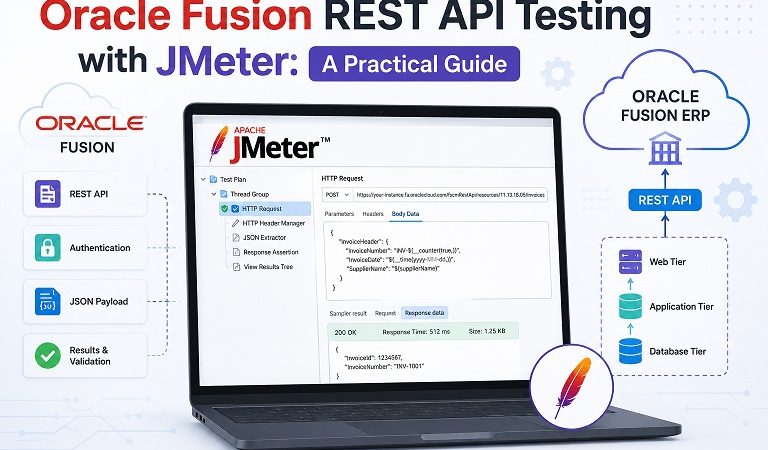
Oracle Fusion ERP exposes a comprehensive set of REST APIs that power everything from financial transactions and HR operations to procurement workflows and supply chain management. While UI-based performance testing (covered in our previous article, Using Apache JMeter for Oracle Fusion ERP Performance Testing: Concepts and Strategy) validates the end-user experience, REST API testing goes deeper — it targets the application’s business logic layer directly, independent of the frontend, and is essential for validating integrations, automation workflows, and high-volume batch operations.
This guide walks through the concepts, authentication strategies, request design, and test execution approach for Oracle Fusion REST API testing using Apache JMeter.
Table of Contents
- Why Test Oracle Fusion REST APIs Separately
- Oracle Fusion REST API Architecture Overview
- Authentication Methods for Oracle Fusion REST APIs
- Setting Up JMeter for REST API Testing
- Designing HTTP Request Samplers for Oracle Fusion
- Working with Oracle Fusion REST API Resources
- Handling Pagination and Bulk Data
- Parameterization and Data-Driven Testing
- Response Validation and Assertions
- Load Testing REST APIs: Strategy and Load Profiles
- Monitoring and Metrics
- Common Mistakes and How to Avoid Them
- Summary and Next Steps
1. Why Test Oracle Fusion REST APIs Separately
If you are already running UI-based JMeter tests against Oracle Fusion (as described in Using Apache JMeter for Oracle Fusion ERP Performance Testing: Concepts and Strategy), you might wonder whether separate API testing is necessary. The answer is yes — and here is why.
Decoupled validation. REST API tests isolate the business logic layer from the presentation layer. When a performance issue is detected, API tests help you determine whether the bottleneck is in the frontend (ADF rendering, JavaScript, page weight) or in the backend (business logic, database queries, integration calls).
Integration testing coverage. Oracle Fusion implementations almost always involve third-party integrations — HRIS systems, banking platforms, legacy ERP data migration, external procurement portals. These integrations consume Oracle Fusion REST APIs directly. Testing those APIs under load validates that your integration layer can handle peak transaction volumes.
Faster test execution. REST API tests are significantly lighter than UI tests. No browser rendering, no ADF view state management, no cookie chains for page navigation. This makes API tests ideal for frequent regression testing in CI/CD pipelines.
Automation and batch operation validation. Many Oracle Fusion automation workflows (scheduled jobs, bulk imports, robotic process automation) operate via REST APIs. Testing these endpoints ensures batch processes complete within acceptable time windows.
Complementary coverage. UI tests cover the user experience; API tests cover the integration and automation layer. Both are needed for a complete non-functional testing strategy.
2. Oracle Fusion REST API Architecture Overview
Oracle Fusion REST APIs follow a consistent design pattern based on industry standards. Understanding this structure is essential before building JMeter tests.
Base URL Structure:
https://<hostname>/fscmRestApi/resources/<version>/<resource>For example:
https://your-fusion-instance.oraclecloud.com/fscmRestApi/resources/11.13.18.05/invoices
https://your-fusion-instance.oraclecloud.com/fscmRestApi/resources/11.13.18.05/purchaseOrders
https://your-fusion-instance.oraclecloud.com/hcmRestApi/resources/latest/workers
Key API categories and their base paths:
| Category | Base Path | Examples |
|---|---|---|
| Financials | /fscmRestApi/resources/ | Invoices, Journals, Payments |
| Procurement | /fscmRestApi/resources/ | Purchase Orders, Requisitions |
| SCM | /fscmRestApi/resources/ | Inventory, Shipments, Orders |
| HCM | /hcmRestApi/resources/ | Workers, Absences, Payroll |
| CRM | /crmRestApi/resources/ | Opportunities, Contacts |
| OIC | /ic/api/integration/v1/ | Integration flows, Connections |
Standard HTTP methods used:
GET— Retrieve a resource or collectionPOST— Create a new resourcePATCH— Partially update an existing resourceDELETE— Remove a resource
Oracle Fusion REST APIs support OData query parameters for filtering, sorting, and field selection:
GET /fscmRestApi/resources/11.13.18.05/invoices?q=InvoiceStatus=UNPAID&limit=25&offset=0&fields=InvoiceId,InvoiceNumber,InvoiceAmountq— filter conditionlimit— number of records per pageoffset— pagination offsetfields— specific fields to return (reduces payload size)orderBy— sort orderexpand— include child resources inline
Understanding OData parameters is important for designing realistic API test scenarios that mirror actual integration behavior.
3. Authentication Methods for Oracle Fusion REST APIs
Oracle Fusion REST APIs support multiple authentication mechanisms. Your choice of method in JMeter depends on how your integrations are configured.
Basic Authentication
The simplest method — send a Base64-encoded username:password in the Authorization header. Supported but generally discouraged in production due to security concerns.
Authorization: Basic <Base64(username:password)>In JMeter, add an HTTP Authorization Manager config element:
- Base URL:
https://your-fusion-instance.oraclecloud.com - Username: your API user
- Password: your API password
- Mechanism: BASIC
OAuth 2.0 (Recommended for Production)
Oracle Fusion Cloud uses Oracle Identity Cloud Service (IDCS) for OAuth 2.0. This is the recommended authentication method for API integrations.
OAuth 2.0 flow in JMeter:
Step 1 — Request an access token:
POST https://idcs-<tenant>.identity.oraclecloud.com/oauth2/v1/token

Headers:
  Content-Type: application/x-www-form-urlencoded
  Authorization: Basic <Base64(clientId:clientSecret)>

Body (x-www-form-urlencoded):
  grant_type=client_credentials
  scope=<your_scope>
Step 2 — Extract the access token:
Use a JSON Extractor in JMeter:
Reference Name: access_token
JSON Path Expression: $.access_token
Match No: 1
Step 3 — Use the token in subsequent API requests:
Authorization: Bearer ${access_token}Handling token expiry: Access tokens typically expire in 3,600 seconds (1 hour). For long-running load tests, implement a token refresh mechanism using a JMeter setUp Thread Group that periodically re-requests a token and stores it in a JMeter property shared across Thread Groups:
// BeanShell / JSR223 PostProcessor
props.put("shared_token", vars.get("access_token"));
Then reference it in other Thread Groups:
Authorization: Bearer ${__P(shared_token)}JWT Token Authentication
Some Oracle Fusion configurations use JWT (JSON Web Token) for API access. JMeter can send JWT tokens the same way as Bearer tokens — capture the JWT from your identity provider’s token endpoint and pass it in the Authorization header.
4. Setting Up JMeter for REST API Testing
Unlike UI testing which relies heavily on the HTTP(S) Test Script Recorder, REST API tests in JMeter are typically built manually — which gives you far more control and produces cleaner, more maintainable test plans.
Essential JMeter configuration for Oracle Fusion REST API testing:
HTTP Request Defaults (Config Element) — set once and inherit across all samplers:
Server Name: your-fusion-instance.oraclecloud.com
Port: 443
Protocol: https
Content Encoding: UTF-8
HTTP Header Manager — applied at the Thread Group level for headers common to all requests:
Content-Type: application/json
Accept: application/json
REST-Framework-Version: 6
The
REST-Framework-Versionheader is Oracle-specific and controls the API response format. Version 6 is the current recommended version for Oracle Fusion Cloud. Always include it to ensure consistent response structure.
HTTP Cookie Manager — add one at the Thread Group level with default settings. Even for REST API testing, Oracle Fusion may set session cookies after authentication that must be maintained.
Test Plan structure recommended for Oracle Fusion REST API testing:
Test Plan
├── setUp Thread Group (Token Acquisition)
│   └── HTTP Request: POST /oauth2/v1/token
│   └── JSON Extractor: access_token
│   └── JSR223 PostProcessor: props.put("token", ...)
│
├── Thread Group: Financials API Load
│   ├── HTTP Header Manager
│   ├── HTTP Cookie Manager
│   ├── CSV Data Set Config (test data)
│   └── Transaction Controller: Create Invoice
│       ├── HTTP Request: POST /invoices
│       ├── JSON Extractor: InvoiceId
│       └── HTTP Request: GET /invoices/${InvoiceId}
│
├── Thread Group: Procurement API Load
│   └── ...
│
└── tearDown Thread Group (Cleanup)
    └── HTTP Request: DELETE test records if needed
5. Designing HTTP Request Samplers for Oracle Fusion
Each JMeter HTTP Request sampler targeting Oracle Fusion REST APIs should be configured precisely. Here is a practical breakdown by operation type.
GET — Retrieve a Resource Collection
Method: GET
Path: /fscmRestApi/resources/11.13.18.05/invoices
Parameters:
  q          = InvoiceStatus=UNPAID;VendorName=${supplier_name}
  limit      = 25
  offset     = 0
  fields     = InvoiceId,InvoiceNumber,InvoiceAmount,InvoiceStatus
  orderBy    = InvoiceDate:desc
Use OData fields to limit the response payload — retrieving only the fields your test needs reduces network overhead and speeds up response times, giving you a more accurate measurement of server-side performance.
POST — Create a New Resource
Method: POST
Path: /fscmRestApi/resources/11.13.18.05/invoices
Headers:
  Content-Type: application/json

Body (raw JSON):
{
  "InvoiceNumber": "INV-PERF-${__threadNum}-${__counter(true,)}",
  "InvoiceAmount": 5000,
  "InvoiceCurrencyCode": "USD",
  "InvoiceDate": "${invoice_date}",
  "BusinessUnit": "${business_unit}",
  "VendorName": "${supplier_name}",
  "VendorSiteCode": "${supplier_site}"
}
Key points:
- Use
${__threadNum}and${__counter}JMeter functions to generate unique identifiers per virtual user per iteration — this prevents duplicate key violations - Parameterize all business data references from CSV files
- Always extract the resource ID from the response for use in downstream requests
PATCH — Update an Existing Resource
Method: PATCH
Path: /fscmRestApi/resources/11.13.18.05/invoices/${InvoiceId}
Headers:
  Content-Type: application/json

Body:
{
  "Description": "Updated by performance test - ${__time(yyyy-MM-dd HH:mm:ss)}"
}
PATCH in Oracle Fusion REST APIs only requires the fields you want to update — you do not need to send the full resource representation.
POST — Execute an Action (Business Operation)
Oracle Fusion REST APIs expose business operations as actions using a specific URL pattern:
Method: POST
Path: /fscmRestApi/resources/11.13.18.05/invoices/${InvoiceId}/action/validate

Body: {} (empty JSON object for actions with no parameters)
Common Oracle Fusion REST API actions include invoice validation, purchase order approval, and payment processing. Always check the Oracle REST API documentation for the correct action endpoint path for your module version.
6. Working with Oracle Fusion REST API Resources
Oracle Fusion REST APIs support child resources — related data objects accessible as sub-paths of a parent resource. Understanding this hierarchy is essential for testing complete business transactions.
Example: Invoice with Line Items and Distributions
Parent resource:
GET /fscmRestApi/resources/11.13.18.05/invoices/${InvoiceId}

Child resources:
GET /fscmRestApi/resources/11.13.18.05/invoices/${InvoiceId}/child/invoiceLines
GET /fscmRestApi/resources/11.13.18.05/invoices/${InvoiceId}/child/invoiceLines/${LineNumber}/child/invoiceDistributions
Inline expansion of child resources (reduces round trips):
GET /fscmRestApi/resources/11.13.18.05/invoices/${InvoiceId}?expand=invoiceLines,invoiceLines.invoiceDistributionsFor performance testing, inline expansion tests the server’s ability to assemble complex nested responses under load — this is often a significant database performance factor.
Creating parent and child resources in a single POST:
POST /fscmRestApi/resources/11.13.18.05/invoices

{
  "InvoiceNumber": "INV-PERF-${__threadNum}-${__counter(true,)}",
  "InvoiceAmount": 10000,
  "VendorName": "${supplier_name}",
  "invoiceLines": [
    {
      "LineNumber": 1,
      "LineAmount": 6000,
      "Description": "Line 1 - Performance Test",
      "AccountCombination": "${account_combination_1}"
    },
    {
      "LineNumber": 2,
      "LineAmount": 4000,
      "Description": "Line 2 - Performance Test",
      "AccountCombination": "${account_combination_2}"
    }
  ]
}
This single request creates the invoice header and all its lines in one transaction — which is how real integrations operate and what you should simulate in performance tests.
7. Handling Pagination and Bulk Data
Oracle Fusion REST APIs return paginated results by default, typically 25 records per page. For performance testing bulk retrieval scenarios, you need to handle pagination explicitly.
Pagination parameters:
limit  = number of records per page (max 500 for most resources)
offset = starting record index
JMeter strategy for paginated load test:
Use a While Controller with a condition that checks whether the previous response returned a full page — if fewer records than the limit were returned, you have reached the last page.
// JSR223 PostProcessor after GET request
import groovy.json.JsonSlurper

def response = new JsonSlurper().parseText(prev.getResponseDataAsString())
def count = response.count  // number of records in current page
def limit = 25

if (count < limit) {
    vars.put("hasMore", "false")
} else {
    def currentOffset = vars.get("offset").toInteger()
    vars.put("offset", (currentOffset + limit).toString())
    vars.put("hasMore", "true")
}
For load testing, you generally do not want every virtual user to paginate through all records — that produces unrealistic load patterns. Instead, parameterize the offset from a CSV file so each virtual user retrieves a different page, simulating concurrent users browsing different parts of a large dataset.
8. Parameterization and Data-Driven Testing
Every business-meaningful value in your Oracle Fusion REST API test must be parameterized. Hardcoded values produce duplicate key errors, validation failures, and unrealistic server behavior.
What to parameterize:
| Parameter | Source | Example |
|---|---|---|
| Supplier names/IDs | CSV file | supplier_data.csv |
| Business units | CSV file | business_units.csv |
| Account combinations | CSV file | coa_segments.csv |
| Employee numbers | CSV file | employee_data.csv |
| Invoice/PO amounts | CSV or Random function | ${__Random(100,50000,)} |
| Dates | JMeter functions | ${__time(yyyy-MM-dd,)} |
| Unique identifiers | JMeter functions | ${__threadNum}-${__counter(true,)} |
CSV Data Set Config setup:
Filename: /path/to/supplier_data.csv
Variable Names: supplier_name,supplier_site,supplier_id
Delimiter: ,
Recycle on EOF: true
Stop Thread on EOF: false
Sharing Mode: All threads
Set Recycle on EOF: true so that virtual users cycle through the dataset without stopping when they reach the end — essential for long-running soak tests.
Generating unique record identifiers:
Oracle Fusion enforces uniqueness on business keys like Invoice Number and PO Number. Use a combination of JMeter built-in functions to guarantee uniqueness across all virtual users and all iterations:
${__threadNum}-${__counter(true,)}-${__time(HHmmss,)}This produces values like 5-142-143022 — thread 5, iteration 142, at time 14:30:22 — which are unique across the entire test run.
9. Response Validation and Assertions
For REST API tests, response validation is more straightforward than UI testing but still requires careful design.
Always validate:
HTTP Status Code — use a Response Assertion:
Field to test: Response Code
Pattern: 200  (for GET/PATCH)
         201  (for successful POST/create)
Absence of error indicators — use a Response Assertion:
Field to test: Response Body
Pattern type: Contains
Pattern: "type":"http://www.w3.org/Protocols/rfc2616/rfc2616-sec10.html#sec10.4"
Negate: true (assert the error response type is NOT present)
Oracle Fusion REST API errors return a consistent structure:
{
  "type": "http://www.w3.org/Protocols/rfc2616/rfc2616-sec10.html#sec10.4",
  "title": "Bad Request",
  "status": "400",
  "detail": "The request could not be understood by the server due to malformed syntax."
}
Asserting the absence of the type field containing the W3C error URL is a reliable way to catch application-level errors regardless of the specific error code.
JSON content validation — use a JSON Assertion for critical fields:
JSON Path: $.InvoiceId
Expected value: not empty
Additionally assert value: false (just assert the path exists)
Response time assertion — add a Duration Assertion to flag responses that exceed your SLA threshold:
Duration in milliseconds: 5000This marks individual samples as failed if they exceed 5 seconds, making it easy to identify SLA breaches in your results.
10. Load Testing REST APIs: Strategy and Load Profiles
REST API load testing for Oracle Fusion follows the same principles outlined in the previous article on UI performance testing, but with different throughput characteristics.
REST API tests can drive significantly higher transaction rates than UI tests with the same number of virtual users — because there is no think time spent on page rendering or form navigation. This means you need to be careful not to generate unrealistically high load that exceeds what real integrations would produce.
Recommended approach: throughput-based load model
Instead of defining load by concurrent users (as in UI testing), define it by transactions per second (TPS) — because integrations and batch jobs produce a known transaction rate, not a user count.
Use JMeter’s Throughput Shaping Timer plugin to precisely control request rate:
Start TPS: 5
End TPS: 50
Duration (seconds): 300
This ramps throughput from 5 to 50 transactions per second over 5 minutes — simulating a batch job accelerating to full speed.
Realistic load profile for Oracle Fusion REST APIs:
Phase 1 — Baseline (5 min):
  Low TPS (10–20% of peak)
  Establish baseline response times
  Confirm authentication and data setup is working

Phase 2 — Ramp-Up (10–15 min):
  Gradually increase to peak TPS
  Watch for the inflection point where response times start climbing

Phase 3 — Sustained Peak (30–60 min):
  Hold at peak TPS
  This is your primary measurement window

Phase 4 — Ramp-Down (5 min):
  Reduce TPS to zero
  Confirm error rate returns to zero as load drops
Mixing API scenarios: Just as with UI testing, combine multiple API scenarios in proportion to real integration volumes — for example, if your integration architecture sends 3 invoice creation requests for every 1 payment processing request, reflect that ratio in your Thread Group configuration.
11. Monitoring and Metrics
JMeter metrics for REST API tests:
- Throughput (TPS) — compare achieved TPS against target TPS; degradation indicates the system is saturating
- Response Time Percentiles — P95 and P99 are most relevant for API SLAs
- Error Rate — broken down by HTTP status code (400 Bad Request usually means a scripting/data issue; 500/503 means a server-side problem)
- Connect Time vs Latency vs Response Time — JMeter measures all three; high connect time suggests network or load balancer issues; high latency-to-response-time gap suggests server processing time
Server-side metrics to monitor concurrently:
- Oracle Fusion REST API Gateway — if your environment uses Oracle API Gateway, monitor request throttling and rate limit hits
- WebLogic Thread Pool — REST API requests consume WebLogic worker threads; pool exhaustion is a common bottleneck at high TPS
- Oracle DB Active Sessions and Wait Events — REST API calls ultimately hit the database; monitor for row lock contention, buffer busy waits, and top SQL by elapsed time
- OIC Activity Metrics — if REST API calls trigger OIC integration flows, monitor OIC throughput and error rates in the OIC console
12. Common Mistakes and How to Avoid Them
Mistake 1: Not including REST-Framework-Version header.
Omitting this header causes Oracle Fusion to respond with an older API response format that may differ structurally from what your JSON extractors expect. Always include REST-Framework-Version: 6 (or the version appropriate for your Oracle Fusion release).
Mistake 2: Using Basic Auth for all tests when OAuth is in scope.
If your integrations use OAuth 2.0, your performance tests must use OAuth too. Testing with Basic Auth when production integrations use OAuth does not validate the actual authentication overhead that production will experience.
Mistake 3: Not handling token expiry in long-running tests.
Access tokens expire after 3,600 seconds. A soak test running for 4+ hours will start failing with 401 Unauthorized errors after the first hour if you do not implement token refresh logic.
Mistake 4: Sending full resource representations in PATCH requests.
Oracle Fusion REST APIs only require the fields you are updating in a PATCH body. Sending the full object (as you might do in a PUT) is technically incorrect for PATCH and may trigger unexpected validation behavior.
Mistake 5: Ignoring child resource performance.
Fetching only the parent resource and ignoring child resources produces unrealistically fast response times. Real integrations typically expand or separately retrieve child resources. Include child resource operations in your test scenarios.
Mistake 6: Not cleaning up test data.
Each test run creates new invoices, POs, or employee records in the test environment. Without cleanup, the database grows over successive test runs and performance degrades — not because of application issues, but because of test data accumulation. Build a tearDown Thread Group or a post-test cleanup script.
Summary and Next Steps
Oracle Fusion REST API testing with JMeter is a powerful complement to UI-based performance testing. The key principles:
- Test both UI and API layers — they reveal different bottlenecks and are both necessary for a complete non-functional testing strategy. See our UI performance testing guide for the complementary approach.
- Master OAuth 2.0 token management — it is the most technically demanding part of Oracle Fusion REST API scripting
- Use throughput-based load models — TPS is a more natural unit for API testing than concurrent users
- Parameterize everything — uniqueness of business keys is non-negotiable in Oracle Fusion
- Validate responses rigorously — HTTP 200 does not mean the business operation succeeded; always check the response body
- Monitor server-side metrics — JMeter results alone cannot tell you why response times degraded
Together, UI performance testing and REST API testing give you complete visibility into your Oracle Fusion ERP system’s non-functional behavior — from the end-user experience through the integration layer and down to the database.
Testing Oracle Fusion REST APIs in your implementation and running into specific challenges? Share your scenario in the comments or reach out — we would love to hear how you are approaching it.
Related posts:
 Using Apache JMeter for Oracle Fusion ERP Performance Testing: Concepts and Strategy
 NFT (Non-Functional Testing) Planning for Oracle Fusion ERP Implementations
 How Install Apache Jmeter on Ubuntu 22.04 : Simple Guide
 Understanding API Synchronous vs Asynchronous (with Real Examples)
 OpenSpeedTest: The Ultimate Self-Hosted Network Speed Test Tool for Accurate Performance Monitoring
 How to Install Oppia on CentOS Stream 10 – A step-by-step guide for ed-tech developers
 How to Install MQTT on Docker (Step-by-Step Tutorial for Beginners)
 A Complete 2025 Guide to the MERN Stack: Architecture, Benefits, Use Cases, and How It Works End-to-End
