How to Run Redis on Kubernetes Using StatefulSet

Redis is one of the most widely used in-memory data stores, powering caching layers, session stores, message queues, and real-time leaderboards across countless production systems. Unlike stateless web applications, however, Redis carries state that must survive restarts, and its instances often need stable, predictable identities — especially when running replication or Sentinel-based failover.
This is exactly the problem a Kubernetes Deployment isn’t designed to solve. Deployments treat pods as interchangeable and give them random names and IPs on every restart. Redis, on the other hand, needs each replica to keep its own persistent volume and a stable network identity across restarts. That’s precisely what Kubernetes’ StatefulSet resource provides, making it the correct primitive for running Redis reliably in a cluster.
This article walks through deploying Redis on Kubernetes using StatefulSet, from a single-instance setup to a replicated, highly available configuration with Sentinel, along with the storage, networking, and security considerations that matter in production.
Table of Contents
- Why StatefulSet Is the Right Fit for Redis
- Prerequisites Before Deployment
- Understanding Headless Services for Redis
- Creating the Redis ConfigMap
- Deploying Redis with a StatefulSet
- Configuring Persistent Storage per Replica
- Setting Up Redis Replication
- Adding High Availability with Redis Sentinel
- Exposing Redis to Applications
- Security Best Practices
- Monitoring Redis on Kubernetes
- Scaling and Upgrading Considerations
- Common Troubleshooting Issues
- Conclusion
Why StatefulSet Is the Right Fit for Redis
Before writing any manifest, it helps to understand exactly what StatefulSet gives you that a Deployment doesn’t.
1. Stable, Predictable Pod Names
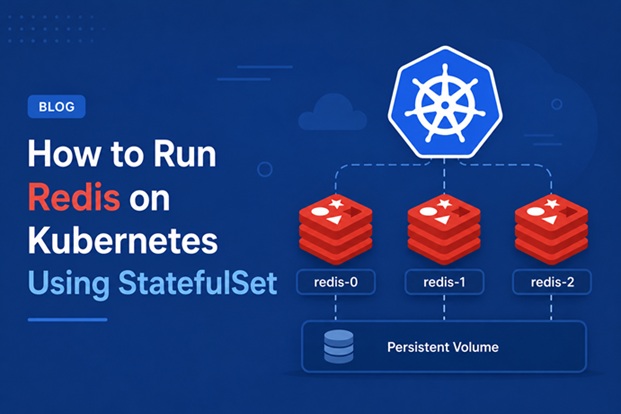
A StatefulSet named redis produces pods named redis-0, redis-1, redis-2, and so on — and these names persist across restarts and rescheduling. This matters enormously for Redis replication, where a replica needs to consistently know the address of its master.
2. Stable Network Identity via Headless Service
Combined with a headless Service, each pod gets a predictable DNS name like redis-0.redis.default.svc.cluster.local, so other Redis nodes — and your application — can reliably address a specific instance rather than a randomly load-balanced one.
3. Ordered, Graceful Deployment and Scaling
StatefulSets create and terminate pods in order (redis-0 before redis-1, and so on), and wait for each pod to be ready before moving to the next. This ordering is important for Redis, where you typically want the master (redis-0) up and healthy before replicas attempt to connect to it.
4. Dedicated Persistent Volume per Replica
Perhaps the most important feature: StatefulSet’s volumeClaimTemplates provisions a distinct PersistentVolumeClaim for every replica, and that same volume is reattached to the same pod identity even after a reschedule. This is essential for Redis persistence (RDB snapshots and AOF logs) to survive pod restarts without data loss.
Deployments simply don’t offer these guarantees, which is why running Redis behind a Deployment often leads to broken replication topologies and lost data after a rollout.
Prerequisites Before Deployment
Make sure the following are in place before starting:
- An active Kubernetes cluster (managed or self-hosted), version 1.23 or later recommended.
- kubectl configured and able to reach the cluster.
- A storage class supporting
ReadWriteOnce, since each Redis pod needs its own dedicated volume. - A dedicated namespace, e.g.
redis, to keep resources isolated. - Basic familiarity with Redis configuration directives (
appendonly,requirepass,replicaof).
Create the namespace first:
kubectl create namespace redisUnderstanding Headless Services for Redis
A headless Service (one with clusterIP: None) doesn’t load-balance traffic. Instead, it returns the individual pod IPs directly through DNS, which is exactly what’s needed for StatefulSet pods to discover and address each other by name.
apiVersion: v1
kind: Service
metadata:
  name: redis
  namespace: redis
  labels:
    app: redis
spec:
  clusterIP: None
  selector:
    app: redis
  ports:
    - port: 6379
      name: redis
With this Service in place, redis-0.redis.redis.svc.cluster.local will resolve directly to the pod redis-0‘s IP — the addressing scheme that Redis replication and Sentinel both depend on.
Creating the Redis ConfigMap
Rather than baking configuration into the image, store the Redis configuration in a ConfigMap so it can be updated independently of the container image.
apiVersion: v1
kind: ConfigMap
metadata:
  name: redis-config
  namespace: redis
data:
  redis.conf: |
    appendonly yes
    appendfsync everysec
    dir /data
    maxmemory 256mb
    maxmemory-policy allkeys-lru
    protected-mode no
Enabling appendonly yes ensures Redis persists every write operation to an append-only file, which combined with a persistent volume protects against data loss on pod restart. The maxmemory-policy directive controls what happens once Redis approaches its memory limit — allkeys-lru is a sensible default for cache-style workloads.
Deploying Redis with a StatefulSet
With the headless Service and ConfigMap ready, define the StatefulSet itself.
apiVersion: apps/v1
kind: StatefulSet
metadata:
  name: redis
  namespace: redis
spec:
  serviceName: redis
  replicas: 3
  selector:
    matchLabels:
      app: redis
  template:
    metadata:
      labels:
        app: redis
    spec:
      containers:
        - name: redis
          image: redis:7.2-alpine
          command:
            - redis-server
            - /etc/redis/redis.conf
          ports:
            - containerPort: 6379
              name: redis
          resources:
            requests:
              cpu: "250m"
              memory: "300Mi"
            limits:
              cpu: "500m"
              memory: "512Mi"
          volumeMounts:
            - name: redis-data
              mountPath: /data
            - name: redis-config
              mountPath: /etc/redis
          readinessProbe:
            exec:
              command: ["redis-cli", "ping"]
            initialDelaySeconds: 5
            periodSeconds: 5
          livenessProbe:
            exec:
              command: ["redis-cli", "ping"]
            initialDelaySeconds: 15
            periodSeconds: 10
      volumes:
        - name: redis-config
          configMap:
            name: redis-config
  volumeClaimTemplates:
    - metadata:
        name: redis-data
      spec:
        accessModes: ["ReadWriteOnce"]
        resources:
          requests:
            storage: 5Gi
        storageClassName: standard
A few details are worth calling out here. The serviceName field must match the headless Service created earlier — this is what wires up the stable DNS naming. The readinessProbe and livenessProbe both use redis-cli ping, which is a lightweight way to confirm the Redis process is actually responsive, not just that the container is running.
Apply the manifests in order:
kubectl apply -f redis-configmap.yaml
kubectl apply -f redis-headless-service.yaml
kubectl apply -f redis-statefulset.yaml
Watch the pods come up one at a time, in order:
kubectl get pods -n redis -wYou should see redis-0 reach Running before redis-1 is even created — this ordered rollout is one of StatefulSet’s defining behaviors.
Configuring Persistent Storage per Replica
Each pod created by the StatefulSet above gets its own PersistentVolumeClaim, automatically named redis-data-redis-0, redis-data-redis-1, and so on. Verify this with:
kubectl get pvc -n redisThis one-to-one mapping between pod identity and volume is what makes StatefulSet suitable for Redis: if redis-1 is deleted and rescheduled, Kubernetes reattaches the exact same volume — redis-data-redis-1 — rather than provisioning a fresh, empty one.
A few storage considerations worth planning for:
Choose a storage class with adequate IOPS. Redis is latency-sensitive; slow disk I/O directly affects AOF fsync performance and can cause write stalls under heavy load.
Size volumes with headroom. Redis’s maxmemory setting bounds in-memory usage, but AOF files and RDB snapshots on disk can temporarily grow larger during rewrites — leave enough space to avoid ENOSPC errors mid-rewrite.
Be deliberate about reclaim policy. If a StatefulSet is deleted entirely, its PVCs are not automatically deleted by default, which is a safety net — but also means orphaned volumes need to be cleaned up manually when a Redis cluster is decommissioned.
Setting Up Redis Replication
With three pods now running independently, the next step is wiring them into a replication topology, with redis-0 acting as master and the others as replicas.
Connect to redis-1 and configure it as a replica of redis-0:
kubectl exec -it redis-1 -n redis -- redis-cli REPLICAOF redis-0.redis.redis.svc.cluster.local 6379Repeat for redis-2:
kubectl exec -it redis-2 -n redis -- redis-cli REPLICAOF redis-0.redis.redis.svc.cluster.local 6379Verify replication status directly on the master:
kubectl exec -it redis-0 -n redis -- redis-cli INFO replicationThe output should show connected_slaves:2, along with the replication offset for each. To make this configuration persist across restarts rather than being set manually every time, add the replicaof directive directly into each replica’s section of the ConfigMap, or use an init container that applies the correct role based on the pod’s ordinal index extracted from its hostname.
Adding High Availability with Redis Sentinel
Manual replica configuration works, but it doesn’t handle failover automatically — if redis-0 goes down, nothing promotes a replica to master on its own. This is where Redis Sentinel comes in.
Sentinel is a separate Redis process that monitors master and replica health, and automatically promotes a replica to master if the current master becomes unreachable. Deploy Sentinel as its own StatefulSet, typically with 3 replicas for quorum-based decision-making.
apiVersion: v1
kind: ConfigMap
metadata:
  name: sentinel-config
  namespace: redis
data:
  sentinel.conf: |
    port 26379
    sentinel monitor mymaster redis-0.redis.redis.svc.cluster.local 6379 2
    sentinel down-after-milliseconds mymaster 5000
    sentinel failover-timeout mymaster 10000
    sentinel parallel-syncs mymaster 1
apiVersion: apps/v1
kind: StatefulSet
metadata:
name: redis-sentinel
namespace: redis
spec:
serviceName: redis-sentinel
replicas: 3
selector:
matchLabels:
app: redis-sentinel
template:
metadata:
labels:
app: redis-sentinel
spec:
containers:
- name: sentinel
image: redis:7.2-alpine
command:
- redis-sentinel
- /etc/redis/sentinel.conf
ports:
- containerPort: 26379
volumeMounts:
- name: sentinel-config
mountPath: /etc/redis
volumes:
- name: sentinel-config
configMap:
name: sentinel-configWith Sentinel running, application clients that support Sentinel-aware Redis clients (most major language libraries do) can query Sentinel for the current master address rather than hardcoding it, so failover becomes transparent to the application layer. The quorum value of 2 in the sentinel monitor line means at least two Sentinel instances must agree the master is down before a failover is triggered, preventing a single flaky network check from causing an unnecessary failover.
Exposing Redis to Applications
Applications inside the cluster can connect directly using the headless Service’s per-pod DNS names, but for simpler client configuration, a standard ClusterIP Service pointing at the current master is often more convenient — especially when combined with Sentinel-based service discovery on the client side.
apiVersion: v1
kind: Service
metadata:
  name: redis-sentinel-svc
  namespace: redis
spec:
  selector:
    app: redis-sentinel
  ports:
    - port: 26379
      targetPort: 26379
Applications connect to this Sentinel service first, ask “who is the current master for mymaster?”, and then connect directly to whichever Redis pod Sentinel reports — a pattern natively supported by client libraries like redis-py, Lettuce, and ioredis.
If Redis is only used as an internal cache with no need for external access, avoid exposing it via Ingress or a LoadBalancer altogether; keeping it reachable only within the cluster network significantly reduces its attack surface.
Security Best Practices
Redis has historically shipped with weak default security posture, so a few explicit steps are necessary in any production deployment.
1. Require Authentication
Set requirepass in the ConfigMap, and store the password as a Kubernetes Secret rather than plain text:
kubectl create secret generic redis-auth --from-literal=password=<strong-password> -n redisReference it as an environment variable and pass it to Redis via requirepass ${REDIS_PASSWORD} at startup, or mount it and reference it from the config file.
2. Restrict Network Access with NetworkPolicy
Only allow application pods that actually need Redis to reach it, blocking lateral access from unrelated namespaces:
apiVersion: networking.k8s.io/v1
kind: NetworkPolicy
metadata:
  name: redis-network-policy
  namespace: redis
spec:
  podSelector:
    matchLabels:
      app: redis
  policyTypes:
    - Ingress
  ingress:
    - from:
        - podSelector:
            matchLabels:
              role: backend
      ports:
        - port: 6379
3. Disable Dangerous Commands
Redis supports renaming or disabling risky commands like FLUSHALL, CONFIG, and KEYS in production, reducing the blast radius if credentials are ever leaked:
rename-command FLUSHALL ""
rename-command CONFIG ""
4. Run as a Non-Root User
Set a securityContext on the pod spec to avoid running the Redis process as root inside the container, limiting the impact of a potential container escape.
5. Keep Images Updated
Track Redis’s release notes for security advisories, and rebuild images promptly when CVEs are disclosed for the Redis version in use.
Monitoring Redis on Kubernetes
Visibility into Redis’s internal state is critical, since memory pressure and replication lag often precede outright failures.
Redis Exporter for Prometheus
Deploy the redis_exporter sidecar alongside each Redis container to expose metrics like connected clients, memory usage, keyspace hits/misses, and replication lag in a Prometheus-compatible format.
- name: redis-exporter
  image: oliver006/redis_exporter:latest
  ports:
    - containerPort: 9121
  env:
    - name: REDIS_ADDR
      value: "redis://localhost:6379"
Key Metrics Worth Alerting On
Watch used_memory relative to maxmemory, connected_slaves on the master (to catch silent replication breaks), and rdb_last_bgsave_status (to catch failed persistence attempts before they compound into data loss).
Centralized Logging
Forward Redis container logs to a centralized logging stack so slow log entries and connection errors remain visible even after a pod restart wipes local container logs.
Scaling and Upgrading Considerations
Scaling a Redis StatefulSet isn’t as simple as increasing the replica count, since new pods need to be wired into the replication topology explicitly.
Scaling Up
After increasing replicas in the StatefulSet spec, the new pod (e.g., redis-3) starts as a standalone instance and must be manually configured with REPLICAOF — or automatically via an init script — before it participates in replication.
Rolling Upgrades
StatefulSets default to RollingUpdate, replacing pods one at a time starting from the highest ordinal. For Redis, this generally means replicas are restarted before the master, which is the safer order since it avoids an unnecessary failover during a routine version bump.
Testing Upgrades in Staging First
Because Redis persistence formats can change between major versions, always validate that AOF and RDB files from the current version load cleanly under the new version before rolling out to production.
Common Troubleshooting Issues
Pod Stuck in Pending Due to PVC Binding Failure
Check kubectl describe pvc redis-data-redis-0 -n redis for provisioner errors — commonly caused by a missing or misconfigured StorageClass.
Replica Shows master_link_status:down
Usually indicates a DNS resolution issue between pods. Confirm the headless Service is correctly configured and that redis-cli -h redis-0.redis.redis.svc.cluster.local ping succeeds from within another pod.
Sentinel Keeps Flapping Between Masters
Often caused by too aggressive a down-after-milliseconds value combined with network jitter. Increase the threshold slightly and confirm Sentinel pods themselves aren’t resource-starved.
Data Loss After Pod Restart
Almost always traces back to appendonly being disabled, or the PVC not actually being reattached correctly — verify with kubectl get pvc that the same claim is bound to the same pod ordinal after a restart.
Conclusion
Running Redis on Kubernetes is a genuinely good fit once StatefulSet is used correctly — stable network identities, ordered deployment, and per-replica persistent volumes solve exactly the problems that make stateful workloads awkward on Kubernetes in the first place. Combined with a headless Service for internal discovery, a properly configured replication topology, and Sentinel for automatic failover, Redis on Kubernetes can be just as resilient as a hand-managed VM-based deployment — with the added benefits of declarative configuration, self-healing, and easier scaling.
As with any stateful workload, the details matter more than they do for stateless services: get the storage class, security hardening, and monitoring right from the start, and Redis on Kubernetes becomes a low-maintenance, production-grade piece of your infrastructure rather than a recurring source of incidents.
Related posts:
 How to Deploy PostgreSQL on Kubernetes with Persistent Storage (2026 Guide)
 How to Back Up and Restore Kubernetes Cluster Using Velero (2026 Guide)
 How to Deploy Jenkins on Kubernetes
 Kubernetes Troubleshooting: 50 kubectl Commands Every Administrator Should Know
 How To Install Redis On Ubuntu 20.04
 What Is KubeKey? Complete Explanation for DevOps Beginners
 MongoDB Backup: Complete Guide to Backing Up and Restoring Your Database in 2026
 How to Install MetalLB on Bare Metal Kubernetes Cluster (L2 and BGP Guide)
