How to Install Apache Groovy on Ubuntu 26.04 LTS (2026)


Apache Groovy remains one of the most practical JVM languages for build automation, scripting, and rapid prototyping — it’s the engine behind Gradle build scripts, Jenkins pipelines, and countless internal DevOps tools. With Ubuntu 26.04 LTS (“Resolute Raccoon”) now the current long-term support release, this guide walks through installing Apache Groovy 5.0.7, the latest stable release as of this writing, using the recommended SDKMAN! workflow as well as a manual installation method for locked-down or offline environments.
By the end of this tutorial you’ll have a working Groovy installation, a verified GROOVY_HOME, the Groovy Shell (groovysh) and Console ready to use, and enough context to wire Groovy into Gradle, Jenkins, or your IDE of choice.
Table of Contents
- Prerequisites
- Installation Methods Compared
- Architecture: How Groovy Sits on the JVM
- Method 1: Installing Groovy with SDKMAN! (Recommended)
- Method 2: Manual Installation from Binary Archive
- Method 3: Installing via APT (System Package)
- Verifying the Installation
- Writing and Running Your First Groovy Script
- Integrating Groovy with Gradle and IDEs
- Managing Multiple Groovy Versions
- Troubleshooting
- Uninstalling Groovy
- FAQ
- Related Reads on bckinfo.com
Prerequisites
Before installing Groovy, make sure your Ubuntu 26.04 LTS system meets the following requirements:
- A user account with
sudoprivileges - An active internet connection
- A supported JDK — Groovy 5.0.x targets JDK 11 or newer, though JDK 17 or JDK 21 (LTS) is recommended for production workloads
- At least 500 MB of free disk space for the JDK and Groovy SDK combined
Ubuntu 26.04 LTS ships without a JDK by default, so install OpenJDK first. JDK 21 is a good baseline choice since it’s an LTS release with long support:
sudo apt update
sudo apt install -y openjdk-21-jdk
Confirm the JDK installed correctly:
java -versionExpected output:
openjdk version "21.0.x" 2026-xx-xx
OpenJDK Runtime Environment (build 21.0.x+xx-Ubuntu-x)
OpenJDK 64-Bit Server VM (build 21.0.x+xx-Ubuntu-x, mixed mode, sharing)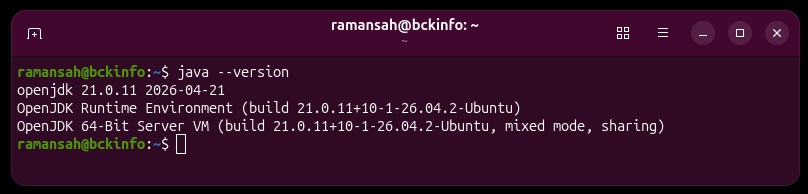
If you manage multiple JDKs on the same machine, sudo update-alternatives --config java lets you switch the active version.
Installation Methods Compared
There are three practical ways to install Groovy on Ubuntu 26.04 LTS. Each has trade-offs depending on whether you need version flexibility, offline reproducibility, or system-level package management.
| Method | Best For | Version Freshness | Multi-Version Support | Root Required |
|---|---|---|---|---|
| SDKMAN! | Developers, CI runners, daily dev work | Latest stable, updated frequently | Yes — switch per shell/project | No |
| Manual Binary Install | Air-gapped servers, reproducible builds, Docker images | Pinned to whatever ZIP you download | Manual (multiple directories + symlink) | Optional |
APT (groovy package) | Quick system-wide installs, legacy scripts | Often several versions behind upstream | No, single version | Yes |
For most developers and CI pipelines, SDKMAN! is the recommended method — it’s the same tool the Groovy project itself recommends, and it lets you pin different Groovy versions per project.
Architecture: How Groovy Sits on the JVM
Understanding where Groovy fits in the JVM toolchain helps when debugging classpath or version issues later.
                    ┌─────────────────────────────────────┐
                    │       Ubuntu 26.04 LTS (OS)         │
                    │                                     │
                    │   ┌──────────────────────────────┐  │
                    │   │      OpenJDK 21 (JVM)        │  │
                    │   │                              │  │
                    │   │  ┌────────────────────────┐  │  │
                    │   │  │   Apache Groovy 5.0.7  │  │  │
                    │   │  │  ────────────────────  │  │  │
                    │   │  │  groovyc  (compiler)   │  │  │
                    │   │  │groovy(script runner)   │  │  │
                    │   │  │groovysh (interactive REPL)│  │
                    │   │  │groovyConsole (GUI editor) │  │
                    │   │  └──────────────┬─────────┘  │  │
                    │   │              │ compiles to   │  │
                    │   │                 ▼            │  │
                    │   │   JVM Bytecode (.class)      │  │
                    │   └──────────────────────────────┘  │
                    └─────────────────────────────────────┘
                                     │
                     ┌───────────────┼────────────────┐
                     ▼               ▼                ▼
               Gradle builds   Jenkins pipelines   Standalone
               (build.gradle)  (Jenkinsfile / DSL)  .groovy scripts
Groovy compiles directly to JVM bytecode, so anything you install below runs on top of the JDK you set up in the prerequisites — no separate runtime is needed.
Method 1: Installing Groovy with SDKMAN! (Recommended)
SDKMAN! is a version manager for JVM-based SDKs (Groovy, Gradle, Maven, Kotlin, and various JDKs). It installs into your home directory, requires no root access, and makes switching Groovy versions trivial.
Step 1 — Install curl and zip
SDKMAN! depends on curl, unzip, and zip:
sudo apt update
sudo apt install -y curl zip unzip
Step 2 — Install SDKMAN!
curl -s "https://get.sdkman.io" | bashLoad SDKMAN! into your current shell session:
source "$HOME/.sdkman/bin/sdkman-init.sh"Verify SDKMAN! installed correctly:
sdk versionStep 3 — Install Apache Groovy
List the available Groovy versions if you want to confirm the current release:
sdk list groovyInstall the latest stable release (5.0.7 at the time of writing):
sdk install groovyTo install a specific version instead:
sdk install groovy 5.0.7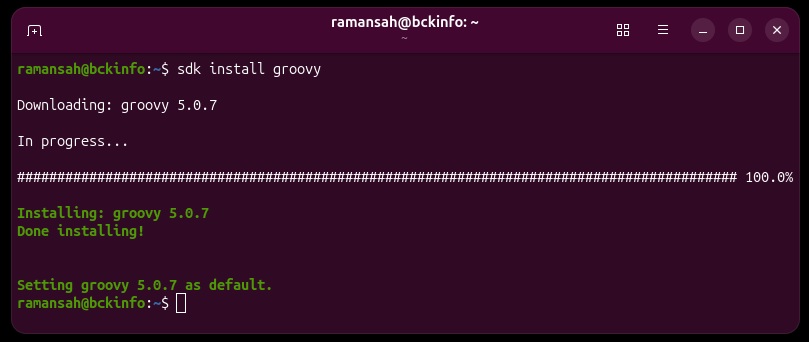
SDKMAN! automatically sets the newly installed version as default and updates your PATH and GROOVY_HOME for you — no manual environment variable editing required.
Method 2: Manual Installation from Binary Archive
For servers without internet access to SDKMAN!’s CDN, Docker base images, or environments where you need a pinned, auditable binary, install Groovy manually from the official distribution archive.
Step 1 — Download the binary distribution
cd /tmp
curl -LO https://groovy.apache.org/download.html
In practice, fetch the direct binary ZIP link from the official Apache Groovy download page (mirror URLs rotate), for example:
curl -LO https://dist.apache.org/repos/dist/release/groovy/5.0.7/distribution/apache-groovy-binary-5.0.7.zipStep 2 — Verify the download (recommended)
Always verify release artifacts against the published SHA-512 checksum before extracting:
curl -LO https://dist.apache.org/repos/dist/release/groovy/5.0.7/distribution/apache-groovy-binary-5.0.7.zip.sha512
sha512sum -c apache-groovy-binary-5.0.7.zip.sha512
Step 3 — Extract and install to /opt
sudo mkdir -p /opt/groovy
sudo unzip apache-groovy-binary-5.0.7.zip -d /opt/groovy
sudo mv /opt/groovy/groovy-5.0.7 /opt/groovy/5.0.7
Step 4 — Set environment variables
Create a dedicated profile script so the settings apply system-wide:
sudo nano /etc/profile.d/groovy.shAdd the following:
export GROOVY_HOME=/opt/groovy/5.0.7
export PATH=$GROOVY_HOME/bin:$PATH
Apply the changes:
sudo chmod +x /etc/profile.d/groovy.sh
source /etc/profile.d/groovy.sh
Step 5 — (Optional) Symlink for version switching
If you plan to keep multiple manual installs side by side, point /opt/groovy/current at the active version and reference that in GROOVY_HOME instead of a hard-coded version number:
sudo ln -sfn /opt/groovy/5.0.7 /opt/groovy/currentThen update /etc/profile.d/groovy.sh to use GROOVY_HOME=/opt/groovy/current.
Method 3: Installing via APT (System Package)
Ubuntu’s universe repository ships a groovy package, but it’s typically several minor versions behind the upstream Apache release and is best reserved for quick, non-critical scripting needs:
sudo apt update
sudo apt install -y groovy
Check the installed version:
apt-cache policy groovyIf you need the current stable release (5.0.x) rather than whatever Ubuntu’s repositories carry, use Method 1 or Method 2 instead.
Verifying the Installation
Regardless of which method you used, confirm Groovy is correctly installed and on your PATH:
groovy -versionExpected output (version number will match what you installed):
Groovy Version: 5.0.7 JVM: 21.0.x Vendor: Eclipse Adoptium OS: LinuxAlso confirm GROOVY_HOME resolves correctly:
echo $GROOVY_HOME
which groovy
Writing and Running Your First Groovy Script
Create a simple script to confirm everything works end-to-end:
nano hello.groovydef name = "bckinfo.com"
println "Hello from Apache Groovy running on Ubuntu 26.04 LTS, ${name}!"
def numbers = [1, 2, 3, 4, 5]
println "Sum: ${numbers.sum()}"
println "Squares: ${numbers.collect { it * it }}"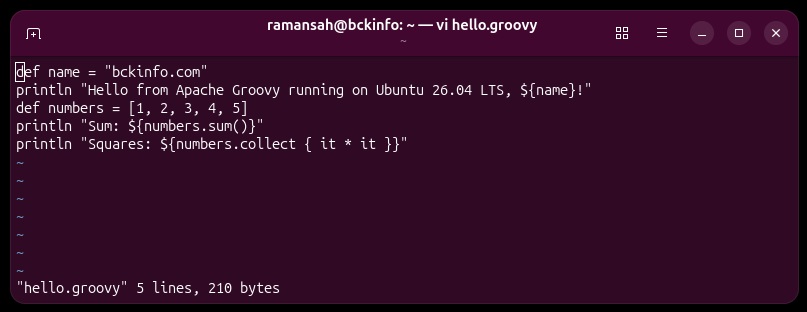
Run it directly with the groovy command — no separate compile step needed:
groovy hello.groovy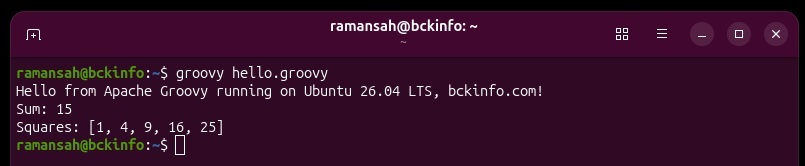
You can also drop into the interactive shell for quick experiments:
groovyshOr launch the graphical Groovy Console:
groovyConsoleIntegrating Groovy with Gradle and IDEs
Since Gradle build scripts are commonly written in Groovy DSL, having a matching local Groovy install is useful for testing snippets outside a full Gradle build. If you’re setting up a Gradle project, install Gradle alongside Groovy via SDKMAN!:
sdk install gradleFor IDE integration:
- IntelliJ IDEA: The Groovy plugin is bundled with IntelliJ IDEA Ultimate and available as a plugin for the Community edition. Point the project SDK at the same
GROOVY_HOMEyou configured above. - VS Code: Install the “Groovy” language extension (Codehaus-based syntax highlighting) or use the “Language Support for Java” extensions if working within Gradle projects.
- Eclipse: Use the Groovy-Eclipse plugin from the update site listed on the Groovy-Eclipse GitHub wiki.
Managing Multiple Groovy Versions
One advantage of SDKMAN! is trivial version switching, useful when maintaining legacy Jenkins pipelines built against Groovy 4.x alongside new projects on Groovy 5.x:
sdk install groovy 4.0.28
sdk install groovy 5.0.7
sdk use groovy 4.0.28      # switch for the current shell session
sdk default groovy 5.0.7   # set the system-wide default
You can also pin a version per project by creating a .sdkmanrc file in the project root:
sdk env initThis generates a .sdkmanrc file that sdk env will read automatically when you cd into the directory (with sdkman_auto_env=true set in ~/.sdkman/etc/config).
Troubleshooting
| Symptom | Likely Cause | Fix |
|---|---|---|
groovy: command not found | PATH not updated, or shell not reloaded | Run source ~/.sdkman/bin/sdkman-init.sh (SDKMAN!) or source /etc/profile.d/groovy.sh (manual install). |
Error: JAVA_HOME is not defined correctly | No JDK installed, or JAVA_HOME points to a missing path | Run sudo apt install openjdk-21-jdk and then export JAVA_HOME=$(dirname $(dirname $(readlink -f $(which java)))). |
Unsupported class file major version | Groovy version too old for the installed JDK, or vice versa | Use Groovy 5.0.x with JDK 11–21. Avoid mixing JDK 25+ with older Groovy releases until compatibility is confirmed. |
sdk: command not found after install | New shell session started before sourcing the SDKMAN! init script | Add source "$HOME/.sdkman/bin/sdkman-init.sh" to your ~/.bashrc or ~/.zshrc. |
groovysh hangs or is extremely slow to start | Insufficient heap on a low-memory VM or container | Set JAVA_OPTS="-Xmx512m" before launching, or increase the VM/container memory allocation. |
| Checksum mismatch on manual download | Corrupted download or wrong mirror | Re-download the archive directly from dist.apache.org instead of using a third-party mirror. |
apt install groovy installs an old version | Ubuntu Universe repository lags behind upstream releases | Use SDKMAN! or the manual binary installation method to install the latest Groovy release. |
Uninstalling Groovy
If installed via SDKMAN!:
sdk uninstall groovy 5.0.7To remove SDKMAN! entirely:
rm -rf "$HOME/.sdkman"Then remove the SDKMAN! init line from ~/.bashrc or ~/.zshrc.
If installed manually:
sudo rm -rf /opt/groovy
sudo rm /etc/profile.d/groovy.sh
If installed via APT:
sudo apt remove --purge -y groovy
sudo apt autoremove -y
FAQ
Does Ubuntu 26.04 LTS include Groovy by default?
No. Groovy is not part of the base Ubuntu install; it must be added via SDKMAN!, a manual binary install, or the groovy APT package.
Which JDK version should I use with Groovy 5.0.x?
JDK 11 is the minimum; JDK 17 or JDK 21 (both LTS releases) are recommended for current production use.
Can I run Groovy scripts without compiling them first?
Yes. The groovy command interprets and runs .groovy scripts directly. Use groovyc only when you need standalone .class files.
Is Groovy still relevant if I mainly write Kotlin or Java?
Groovy remains the default DSL for Gradle build scripts and Jenkins pipeline syntax, so having it available is useful even if it isn’t your primary application language.
How do I keep Groovy updated?
With SDKMAN!, run sdk upgrade groovy periodically, or check sdk list groovy for newer releases and install them alongside your current version.
Related posts:
 How To Install Apache Spark On Ubuntu 20.04
 How To Install Apache Web Server on Ubuntu 18.04 LTS
 How To Uninstall Apache Web Server from Ubuntu 22.04 (A Step-by-Step Guide)
 How to Install and Configure Apache2 on Ubuntu 24.04: A Comprehensive Guide
 How to Install Apache Doris on Ubuntu 24.04 LTS: Step-by-Step Guide
 How To Install Apache Solr 8.9 On Ubuntu 20.04 LTS Step by Step
 How to Install AtomicParsley on Ubuntu 24.04 (Step-by-Step Guide)
 How to Install Apache HertzBeat on Ubuntu 26.04 LTS
