Apache Parquet Explained: Columnar Storage Format for Modern Data Analytics

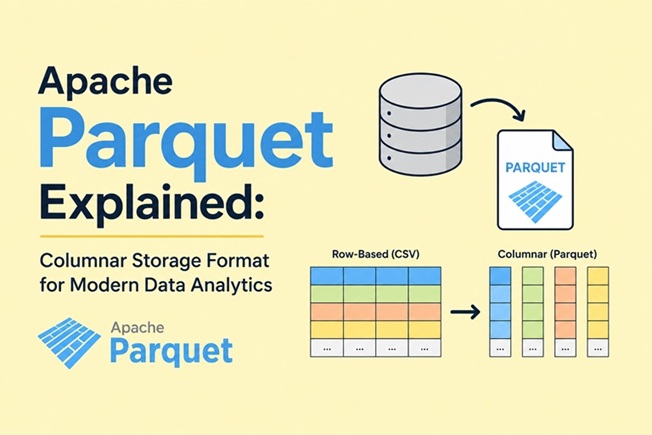
Table of Contents
- What is Apache Parquet
- Row-Based vs Columnar Storage: The Core Difference
- How Parquet Works Internally
- Compression and Encoding in Parquet
- Parquet vs CSV vs JSON vs Avro vs ORC
- Working with Parquet in Python
- Working with Parquet in Apache Spark
- Parquet in the Modern Data Stack
- Parquet vs Delta Lake vs Apache Iceberg
- What’s New in Apache Parquet in 2026
- Best Practices for Production
- When NOT to Use Parquet
- Frequently Asked Questions
Every modern data stack eventually encounters the same problem: CSV files are easy to understand but painfully slow to query at scale. A billion-row CSV file that just needs a count of unique users in one column forces you to read every single byte of every single row — even columns you don’t care about. Apache Parquet takes a fundamentally different approach: it stores data column by column rather than row by row, which means analytics engines can scan only the data they actually need.
Apache Parquet is thirteen years old, holds more of the world’s analytical data than any other format, and for most of its life has been the least dramatic project in the data stack. That era is over — 2026 is the busiest, most consequential stretch of Parquet development in a decade. This guide covers everything from how Parquet actually works to the major changes shipping this year.
What is Apache Parquet
Apache Parquet is an open source, column-oriented data file format designed for efficient data storage and retrieval. It provides high performance compression and encoding schemes to handle complex data in bulk and is supported in many programming languages and analytics tools.
Originally created as a joint project between Twitter and Cloudera in 2013, inspired by Google’s Dremel paper on nested data processing, Parquet has since become the de facto standard storage format for analytical workloads across the data engineering ecosystem. Since April 2015, Apache Parquet has been a top-level Apache Software Foundation (ASF)-sponsored project.
Key characteristics at a glance:
- Columnar — data organized by column, not by row
- Self-describing — schema metadata embedded in every file
- Language-agnostic — native support in Python, Java, C++, Go, Rust, and more
- Open source — Apache 2.0 license, no vendor lock-in
- Compressed — multiple codecs supported per column
Row-Based vs Columnar Storage: The Core Difference
This is the most important concept to understand before everything else makes sense.
Row-based storage (CSV, JSON, Avro):
Imagine a simple sales table:
OrderID | CustomerID | Product  | Amount | Date
--------|------------|----------|--------|----------
1001    | C001       | Laptop   | 1200   | 2026-01-01
1002    | C002       | Phone    | 800    | 2026-01-02
1003    | C001       | Tablet   | 450    | 2026-01-03
In a row-based format, the data is stored on disk like this:
1001, C001, Laptop, 1200, 2026-01-01 | 1002, C002, Phone, 800, 2026-01-02 | ...To calculate total sales (SUM(Amount)), the query engine has to read every byte of every row — including OrderID, CustomerID, Product, and Date that it doesn’t need.
Columnar storage (Parquet):
The same data stored in Parquet looks like this on disk:
[OrderIDs]    : 1001, 1002, 1003, ...
[CustomerIDs] : C001, C002, C001, ...
[Products]    : Laptop, Phone, Tablet, ...
[Amounts]     : 1200, 800, 450, ...
[Dates]       : 2026-01-01, 2026-01-02, 2026-01-03, ...
Now SUM(Amount) only reads the [Amounts] column — skipping the other four entirely. For instance, analyzing a single column in a petabyte-scale dataset might require reading the entire CSV file, while Parquet would access only the relevant column chunks.
The performance difference compounds with scale: at a billion rows, this is the difference between a query taking 45 minutes (CSV) and 8 seconds (Parquet).
How Parquet Works Internally
A Parquet file has a three-level structure:
Parquet File
├── File Metadata (schema, row group info)
├── Row Group 1
│   ├── Column Chunk: OrderID
│   │   └── Pages (data pages, dictionary pages)
│   ├── Column Chunk: CustomerID
│   │   └── Pages
│   └── Column Chunk: Amount
│       └── Pages
├── Row Group 2
│   └── ...
└── Footer (metadata, column statistics)
Row Groups are horizontal partitions of the dataset — each row group contains a batch of rows (typically 128MB–1GB) for all columns. This batching enables parallel processing: different workers can process different row groups simultaneously.
Column Chunks are the actual columnar data within each row group — one chunk per column, per row group.
Pages are the smallest unit of data within a column chunk — typically 1MB. Compression and encoding are applied at the page level.
The Footer is critical: it contains statistics for every column in every row group (min value, max value, null count). Query engines use these statistics for predicate pushdown — if a query filters WHERE Amount > 1000, the engine checks the footer first and skips any row group where max(Amount) < 1000 entirely, without reading a single byte of that row group’s data.
Compression and Encoding in Parquet
In Parquet, compression is performed column by column, which enables different encoding schemes to be used for text and integer data. This per-column compression is one of Parquet’s biggest advantages — string columns and numeric columns have completely different data patterns, and compressing them separately yields much better ratios than compressing a mixed row.
Compression codecs supported:
| Codec | Compression ratio | Speed | Best for |
|---|---|---|---|
| Snappy | Moderate | Very fast | Default — balanced read performance |
| Gzip | High | Slower | Cold storage, minimize bytes |
| Zstd | High | Fast | Recommended for new workloads (2026) |
| LZ4 | Low-moderate | Fastest | Ultra-low latency scenarios |
| Brotli | Very high | Slowest | Maximum compression, rarely used |
| Uncompressed | None | Fastest reads | Already-compressed data (images, video) |
Recommendation for 2026: Zstd has largely superseded Gzip for new Parquet workloads — it achieves similar compression ratios at significantly faster decompression speeds. Snappy remains the practical default for most use cases where read speed matters more than compression ratio.
Encoding techniques:
Beyond compression, Parquet applies encoding to further reduce data size:
- Dictionary encoding — automatically applied when a column has fewer than 10⁵ unique values. Instead of storing
"United States"thousands of times, it stores an integer index into a dictionary. A column with 200 million rows but only 50 unique country names gets compressed to near-nothing. - Run-length encoding (RLE) — stores consecutive identical values as a single value + count. Ideal for sorted or clustered data.
- Bit packing — stores small integers in fewer bits than their type would require. A column of values 0-7 doesn’t need 32 bits per value; it needs 3.
Parquet implements a hybrid of bit packing and RLE, in which the encoding switches based on which produces the best compression results.
Parquet vs CSV vs JSON vs Avro vs ORC
In short, Parquet is better for reading and analyzing large datasets, while Avro is ideal for writing and storing data in an easy-to-update way.
| Format | Storage type | Read performance | Write performance | Schema | Best for |
|---|---|---|---|---|---|
| CSV | Row-based | Slow at scale | Fast | None (implicit) | Small files, Excel/human-readable |
| JSON | Row-based | Slow at scale | Fast | None (implicit) | APIs, document storage |
| Avro | Row-based | Moderate | Fast | Embedded | Streaming (Kafka), write-heavy |
| ORC | Columnar | Fast | Fast | Embedded | Hive ecosystem |
| Parquet | Columnar | Very fast | Moderate | Embedded | Analytics, data lakes, ML |
ORC is highly compatible with the Hive ecosystem, providing benefits like ACID transaction support when working with Apache Hive. However, Parquet offers broader accessibility, supporting multiple programming languages like Java, C++, and Python, making it usable in almost any big data setting.
The practical decision:
- Use CSV/JSON when humans or simple tools need to read the file directly
- Use Avro when you’re writing streaming events to Kafka and need fast per-record writes
- Use ORC when your stack is heavily Hive-based and you need ACID transactions at the format level
- Use Parquet for everything else — analytics queries, data lake storage, ML training datasets, ETL intermediate formats
Working with Parquet in Python
With pandas and PyArrow
import pandas as pd
import pyarrow as pa
import pyarrow.parquet as pq

# Create a sample DataFrame
df = pd.DataFrame({
    'order_id': range(1000000),
    'customer_id': ['C' + str(i % 1000).zfill(4) for i in range(1000000)],
    'product': ['Laptop', 'Phone', 'Tablet', 'Monitor', 'Keyboard'] * 200000,
    'amount': [1200, 800, 450, 350, 120] * 200000,
    'date': pd.date_range('2026-01-01', periods=1000000, freq='min')
})

# Write to Parquet with Zstd compression
df.to_parquet(
    'sales.parquet',
    engine='pyarrow',
    compression='zstd',
    index=False
)

# Read back — full file
df_read = pd.read_parquet('sales.parquet', engine='pyarrow')

# Read only specific columns (column pruning — reads only 2 of 5 columns from disk)
df_amounts = pd.read_parquet(
    'sales.parquet',
    columns=['customer_id', 'amount'],
    engine='pyarrow'
)

# Read with filter (predicate pushdown — skips row groups that don't match)
df_filtered = pd.read_parquet(
    'sales.parquet',
    filters=[('amount', '>', 500)],
    engine='pyarrow'
)

# Check Parquet file metadata
parquet_file = pq.read_metadata('sales.parquet')
print(f"Row groups: {parquet_file.num_row_groups}")
print(f"Total rows: {parquet_file.num_rows}")
print(f"Schema: {parquet_file.schema}")
With DuckDB (fastest option for local analytics)
DuckDB can query Parquet files directly with SQL — no loading into memory required:
import duckdb

# Query Parquet directly with SQL
result = duckdb.sql("""
    SELECT
        product,
        COUNT(*) as order_count,
        SUM(amount) as total_revenue,
        AVG(amount) as avg_order_value
    FROM read_parquet('sales.parquet')
    WHERE amount > 500
    GROUP BY product
    ORDER BY total_revenue DESC
""").df()

print(result)

# Query multiple Parquet files with wildcards
result = duckdb.sql("""
    SELECT * FROM read_parquet('data/sales_*.parquet')
    WHERE date >= '2026-01-01'
    LIMIT 100
""").df()
DuckDB is particularly compelling for local analytics: it pushes predicates directly into Parquet’s file format, reads only the columns it needs, and typically outperforms pandas for analytical queries on files larger than available RAM.
Write partitioned Parquet (for data lake patterns)
import pyarrow.parquet as pq
import pyarrow as pa

table = pa.Table.from_pandas(df)

# Write partitioned by year and product
pq.write_to_dataset(
    table,
    root_path='sales_lake/',
    partition_cols=['product'],
    compression='zstd'
)
# Result:
# sales_lake/product=Laptop/part-0.parquet
# sales_lake/product=Phone/part-0.parquet
# sales_lake/product=Tablet/part-0.parquet
Partitioned datasets allow query engines to skip entire directories when the partition key doesn’t match the filter — a WHERE product = 'Laptop' query only reads the product=Laptop/ directory.
Working with Parquet in Apache Spark
Spark reads and writes Parquet natively with no additional libraries:
from pyspark.sql import SparkSession
from pyspark.sql.functions import col, sum, avg, count

spark = SparkSession.builder \
    .appName("ParquetDemo") \
    .config("spark.sql.parquet.compression.codec", "zstd") \
    .getOrCreate()

# Read Parquet (Spark automatically uses predicate pushdown and column pruning)
df = spark.read.parquet("s3://your-bucket/sales/")

# Spark pushes this filter into the Parquet reader — reads minimum data from S3
df_filtered = df.filter(
    (col("amount") > 500) & (col("date") >= "2026-01-01")
).select("customer_id", "product", "amount")

# Aggregate
result = df_filtered.groupBy("product").agg(
    count("*").alias("order_count"),
    sum("amount").alias("total_revenue"),
    avg("amount").alias("avg_order_value")
).orderBy(col("total_revenue").desc())

result.show()

# Write back to Parquet — partitioned by date for efficient time-range queries
df.write \
  .mode("overwrite") \
  .partitionBy("date") \
  .parquet("s3://your-bucket/sales_partitioned/")
For analytics pipelines that feed into visualization tools like Apache Superset, a common pattern is: raw data arrives as events (from Apache Kafka), gets written to Parquet in a data lake, and Superset queries the Parquet files via Athena, Trino, or DuckDB. See our Apache Superset with Docker Compose guide for the visualization layer.
Parquet in the Modern Data Stack
Apache Parquet has become the de-facto standard for storing data used in analytics workloads, and has seen very broad adoption as a free and open-source storage format.
Where Parquet fits in a modern data stack:
Data Sources (databases, APIs, IoT, logs)
        │
        │ ingestion (Kafka, Flink, Spark Streaming)
        ▼
Raw Zone (data lake — S3, ADLS, GCS)
  └── Parquet files (partitioned by date/entity)
        │
        │ transformation (dbt, Spark, DuckDB)
        ▼
Curated Zone (data warehouse/lakehouse)
  └── Parquet + table format (Iceberg, Delta Lake)
        │
        │ query (Athena, BigQuery, Trino, Spark SQL)
        ▼
Analytics & Dashboards (Apache Superset, Grafana, Tableau)
Cloud storage systems such as Amazon S3, Azure Data Lake Storage, and Google Cloud Storage commonly store data in Parquet format due to its efficient columnar representation and retrieval capabilities.
Major query engines with native Parquet support:
- Apache Spark, Apache Hive, Apache Flink
- Amazon Athena, Redshift Spectrum
- Google BigQuery
- Snowflake, Databricks
- Trino, Presto, DuckDB
Parquet vs Delta Lake vs Apache Iceberg
A common point of confusion: Parquet is a file format, while Delta Lake and Apache Iceberg are table formats that use Parquet as their underlying storage layer.
| Apache Parquet | Delta Lake | Apache Iceberg | |
|---|---|---|---|
| Type | File format | Table format (built on Parquet) | Table format (built on Parquet) |
| ACID transactions | ❌ No | ✅ Yes | ✅ Yes |
| Time travel | ❌ No | ✅ Yes | ✅ Yes |
| Schema evolution | Limited | Full | Full |
| Row-level deletes/updates | ❌ No | ✅ Yes (copy-on-write) | ✅ Yes |
| Ecosystem | Universal | Databricks-native, open | Cloud-neutral, Apache TLP |
| Streaming + batch unified | ❌ No | ✅ Yes | ✅ Yes |
The simple way to think about it: Delta Lake and Iceberg are Parquet plus a metadata management layer that adds database-like capabilities (transactions, versioning, updates) to files sitting in cloud object storage. You can’t choose “Iceberg instead of Parquet” — you choose Iceberg, which stores its data in Parquet files.
What’s New in Apache Parquet in 2026
The past year alone brought a native variant type for semi-structured data, first-class geospatial types, a new format release, an active redesign effort for the file footer, proposed types for embeddings and unstructured blobs, a new floating-point encoding, and the single longest discussion thread on the mailing list: eighty-plus messages debating the future of Parquet versioning itself.
The major additions in 2026:
1. Native Variant type (February 2026)
Parquet now has first-class support for semi-structured data — the binary encoding replaces JSON text with a compact, offset-navigable representation. Frequently occurring fields can be “shredded” into real Parquet columns with real statistics, while the rest stays as semi-structured payload. This means you can store JSON-like data in Parquet without the performance penalty of storing it as raw text strings.
2. Geospatial types
Native geometry types (points, linestrings, polygons) are now part of the Parquet spec — no more encoding geographic data as WKB binary blobs or WKT strings. This makes Parquet a proper storage format for geospatial analytics alongside tools like Apache Sedona.
3. New floating-point encoding
A new encoding specifically optimized for floating-point columns (common in ML features and sensor data) achieves better compression ratios than the previous approaches, particularly for columns that come from ML model outputs.
Parquet’s type system is being extended along exactly the axes AI workloads demand: semi-structured context, dense vectors, efficient floats, and raw payloads. The 2026 format is learning that data is whatever a model touches.
Best Practices for Production
File size: Aim for 100MB–1GB per Parquet file to balance read performance and metadata overhead. Files that are too small create metadata overhead; files that are too large reduce parallelism.
Partitioning strategy:
# Good: partition by high-cardinality time dimensions
pq.write_to_dataset(table, partition_cols=['year', 'month'])

# Bad: partition by extremely high-cardinality column (creates millions of files)
# pq.write_to_dataset(table, partition_cols=['customer_id'])  # Don't do this
Compression choice:
- Default: Snappy (balanced)
- Cold storage / minimize cost: Zstd level 3+
- Ultra-fast reads: LZ4 or Uncompressed
Row group size: Keep row groups at 128MB–512MB. Smaller row groups reduce the benefit of predicate pushdown; larger row groups reduce parallelism.
Column order: Put the most frequently filtered columns first in the schema — some engines use column order as a hint for statistics collection and data layout.
Sort before writing: If your queries frequently filter on a specific column (like date or region), sort the DataFrame by that column before writing to Parquet. This maximizes the effectiveness of predicate pushdown — sorted data means each row group covers a tight range of values, and the min/max statistics in the footer become much more selective.
# Sort by date before writing — maximizes predicate pushdown effectiveness
df_sorted = df.sort_values('date')
df_sorted.to_parquet('sales.parquet', compression='zstd', index=False)
When NOT to Use Parquet
Parquet is excellent for analytics but the wrong tool for some use cases:
- Frequent row-level updates: Parquet is immutable — updating a single row means rewriting the entire file or row group. For OLTP workloads with frequent updates, use a relational database.
- Streaming writes (individual records): Writing one record at a time to Parquet is inefficient — the format is designed for batch writes. Use Avro for individual event streaming (e.g., Kafka messages), then convert to Parquet periodically for analytics.
- Human-readable data exchange: Parquet is binary and not human-readable. For data exchange with external teams, partners, or tools that don’t support Parquet, CSV or JSON may be more practical despite the performance cost.
- Very small datasets: The overhead of Parquet’s structure (file footer, row group metadata) isn’t worth it for files under ~10MB. CSV is simpler and plenty fast at that scale.
Frequently Asked Questions
What is a Parquet file?
A Parquet file is a binary data file that stores tabular data in columnar format. Unlike CSV files where each row is stored together, Parquet stores all values for each column together, which makes analytical queries significantly faster because they only need to read the relevant columns.
Is Parquet better than CSV?
For analytics workloads, yes — significantly. Parquet queries typically run 10x–100x faster than equivalent CSV queries on large datasets, and Parquet files are usually 3x–10x smaller due to compression. However, CSV is simpler for small files or data that needs to be human-readable.
What tools can read Parquet files?
Almost every major data tool supports Parquet: Python (pandas, PyArrow, DuckDB), Apache Spark, Apache Hive, Presto, Trino, Amazon Athena, Google BigQuery, Snowflake, Databricks, and more. It’s one of the most widely supported formats in the data engineering ecosystem.
Can you open a Parquet file in Excel?
Not natively. Parquet is a binary format. To view Parquet data in Excel, you can convert it to CSV first (df.to_csv('output.csv') in pandas), or use a Parquet viewer like the DuckDB CLI or a VS Code extension.
What is the difference between Parquet and ORC?
Both are columnar formats designed for analytics. ORC is closely tied to the Apache Hive ecosystem and is the default format in many Hive deployments. Parquet has broader ecosystem support — it works across Spark, Hive, Presto, BigQuery, Snowflake, and Python tools. For new projects outside of pure Hive environments, Parquet is generally the better choice.
What compression should I use with Parquet?
Snappy is the most common default — it’s fast to decompress and gives decent compression ratios. For new workloads in 2026, Zstd is increasingly recommended as it achieves better compression ratios than Snappy at similar or better decompression speeds. Use Gzip only when minimizing storage size is the primary concern and read latency matters less.
Related posts:
 Introduction to Apache Parquet: The Efficient Columnar Storage Format for Big Data
How to Install Apache Parquet on Docker: A Complete Step-by-Step Guide
Introduction to Apache Parquet: The Efficient Columnar Storage Format for Big Data
How to Install Apache Parquet on Docker: A Complete Step-by-Step Guide
 How To Install Apache Airflow 2.1 On Ubuntu 20.04 LTS Step by Step Guide
 How To Install Apache Web Server On Fedora 38
 Apache Subversion (SVN): A Comprehensive Guide
 Apache Iceberg: The Next-Generation Table Format for Big Data Analytics
 How to Install Apache Kafka on Docker (Step-by-Step Guide)
 How to Install Apache Maven on Ubuntu 26.04 LTS (Step-by-Step Guide)
