Docker in Docker Security: Risks, Alternatives, and Safe Implementation Guide 2026

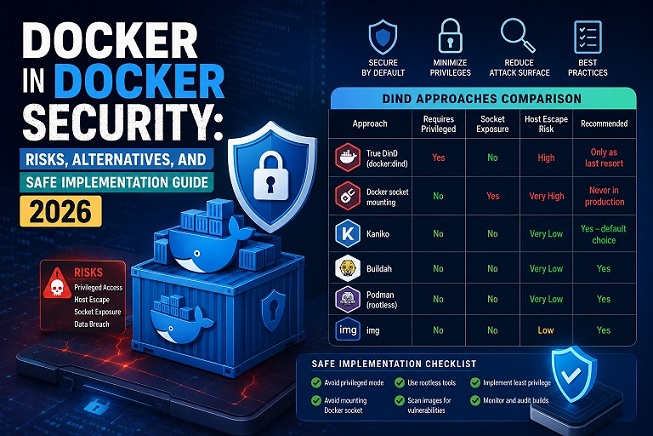
Docker in Docker — commonly abbreviated as DinD — is one of those patterns that seems perfectly logical on the surface. You need to build Docker images inside a CI/CD pipeline that itself runs in a container, so why not just run Docker inside Docker? If you’re new to container security fundamentals, start with our Docker Security Best Practices for Production guide before implementing DinD safely.
The answer is: you can. But the security implications are severe, frequently misunderstood, and in most cases entirely avoidable. This guide breaks down exactly what Docker in Docker is, why it is dangerous, what the safer alternatives are, and how to implement DinD securely when you have no other choice.
What Is Docker in Docker (DinD)?
Docker in Docker refers to running a Docker daemon inside a Docker container. This is primarily used in CI/CD pipelines where:
- The CI runner itself is containerized (GitLab CI, Jenkins on Kubernetes, GitHub Actions self-hosted)
- Pipeline jobs need to build, tag, and push Docker images
- Integration tests require spinning up Docker containers as part of the test suite
There are two common approaches to achieving this:
Approach 1 — True DinD: Run a full Docker daemon inside the container using the docker:dind image. The inner daemon is completely separate from the outer host daemon.
Approach 2 — Docker socket mounting: Mount the host’s Docker socket (/var/run/docker.sock) into the CI container, giving it access to the host daemon directly.
Both approaches carry serious security risks. Understanding those risks is the prerequisite for making safe decisions.
Why Docker in Docker Is a Security Problem
The Privileged Container Problem
True DinD requires running the container in --privileged mode. This is not optional — the inner Docker daemon needs access to kernel features (namespaces, cgroups, device access) that are blocked by default.
# This is what DinD requires — and why it is dangerous
docker run --privileged docker:dind
A privileged container has nearly all Linux capabilities enabled. It can:
- Mount the host filesystem
- Load and unload kernel modules
- Access all host devices including
/dev/memand/dev/sda - Modify network interfaces and firewall rules
- Escape container isolation entirely with the right sequence of commands
In short, --privileged effectively removes most of the security boundary that makes containers useful in the first place. Any process that escapes the inner container can potentially take over the host.
The Docker Socket Problem
Mounting /var/run/docker.sock into a container is often described as a “safer” alternative to full DinD, but it is arguably more dangerous in a different way.
# This gives the container root-equivalent access to the host
volumes:
  - /var/run/docker.sock:/var/run/docker.sock
A container with access to the Docker socket can:
- Spawn new privileged containers
- Mount the host root filesystem into a new container
- Read environment variables from all other running containers
- Stop, remove, or modify any container on the host
- Extract secrets from running services
This is a complete host takeover waiting to happen. The Docker socket is the master key to the entire host — treat it accordingly.
Nested Cgroup and Filesystem Conflicts
Beyond the privilege issues, DinD creates technical conflicts at the storage layer. The inner Docker daemon needs its own storage driver, which must operate on top of the outer container’s filesystem. This leads to:
- Storage driver conflicts: The outer container may use
overlay2, but running a secondoverlay2instance inside it requires the host kernel to support nested overlays, which not all kernels handle cleanly - cgroup namespace conflicts: Managing cgroups for containers within containers requires careful version alignment between the kernel, runc, and containerd
- Volume mount propagation issues: Data written inside inner containers may not propagate correctly to the outer layer or to persistent storage
Secure Alternatives to Docker in Docker
Before accepting the security trade-offs of DinD, evaluate these purpose-built alternatives that achieve the same CI/CD goals without privileged containers or socket exposure.
Alternative 1: Kaniko — Rootless Image Building
Kaniko is an open source tool from Google that builds Docker images from a Dockerfile entirely in userspace, without requiring a Docker daemon or privileged access.
# GitLab CI example using Kaniko
build-image:
  image:
    name: gcr.io/kaniko-project/executor:v1.21.0-debug
    entrypoint: [""]
  script:
    - /kaniko/executor
      --context $CI_PROJECT_DIR
      --dockerfile $CI_PROJECT_DIR/Dockerfile
      --destination $CI_REGISTRY_IMAGE:$CI_COMMIT_SHORT_SHA
  only:
    - main
Security advantages of Kaniko:
- No Docker daemon required — no privileged mode
- No socket mounting
- Runs as a non-root user by default
- Each build is fully isolated in its own container
- Supports all major registries (Docker Hub, ECR, GCR, ACR)
Kaniko is the recommended default for most Kubernetes-based CI/CD pipelines.
Alternative 2: Buildah — OCI-Compliant Rootless Builds
Buildah is a tool for building OCI and Docker images without a daemon. Unlike Kaniko, Buildah supports rootless builds natively and can be run without any elevated privileges on the host.
# Build an image with Buildah — no daemon, no root
buildah bud -t myapp:latest .

# Push to a registry
buildah push myapp:latest docker://registry.example.com/myapp:latest

# Run as a completely unprivileged user
buildah from --pull ubuntu:22.04
# GitLab CI example with Buildah
build:
image: quay.io/buildah/stable:latest
variables:
STORAGE_DRIVER: vfs
BUILDAH_FORMAT: docker
script:
- buildah login -u $CI_REGISTRY_USER -p $CI_REGISTRY_PASSWORD $CI_REGISTRY
- buildah bud -t $CI_REGISTRY_IMAGE:$CI_COMMIT_SHORT_SHA .
- buildah push $CI_REGISTRY_IMAGE:$CI_COMMIT_SHORT_SHAAlternative 3: img — Unprivileged Image Building
img is another daemon-free image builder that uses rootless containers and user namespaces. It is particularly well-suited for environments where neither Kaniko nor Buildah is available.
# Build without root or daemon
img build -t myapp:latest .

# Push to registry
img push myapp:latest
Alternative 4: Podman — Drop-in Docker Replacement
Podman is a daemonless container engine that is fully compatible with Docker commands. Unlike Docker, Podman does not require a central daemon running as root, making it inherently more secure for CI/CD workloads.
# Podman commands are identical to Docker
podman build -t myapp:latest .
podman run -d -p 8080:80 myapp:latest
podman push myapp:latest registry.example.com/myapp:latest
# GitHub Actions using Podman
- name: Build with Podman
run: |
podman build -t $IMAGE_NAME:$GITHUB_SHA .
podman push $IMAGE_NAME:$GITHUB_SHAPodman supports rootless mode by default, uses the same image format as Docker, and works with existing Dockerfiles and Compose files without modification.
When You Must Use DinD: Implementing It Securely
There are legitimate scenarios where DinD is genuinely necessary — for example, testing Docker itself, or running legacy CI pipelines that cannot be refactored immediately. In these cases, apply every available mitigation to reduce the risk surface.
Step 1: Use the Official DinD Image with TLS Enabled
The official docker:dind image supports TLS between the outer container and the inner daemon. Always enable this rather than using unencrypted communication.
# docker-compose.yml for a secure DinD setup
version: "3.9"

services:
  docker-daemon:
    image: docker:24-dind
    privileged: true
    environment:
      DOCKER_TLS_CERTDIR: /certs
    volumes:
      - dind-certs-ca:/certs/ca
      - dind-certs-client:/certs/client
      - dind-storage:/var/lib/docker
    networks:
      - dind_net

  ci-runner:
    image: docker:24-cli
    environment:
      DOCKER_TLS_CERTDIR: /certs
      DOCKER_HOST: tcp://docker-daemon:2376
      DOCKER_TLS_VERIFY: 1
      DOCKER_CERT_PATH: /certs/client
    volumes:
      - dind-certs-client:/certs/client:ro
    networks:
      - dind_net
    depends_on:
      - docker-daemon

networks:
  dind_net:
    driver: bridge
    internal: true

volumes:
  dind-certs-ca:
  dind-certs-client:
  dind-storage:
Key points in this configuration:
- TLS is enforced between the CI runner and the Docker daemon via
DOCKER_TLS_CERTDIR - The DinD network is marked
internal: true— no direct internet access - Certificate volumes are mounted read-only on the client side
- Docker storage is isolated in a named volume, not the host filesystem
Step 2: Apply Seccomp Profile to the Privileged Container
Even though --privileged disables most security restrictions, you can still apply a custom seccomp profile to block the most dangerous syscalls.
# Apply a restrictive seccomp profile to the DinD container
docker run --privileged \
  --security-opt seccomp=/path/to/dind-seccomp.json \
  docker:24-dind
A good starting point for a DinD seccomp profile blocks syscalls that are almost never needed in a build context, such as ptrace, perf_event_open, and kexec_load.
Step 3: Isolate the DinD Environment on a Dedicated Host or Node
Never run DinD containers on the same host or Kubernetes node as your production workloads. Treat DinD nodes as a separate security zone:
- Dedicated build nodes with no access to production secrets
- Separate network segment with egress filtering
- No shared volumes or network access to production services
- Automated cleanup of all containers and images after each build job
# Kubernetes: taint nodes dedicated to DinD builds
kubectl taint nodes build-node-1 dedicated=dind:NoSchedule

# Only DinD pods with the matching toleration can schedule here
tolerations:
  - key: "dedicated"
    operator: "Equal"
    value: "dind"
    effect: "NoSchedule"
Step 4: Limit What the Inner Docker Daemon Can Do
Use Docker daemon configuration inside the DinD container to restrict what the inner daemon allows:
{
  "icc": false,
  "no-new-privileges": true,
  "log-driver": "json-file",
  "log-opts": {
    "max-size": "10m",
    "max-file": "3"
  },
  "storage-driver": "overlay2",
  "default-ulimits": {
    "nofile": {
      "Name": "nofile",
      "Hard": 1024,
      "Soft": 512
    }
  }
}
Mount this configuration into the DinD container:
services:
  docker-daemon:
    image: docker:24-dind
    privileged: true
    volumes:
      - ./daemon.json:/etc/docker/daemon.json:ro
      - dind-certs-ca:/certs/ca
      - dind-storage:/var/lib/docker
Step 5: Rotate Secrets and Credentials After Every Build
One of the most overlooked DinD security practices is credential hygiene. Build jobs frequently need access to registry credentials, cloud provider tokens, and deployment keys. These must be:
- Injected as short-lived tokens, not long-lived API keys
- Scoped to the minimum permissions needed for the build
- Rotated or revoked automatically after the build completes
- Never stored in the Docker image layer or build cache
# GitLab CI: use masked and protected variables
# Never echo secrets in build logs
- echo $CI_REGISTRY_PASSWORD | docker login -u $CI_REGISTRY_USER --password-stdin $CI_REGISTRY

# Always logout after the build
- docker logout $CI_REGISTRY
Step 6: Scan Images Built Inside DinD Before Pushing
Any image produced by a DinD build job should be scanned for vulnerabilities before it is pushed to a registry or deployed.
# Scan the built image with Trivy before pushing
- trivy image --exit-code 1 --severity CRITICAL $IMAGE_NAME:$TAG

# Only push if the scan passes
- docker push $IMAGE_NAME:$TAG
Integrate this as a mandatory pipeline gate — a failed scan should block the push automatically.
DinD vs Socket Mounting vs Alternatives — Comparison
| Approach | Requires Privileged Mode | Docker Socket Exposure | Host Escape Risk | Recommendation |
|---|---|---|---|---|
True DinD (docker:dind) | Yes | No | High | Use only when no safer alternative exists. |
| Docker Socket Mounting | No | Yes | Very High | Not recommended for production environments. |
| Kaniko | No | No | Very Low | Preferred default option for secure container image builds. |
| Buildah | No | No | Very Low | Recommended for rootless and daemonless image creation. |
| Podman (Rootless) | No | No | Very Low | Recommended for secure, daemonless container operations. |
| img | No | No | Low | A viable lightweight alternative for container image builds. |
The conclusion from this comparison is clear: Kaniko, Buildah, and Podman should be the first choice for any new CI/CD pipeline. DinD and socket mounting should be considered legacy patterns with known security trade-offs.
Monitoring and Detecting DinD Abuse
Even with all mitigations in place, runtime monitoring is essential. Use Falco to detect suspicious behavior inside DinD environments:
# Custom Falco rule for DinD abuse detection
- rule: Unexpected privileged container spawned
  desc: Detect a new privileged container being started
  condition: >
    container.privileged=true and
    not container.image.repository in (allowed_dind_images)
  output: >
    Privileged container started
    (user=%user.name image=%container.image.repository
    container=%container.name)
  priority: WARNING

- rule: Docker socket accessed from unexpected container
  desc: Detect access to the Docker socket from a non-CI container
  condition: >
    open_write and
    fd.name=/var/run/docker.sock and
    not container.image.repository in (allowed_ci_images)
  output: Docker socket accessed unexpectedly (container=%container.name)
  priority: CRITICAL
Docker in Docker Security Checklist
Apply this checklist to every DinD implementation:
[ ] Evaluated Kaniko, Buildah, or Podman as alternatives first
[ ] If using DinD: TLS enabled between client and daemon
[ ] If using DinD: network_mode is NOT host
[ ] If using DinD: isolated on dedicated build nodes only
[ ] Docker socket is NOT mounted into any non-DinD container
[ ] Inner daemon configured with icc:false and no-new-privileges
[ ] Seccomp profile applied even to privileged containers
[ ] Build credentials are short-lived and rotated after each job
[ ] All built images scanned with Trivy before pushing
[ ] DinD nodes have no access to production secrets or networks
[ ] Falco rules deployed to detect privileged container abuse
[ ] Post-build cleanup removes all containers, images, and volumes
Securing your CI/CD build pipeline is only one piece of a larger
puzzle. DinD runs inside a container — which means the security of that
container and the host it sits on are equally important. To build a
truly hardened Docker environment from the ground up, work through the
rest of the Docker Security series on bckinfo.com:
- Docker Compose Security: Complete Hardening Guide for 2026 — isolate networks, manage secrets, and harden your entire multi-container stack
- Secure Docker Host: Complete Hardening Guide for 2026 — lock down the machine running Docker before a single container is launched
- Docker Container Security Best Practices: A Comprehensive Guide — harden individual containers with non-root users, capability restrictions, and read-only filesystems
- Trivy Docker Security: How to Scan and Fix Container Vulnerabilities — scan every image your DinD pipeline produces before it reaches a registry
Each layer reinforces the others. A secure build pipeline that produces
vulnerable images is still a liability — and a well-hardened container
running on an exposed host is equally incomplete.
Conclusion
Docker in Docker is not inherently evil — it is a tool with a specific use case and significant security trade-offs. The problem is that it is far too often used as a quick solution when safer, purpose-built alternatives exist.
For any new CI/CD pipeline, start with Kaniko or Buildah. They achieve the same outcome — building and pushing Docker images — without privileged containers, without socket mounting, and without the host escape risks that DinD carries.
If you are maintaining a legacy DinD setup that cannot be replaced immediately, apply every mitigation in this guide: TLS enforcement, isolated build nodes, inner daemon hardening, credential rotation, image scanning, and Falco monitoring. DinD can be made substantially safer — it just requires deliberate effort.
The security of your build pipeline is part of your supply chain security. An attacker who compromises your CI environment does not need to attack production directly — they can simply inject malicious code into the images you build and push from it.
Have a specific DinD configuration or CI/CD platform you need help with? Leave a comment below.
Related posts:
 Trivy Docker Security: How to Scan and Fix Container Vulnerabilities
 Docker Compose Security: Complete Hardening Guide for 2026
 Secure Docker Host: Complete Hardening Guide for 2026
 Docker Network Security: A Complete Guide to Securing Container Communication in 2026
 How To Install Docker On CentOS 7
 Setting Up an Ubuntu Docker Container with SSH Access
 How To Install Docker CE On Ubuntu 24.04 LTS
How To Run Commands Inside Docker Containers: A Step-by-Step Guide
How To Install Docker CE On Ubuntu 24.04 LTS
How To Run Commands Inside Docker Containers: A Step-by-Step Guide
