Docker Network Security: A Complete Guide to Securing Container Communication in 2026

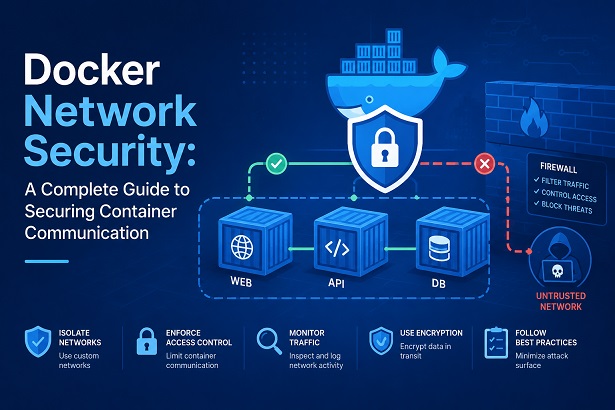
Every container you run talks to something — another container, the host, a database, or the internet. That communication happens over a Docker network, and by default, Docker’s networking model trusts almost everything inside the same network. One misconfigured bridge network or an overly permissive --publish flag can quietly turn your container fleet into an open hallway where any compromised service can reach every other service on the box.
This guide breaks down how Docker networking actually works under the hood, where the real risks live, and the concrete steps you can take today to lock it down — without breaking the connectivity your applications depend on. It builds directly on the host-hardening and Compose-hardening practices covered earlier in this series, so if you haven’t secured the host or your Compose stacks yet, it’s worth doing that first.
Table of Contents
- Why Docker Network Security Matters
- How Docker Networking Works: A Quick Refresher
- The Default Bridge Network Problem
- Network Segmentation: Isolating Services by Trust Level
- Securing Port Exposure and Publishing
- Encrypting Overlay Networks in Docker Swarm
- Firewall Rules and iptables Interaction
- Macvlan and IPvlan: When You Need Direct LAN Access
- DNS Security Inside Docker Networks
- Inter-Container Communication Controls
- Monitoring and Auditing Docker Network Traffic
- Common Misconfigurations to Avoid
- A Practical Hardening Checklist
- Frequently Asked Questions
- Conclusion
Why Docker Network Security Matters
Containers are processes, not virtual machines. They share the host kernel, and by default, they share network namespaces designed for convenience rather than isolation. That convenience is exactly what attackers exploit during lateral movement. Once an attacker compromises one container — through a vulnerable dependency, an exposed admin panel, or a leaked credential — the next step is almost always reconnaissance across the network the container sits on.
If every service in your stack sits on the same flat bridge network with no segmentation, that reconnaissance is trivial. The attacker can scan internal IPs, hit your database directly, or pivot into your orchestration tooling. Network security is the layer that decides whether a single compromised container is a contained incident or the start of a full breach.
This matters even more in 2026 as container density per host has grown and many teams run mixed workloads — public-facing APIs next to internal admin tools next to data stores — on the same Docker Engine or Swarm cluster.
How Docker Networking Works: A Quick Refresher
Docker ships with several network drivers, each with different security implications:
- bridge — the default driver. Containers on the same bridge network can reach each other by IP and, on user-defined bridges, by container name via embedded DNS.
- host — removes network isolation entirely; the container shares the host’s network stack directly. This is the least secure option and should be reserved for very specific performance-critical cases.
- overlay — used in Docker Swarm to connect containers across multiple hosts, using VXLAN encapsulation.
- macvlan / ipvlan — assigns containers a MAC or IP address directly on the physical network, bypassing the Docker bridge entirely.
- none — disables networking for the container completely, useful for batch jobs that need no network access at all.
Each container connects to a network through a virtual ethernet (veth) pair, and Docker manages routing between networks using Linux network namespaces, virtual bridges, and iptables rules it inserts automatically. Understanding that Docker manipulates iptables behind the scenes is critical — it’s the source of more than one network security surprise, which we’ll cover below.
The Default Bridge Network Problem
When you run a container without specifying a network, Docker attaches it to the default bridge network (usually named docker0 at the host level). This network has two notable weaknesses:
- No automatic DNS-based service discovery. Containers can only reach each other by IP address, which encourages hardcoded IPs and makes segmentation harder to reason about.
- All containers on it can communicate freely unless you explicitly restrict it, because
icc(inter-container communication) is enabled by default.
The fix is straightforward: stop using the default bridge network for anything beyond quick local testing. Create user-defined bridge networks for every application stack:
docker network create --driver bridge --subnet 172.28.0.0/16 app-frontend-net
docker network create --driver bridge --subnet 172.29.0.0/16 app-backend-net
User-defined bridges give you DNS-based service discovery between containers on the same network, and — critically — containers on different user-defined bridge networks cannot talk to each other unless you explicitly connect them. That isolation boundary is the foundation of everything else in this guide.
Network Segmentation: Isolating Services by Trust Level
Segmentation is the single highest-leverage thing you can do for Docker network security. The principle is simple: group containers by trust level and exposure, and only allow the minimum necessary connectivity between groups.
A typical three-tier web application should look like this:
- Public-facing tier (reverse proxy, web server) — connected to an external-facing network and to the application network.
- Application tier (API services, app logic) — connected to the application network and the data network, but never directly to the public-facing network.
- Data tier (databases, caches, queues) — connected only to the data network. No internet access, no public network membership.
In Docker Compose, this looks like:
services:
  nginx:
    image: nginx:latest
    networks:
      - public-net

  api:
    image: myapp/api:latest
    networks:
      - public-net
      - data-net

  postgres:
    image: postgres:16
    networks:
      - data-net

networks:
  public-net:
    driver: bridge
  data-net:
    driver: bridge
    internal: true
Notice the internal: true flag on data-net. This tells Docker not to provide that network with a default route to the outside world, so even if the database container is compromised, it cannot reach the internet to exfiltrate data or pull a second-stage payload — it can only talk to other containers on data-net.
This pattern directly complements the container-level isolation discussed in the Compose security hardening guide; network segmentation and least-privilege container configuration work as two layers of the same defense.
Securing Port Exposure and Publishing
The -p or --publish flag is one of the most common sources of accidental exposure. A few rules worth internalizing:
Always bind to a specific interface, not all interfaces. Writing -p 5432:5432 actually means -p 0.0.0.0:5432:5432, which exposes the port on every network interface on the host — including any public IP. Instead, bind explicitly:
docker run -p 127.0.0.1:5432:5432 postgres:16This makes the database reachable only from the host itself, useful for local debugging without exposing it to the network at all.
Don’t publish ports you don’t need to. If a container only needs to be reached by other containers on the same Docker network, don’t publish the port at all — EXPOSE in a Dockerfile is documentation, not a security control, but skipping -p/ports: entirely means the service is genuinely unreachable from outside Docker’s internal networking.
Audit exposed ports regularly. A quick host-level check:
docker ps --format "table {{.Names}}\t{{.Ports}}"Anything bound to 0.0.0.0 that doesn’t need to be public-facing should be flagged and fixed immediately.
Encrypting Overlay Networks in Docker Swarm
If you’re running Docker Swarm across multiple hosts, traffic between nodes traverses the network using VXLAN — and by default, that traffic is not encrypted unless you explicitly enable it. Anyone with access to the underlying network segment between your Swarm nodes can potentially sniff inter-container traffic.
Enable encryption when creating the overlay network:
docker network create \
  --driver overlay \
  --opt encrypted \
  swarm-secure-net
This enables IPsec encryption for data-plane traffic between nodes participating in that overlay network. There is a performance cost — typically a measurable CPU overhead from the encryption/decryption cycle — but for any Swarm deployment spanning untrusted or shared network infrastructure (cloud VPC peering, multi-datacenter links, etc.), this should be considered close to mandatory rather than optional.
Also verify that Swarm’s control-plane traffic (the management communication between manager nodes) is itself encrypted, which it is by default since Swarm mode was introduced — but it’s worth confirming with docker info that your cluster hasn’t been initialized with legacy compatibility flags that weaken this.
Firewall Rules and iptables Interaction
Here’s where many Docker network security efforts quietly fail: Docker manipulates iptables directly, often in ways that override rules administrators think they’ve set at the host firewall level.
When Docker starts, it creates its own iptables chains (DOCKER, DOCKER-USER, DOCKER-ISOLATION-STAGE-1/2) and inserts rules into the FORWARD chain. If you’ve ever set a UFW or firewalld rule to block a port, then watched Docker traffic sail right through anyway, this is why — Docker’s rules are processed earlier in the chain.
The supported way to add custom firewall rules that Docker won’t silently bypass is the DOCKER-USER chain, which Docker guarantees it will not flush or override:
iptables -I DOCKER-USER -i eth0 -d 172.28.0.0/16 -j DROP
iptables -I DOCKER-USER -i eth0 -p tcp --dport 5432 -j DROP
Place your restrictive rules here, and they’ll persist across Docker restarts and network recreations. For host-level hardening generally — including SSH access control, fail2ban configuration, and kernel-level protections — that’s covered in more depth in this series’ secure Docker host guide, which pairs well with the network-level controls described here.
If you’re using firewalld instead of raw iptables or UFW, be aware that recent Docker versions have improved native integration, but it’s still worth verifying with firewall-cmd --list-all that Docker hasn’t created zones or rules that conflict with your intended policy.
Macvlan and IPvlan: When You Need Direct LAN Access
Some workloads — network monitoring tools, certain legacy applications, or services that need to appear as distinct physical devices on the LAN — use macvlan or ipvlan drivers to bypass Docker’s bridge/NAT layer entirely and get a real MAC or IP address on the physical network.
docker network create -d macvlan \
  --subnet=192.168.1.0/24 \
  --gateway=192.168.1.1 \
  -o parent=eth0 \
  macvlan-net
This is powerful, but it removes a layer of isolation: containers on a macvlan network are now first-class citizens on your physical network, visible to anything else on that segment, including your existing network ACLs and firewall rules, for better or worse. Use macvlan deliberately, document why each container needs it, and make sure your physical network segmentation (VLANs, switch ACLs) accounts for the fact that container traffic is now indistinguishable from a normal host on the wire.
For nearly all standard application stacks, bridge or overlay networks with proper segmentation are sufficient, and macvlan should be the exception rather than the default.
DNS Security Inside Docker Networks
Docker’s embedded DNS server (127.0.0.11 inside each container) resolves container names to IPs within the same user-defined network. A few security-relevant points often get overlooked:
- DNS resolution leaks network membership. Any container on a network can resolve the names of every other container on that same network, which is one more reason segmentation matters — it’s not just about IP reachability, it’s about not revealing your internal topology to a compromised container.
- External DNS queries from containers go through the host’s resolver unless you override it. If a container is compromised, its outbound DNS queries can be used for data exfiltration via DNS tunneling. Restricting outbound DNS for containers that don’t need internet access (combined with
internal: truenetworks, as discussed earlier) closes this off. - Avoid disabling embedded DNS (
--dns-optworkarounds ornetwork_mode: host) unless you have a specific reason — doing so often pushes teams back toward hardcoded IPs, which makes auditing and segmentation harder, not easier.
Inter-Container Communication Controls
Beyond network-level segmentation, Docker offers a daemon-level setting that controls whether containers on the same bridge network can talk to each other by default:
{
  "icc": false
}
Setting this in /etc/docker/daemon.json disables inter-container communication on the default bridge globally, forcing explicit linking or routing for any communication you actually want. This is a blunt instrument — it affects the whole daemon — so it’s most useful as a host-wide safety net rather than your primary segmentation strategy. Your user-defined networks and internal: true flags should do the precision work; icc: false is the backstop for anything accidentally left on the default bridge.
Monitoring and Auditing Docker Network Traffic
Network security controls are only as good as your visibility into whether they’re working. A few practical approaches:
Inspect network membership regularly.
docker network inspect data-net --format '{{range .Containers}}{{.Name}} {{end}}'Run this periodically (or in a scheduled script) to confirm no container has been accidentally attached to a network it shouldn’t be on — a common drift issue when Compose files are edited without a full review.
Capture traffic at the bridge level for investigation. Tools like tcpdump can attach to the virtual bridge interface Docker creates for a given network, letting you inspect traffic without modifying the containers themselves:
tcpdump -i br-$(docker network inspect data-net -f '{{.Id}}' | cut -c1-12) -nUse dedicated container network monitoring tools for production environments — options like Cilium (with eBPF-based visibility), Falco for runtime network anomaly detection, or commercial container security platforms give you alerting on unexpected connections, not just point-in-time inspection.
Log connection attempts to internal-only networks. Anything trying to reach an internal: true network from outside Docker’s managed namespaces, or anything inside that network trying to reach the internet, is worth an alert — by design, it shouldn’t be possible, so an attempt suggests either a misconfiguration or active exploitation.
Common Misconfigurations to Avoid
A quick list of the mistakes that show up most often in real-world Docker deployments:
- Running everything on the default bridge network because it’s the path of least resistance, leaving no segmentation at all.
- Publishing database or admin ports to
0.0.0.0for convenience during development and forgetting to restrict it before deployment. - Leaving Swarm overlay networks unencrypted across multi-host or multi-cloud deployments.
- Assuming host firewall rules apply to container traffic without accounting for Docker’s iptables manipulation, leading to a false sense of security.
- Using
network_mode: hostfor convenience, which eliminates network namespace isolation for that container entirely. - Not auditing which containers belong to which networks after months of incremental Compose file changes, resulting in unintentional cross-tier connectivity.
- Treating
EXPOSEin a Dockerfile as a security boundary, when it is purely informational and enforces nothing at runtime.
A Practical Hardening Checklist
- [ ] Replace the default bridge network with purpose-built, user-defined networks for every stack.
- [ ] Segment containers by trust tier (public / application / data) using separate networks.
- [ ] Mark data-tier and internal-only networks with
internal: true. - [ ] Bind published ports to specific interfaces (
127.0.0.1or a private IP) instead of0.0.0.0wherever possible. - [ ] Enable
--opt encryptedon Swarm overlay networks carrying traffic across untrusted links. - [ ] Add custom firewall restrictions to the
DOCKER-USERiptables chain, not the defaultFORWARDchain. - [ ] Use macvlan/ipvlan only when genuinely required, with physical network segmentation accounted for.
- [ ] Restrict outbound DNS and internet access for containers that don’t need it.
- [ ] Periodically audit network membership with
docker network inspect. - [ ] Set up alerting for unexpected cross-network or outbound connections from internal-only services.
Frequently Asked Questions
Does Docker encrypt traffic between containers by default?
No. Traffic on bridge networks is unencrypted by default, and overlay network traffic in Swarm requires the --opt encrypted flag to enable IPsec encryption between nodes.
Can two containers on different Docker networks communicate?
Not by default. Containers on separate user-defined networks are isolated from each other unless a container is explicitly connected to both networks, which is the basis of effective segmentation.
Is network_mode: host ever safe to use?
It removes network namespace isolation, so it should be limited to specific performance-sensitive or monitoring use cases where the security tradeoff is well understood, never used as a default convenience setting.
Why does my host firewall rule not block container traffic?
Docker inserts its own iptables rules ahead of typical host firewall chains. Rules need to be added to the DOCKER-USER chain to reliably apply to container traffic.
Do I need macvlan for normal web applications?
Almost never. Standard bridge or overlay networks with proper segmentation cover the vast majority of application architectures; macvlan is reserved for specific LAN-integration use cases.
Conclusion
Docker network security isn’t a single setting you flip — it’s a set of layered decisions: how you segment your networks, how you expose ports, whether you encrypt overlay traffic, how your firewall actually interacts with Docker’s own iptables rules, and how closely you watch for drift over time. None of these controls are exotic; they’re mostly a matter of being deliberate instead of accepting Docker’s convenience-oriented defaults.
Combined with host-level hardening and Compose-level least privilege covered elsewhere in this series, network segmentation closes one of the most commonly exploited gaps in container deployments: the assumption that everything inside Docker is implicitly trusted. Treat your container network the same way you’d treat any other network boundary in your infrastructure, and a single compromised container stops being a fleet-wide incident.
Related posts:
 Trivy Docker Security: How to Scan and Fix Container Vulnerabilities
 Docker Compose Security: Complete Hardening Guide for 2026
 Docker in Docker Security: Risks, Alternatives, and Safe Implementation Guide 2026
 How To Install Docker On CentOS 7
 Setting Up an Ubuntu Docker Container with SSH Access
 How To Install Docker On Fedora 38
How To Install Docker CE On Ubuntu 24.04 LTS
How To Install Docker On Fedora 38
How To Install Docker CE On Ubuntu 24.04 LTS
 Install GitLab on Docker: Step-by-Step Guide for DevOps and IT Operations
