Persistent Volumes (PV) and Persistent Volume Claims (PVC) in Kubernetes Explained

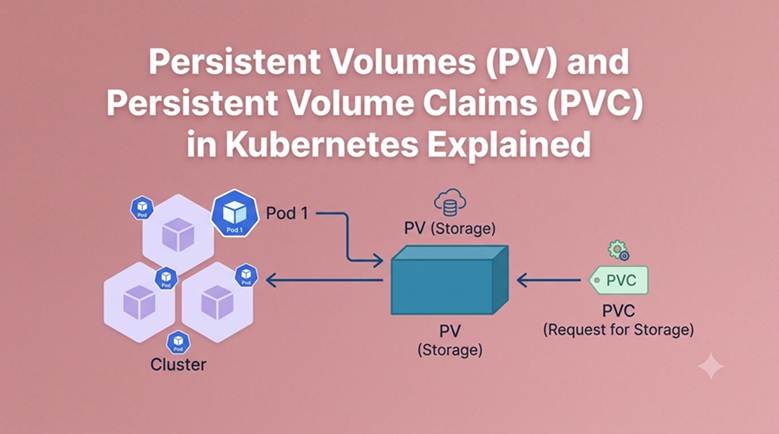
Table of Contents
- The Ephemeral Container Problem
- The Three-Layer Storage Abstraction
- Ephemeral Volumes vs Persistent Volumes
- PersistentVolume (PV): The Storage Resource
- PersistentVolumeClaim (PVC): The Storage Request
- The PV-PVC Binding Lifecycle
- Static Provisioning: Manual PV Creation
- Dynamic Provisioning: StorageClass
- Access Modes Explained
- Reclaim Policies: Retain, Delete, Recycle
- Using PVCs in Pods and Deployments
- StatefulSet Storage with volumeClaimTemplates
- VolumeSnapshots: Backup and Restore PVCs
- Expanding PVC Size (Volume Expansion)
- Storage Best Practices
- Common Issues and Quick Fixes
- Frequently Asked Questions
- Next Steps
Containers are ephemeral by design. When a Pod restarts, its filesystem resets to the original container image state. This works perfectly for stateless applications, but databases, message queues, and file storage systems need data to survive Pod restarts, node failures, and even cluster migrations.
Think of it this way: a StorageClass is a recipe, a PVC is an order, and a PV is the dish delivered to the pod’s table. This guide covers the full journey — from why persistent storage exists in Kubernetes, to static and dynamic provisioning, access modes, reclaim policies, volume snapshots, and the StatefulSet storage patterns used for real databases in production.
The Ephemeral Container Problem
Every container in Kubernetes has a writable layer — a temporary filesystem that exists only for the life of the container. The moment a pod restarts (due to a crash, update, or rescheduling), everything written to that writable layer disappears:
Container writes data → /data/userfiles/
Pod crashes → container restarts
/data/userfiles/ → GONE

Same problem if:
- Node runs out of memory → pod evicted to another node
- Rolling update replaces old pod with new pod
- Manual pod deletion for maintenance
For a web frontend serving static HTML, this is fine — it just reads from the container image. For a database storing user records, this is catastrophic.
Use persistent storage for anything you cannot afford to lose. Kubernetes separates what storage exists from what storage is requested via a three-layer abstraction.
The Three-Layer Storage Abstraction
Kubernetes decouples storage provisioning from consumption. Cluster administrators create storage resources (PVs), and developers request storage (PVCs) without needing to know the underlying infrastructure.
┌─────────────────────────────────────────────────────┐
│  STORAGECLASS                                       │
│  "What kind of storage is available"                │
│  Recipe: fast-ssd, slow-hdd, nfs-shared            │
│  Created by: cluster administrator                  │
├─────────────────────────────────────────────────────┤
│  PERSISTENTVOLUME (PV)                              │
│  "A specific piece of storage that exists"          │
│  The dish: 100GB SSD on node-1, NFS mount          │
│  Created by: admin (static) or StorageClass (auto)  │
├─────────────────────────────────────────────────────┤
│  PERSISTENTVOLUMECLAIM (PVC)                        │
│  "A request for storage"                            │
│  The order: "I need 50GB of fast storage"           │
│  Created by: developer/application                  │
└─────────────────────────────────────────────────────┘
            │
            ▼
         POD
   mounts PVC at /data
This separation matters in practice:
- The ops team sets up storage infrastructure and creates StorageClasses
- The dev team creates PVCs that say “I need X GB of Y type” — without knowing or caring whether it’s AWS EBS, GCP Persistent Disk, Ceph, or local NVMe
- Kubernetes automatically finds a matching PV and binds it to the PVC
Ephemeral Volumes vs Persistent Volumes
Not all Kubernetes volumes are persistent. Understanding the distinction helps choose the right tool:
| Volume Type | Survives pod restart? | Survives pod deletion? | Use case |
|---|---|---|---|
emptyDir | ✅ Yes | ❌ No | Scratch space, inter-container sharing |
configMap | ✅ Yes | ✅ (data in etcd) | Config files injected into pods |
secret | ✅ Yes | ✅ (data in etcd) | Credentials injected into pods |
hostPath | ✅ Yes (same node) | ✅ Yes | Node-level access (DaemonSets) |
PersistentVolume | ✅ Yes | ✅ Yes | Databases, file storage, stateful apps |
Common ephemeral types include: emptyDir — a scratch directory created when a pod is assigned to a node, destroyed when the pod is removed. configMap/secret — project configuration and credentials into the filesystem, backed by cluster state, not a real disk. Key point: if a pod using an emptyDir volume is killed and rescheduled to a different node, all data in that volume is gone.
PersistentVolume (PV): The Storage Resource
A PersistentVolume is a cluster-scoped resource (not namespace-scoped) that represents an actual piece of storage:
# static-pv.yaml — manually created by cluster admin
apiVersion: v1
kind: PersistentVolume
metadata:
  name: pv-fast-100gi
  labels:
    type: ssd
    environment: production
spec:
  capacity:
    storage: 100Gi        # Total size of this PV

  accessModes:
    - ReadWriteOnce       # Only one node can mount this at a time (for RWO)

  persistentVolumeReclaimPolicy: Retain    # What happens after PVC is deleted

  storageClassName: fast-ssd    # Must match the PVC's storageClassName

  # The actual storage backend — choose one:

  # Option 1: Local path (development/testing only)
  hostPath:
    path: /mnt/data/pv-fast-100gi
    type: DirectoryOrCreate

  # Option 2: NFS share
  # nfs:
  #   server: nfs-server.company.com
  #   path: /exports/kubernetes/pv-fast-100gi

  # Option 3: AWS EBS (static, pre-created volume)
  # awsElasticBlockStore:
  #   volumeID: vol-0a1b2c3d4e5f67890
  #   fsType: ext4

  # Option 4: Local disk (for high-performance bare metal)
  # local:
  #   path: /dev/nvme0n1
  # nodeAffinity:         # Required for local volumes — must schedule on specific node
  #   required:
  #     nodeSelectorTerms:
  #       - matchExpressions:
  #           - key: kubernetes.io/hostname
  #             operator: In
  #             values:
  #               - node-with-nvme-disk
Key PV fields:
capacity.storage— the size of this PV. A PVC requesting 40Gi can bind to a 100Gi PV, but 100Gi PVCs can’t bind to 40Gi PVsaccessModes— who can mount this (see Section 9)persistentVolumeReclaimPolicy— what happens when the PVC is released (see Section 10)storageClassName— groups PVs into classes for matching with PVCs
PV phases:
kubectl get pv
# NAME              CAPACITY   ACCESS MODES   RECLAIM POLICY   STATUS      CLAIM
# pv-fast-100gi 100Gi RWO Retain Available <none>| Status | Meaning |
|---|---|
Available | Free — no PVC has claimed it yet |
Bound | Claimed by a PVC — in use |
Released | PVC was deleted, but the PV hasn’t been reclaimed yet |
Failed | Automatic reclamation failed |
PersistentVolumeClaim (PVC): The Storage Request
A PVC is a namespace-scoped request for storage. Developers create PVCs; they don’t create PVs:
# pvc-request.yaml — created by developer/application team
apiVersion: v1
kind: PersistentVolumeClaim
metadata:
  name: database-storage
  namespace: production
spec:
  accessModes:
    - ReadWriteOnce        # Must be compatible with the PV's access modes

  storageClassName: fast-ssd    # Match a StorageClass (or specific PV's class)

  resources:
    requests:
      storage: 50Gi        # Request 50Gi — will bind to a PV of at least this size

  # Optional: select a specific PV using labels
  # selector:
  #   matchLabels:
  #     type: ssd
  #     environment: production
kubectl apply -f pvc-request.yaml
kubectl get pvc -n production
# NAME STATUS VOLUME CAPACITY ACCESS MODES STORAGECLASS
# database-storage Bound pv-fast-100gi 100Gi RWO fast-ssdSTATUS: Bound — Kubernetes found a matching PV (100Gi SSD, matching storageClass and accessMode) and bound it to this PVC. The pod requesting database-storage now has 100Gi of persistent storage, even though it only asked for 50Gi.
The PV-PVC Binding Lifecycle
The interaction between PVs and PVCs follows this lifecycle: Provisioning → Binding → Using → Reclaiming.
PROVISIONING
  │
  ├── Static: Admin manually creates PV before PVC
  │     PV exists and waits → Available
  │
  └── Dynamic: No PV exists yet
        PVC created → StorageClass provisions PV automatically

BINDING
  │
  PVC created → Kubernetes finds matching PV
  └── Match criteria:
        • storageClassName matches
        • accessModes compatible
        • PV capacity ≥ PVC request
        • PV not already bound to another PVC
        • PV selector labels match (if specified)

  PV.status = Bound, PVC.status = Bound
  One-to-one relationship: one PV ↔ one PVC

USING
  │
  Pod mounts PVC → data accessible at mountPath
  PV stays Bound as long as:
    • PVC exists
    • Pod using PVC is running

RECLAIMING
  │
  PVC deleted → PV becomes Released
  └── Reclaim policy determines next state:
        Retain → PV stays, data preserved (manual cleanup needed)
        Delete → PV and underlying storage deleted automatically
        Recycle → Data wiped, PV becomes Available again (deprecated)
Static Provisioning: Manual PV Creation
Binding a persistent volume claim to a statically provisioned persistent volume is simple when storageClassName: "" disables dynamic provisioning.
Static provisioning is the traditional approach: an administrator pre-creates PVs, and PVCs claim them. Useful when you have specific hardware (a pre-created AWS EBS volume, a specific NFS export) that must be claimed by a specific application:
# Step 1: Admin creates a PV (specific pre-existing storage)
apiVersion: v1
kind: PersistentVolume
metadata:
  name: postgres-primary-pv
spec:
  capacity:
    storage: 200Gi
  accessModes:
    - ReadWriteOnce
  persistentVolumeReclaimPolicy: Retain
  storageClassName: ""      # Empty string = static only, no StorageClass matching
  # AWS EBS volume that was pre-created in the same AZ as the cluster
  awsElasticBlockStore:
    volumeID: vol-0a1b2c3d4e5f67890
    fsType: ext4
---
# Step 2: Developer creates PVC claiming this specific PV
apiVersion: v1
kind: PersistentVolumeClaim
metadata:
  name: postgres-primary-pvc
  namespace: production
spec:
  accessModes:
    - ReadWriteOnce
  storageClassName: ""      # Match static PV
  volumeName: postgres-primary-pv    # Directly reference the PV by name
  resources:
    requests:
      storage: 200Gi
When to use static provisioning:
- Pre-created cloud volumes (EBS, GCP PD) with specific performance tiers that need to be claimed by a specific database
- NFS mounts with existing data (migration from non-Kubernetes)
- Air-gapped environments where dynamic provisioning isn’t available
Dynamic Provisioning: StorageClass
Dynamic provisioning eliminates the need to pre-create PVs. When a PVC references a StorageClass, Kubernetes automatically provisions a new volume from the underlying storage system.
This is the modern, recommended approach for most workloads:
# storageclass.yaml — created by cluster admin (one time)
apiVersion: storage.k8s.io/v1
kind: StorageClass
metadata:
  name: fast-ssd
  annotations:
    storageclass.kubernetes.io/is-default-class: "true"  # Make this the default
provisioner: ebs.csi.aws.com    # CSI driver for this storage backend

parameters:
  type: gp3                     # AWS EBS volume type
  iops: "3000"                  # Provisioned IOPS
  throughput: "125"             # MB/s throughput
  encrypted: "true"             # Encrypt at rest

reclaimPolicy: Delete           # Delete PV when PVC is deleted
allowVolumeExpansion: true      # Allow PVC resize after creation
volumeBindingMode: WaitForFirstConsumer   # Don't provision until pod is scheduled
                                          # Ensures volume is in the same AZ as the pod
StorageClass examples for different environments:
# For bare metal with local SSDs (rancher local-path-provisioner)
apiVersion: storage.k8s.io/v1
kind: StorageClass
metadata:
  name: local-path
provisioner: rancher.io/local-path
reclaimPolicy: Delete
volumeBindingMode: WaitForFirstConsumer
---
# For NFS shared storage (ReadWriteMany capable)
apiVersion: storage.k8s.io/v1
kind: StorageClass
metadata:
  name: nfs-shared
provisioner: nfs.csi.k8s.io
parameters:
  server: nfs-server.company.com
  share: /exports/kubernetes
reclaimPolicy: Retain
---
# For Ceph (on-premise, high performance)
apiVersion: storage.k8s.io/v1
kind: StorageClass
metadata:
  name: ceph-rbd
provisioner: rook-ceph.rbd.csi.ceph.com
parameters:
  clusterID: rook-ceph
  pool: replicapool
  imageFormat: "2"
  imageFeatures: layering
reclaimPolicy: Delete
allowVolumeExpansion: true
With dynamic provisioning, PVC creation is all the developer needs to do:
# developer creates ONLY this — the PV is auto-created by StorageClass
apiVersion: v1
kind: PersistentVolumeClaim
metadata:
  name: app-storage
  namespace: production
spec:
  storageClassName: fast-ssd    # References the StorageClass
  accessModes:
    - ReadWriteOnce
  resources:
    requests:
      storage: 50Gi
kubectl apply -f pvc.yaml
kubectl get pvc app-storage -n production
# NAME STATUS VOLUME CAPACITY STORAGECLASS
# app-storage Bound pvc-a1b2c3d4-e5f6-7890-abcd-ef1234567890 50Gi fast-ssd
# ↑ PV auto-created with a UUID name — developer never touched PV YAMLAccess Modes Explained
Access modes control how many nodes can mount the volume simultaneously and with what permissions:
| Access Mode | Short | Meaning | Typical storage backends |
|---|---|---|---|
ReadWriteOnce | RWO | One node can mount read/write | EBS, GCP PD, local disk, most block storage |
ReadOnlyMany | ROX | Many nodes can mount read-only | NFS, shared block storage |
ReadWriteMany | RWX | Many nodes can mount read/write | NFS, CephFS, Azure Files, GCS Fuse |
ReadWriteOncePod | RWOP | One pod (not node) read/write | Block storage (K8s 1.22+) |
Critical distinction: ReadWriteOnce is per NODE, not per Pod:
Node A: Pod 1 mounts PVC (RWO) → ✅ OK
Node A: Pod 2 also mounts same PVC (RWO) → ✅ OK (same node!)
Node B: Pod 3 tries to mount same PVC (RWO) → ❌ Fails (different node)
This is why ReadWriteOncePod (RWOP) was added in Kubernetes 1.22 — for cases where you truly need only one pod to access a volume, even on the same node.
Choosing the right access mode:
# Database (PostgreSQL, MySQL, MongoDB) — single primary writer
accessModes:
  - ReadWriteOnce

# Shared config/asset server — many readers, few writers
accessModes:
  - ReadWriteMany    # Requires NFS or CephFS

# Log archive — many readers, write-once
accessModes:
  - ReadOnlyMany

# Critical single-writer application (guaranteed exclusive access)
accessModes:
  - ReadWriteOncePod
Reclaim Policies: Retain, Delete, Recycle
The reclaim policy determines what happens to a PV and its data when the claiming PVC is deleted:
Retain — Data preserved, manual cleanup required:
persistentVolumeReclaimPolicy: RetainPVC deleted → PV status becomes Released
↓
Data on the underlying storage is PRESERVED
↓
PV is NOT automatically reused — status stays Released
↓
Admin must manually:
1. Inspect the data (confirm OK to delete or migrate)
2. kubectl delete pv <pv-name> (or manually clean data and recreate PV)Use Retain for production databases — never accidentally delete database storage.
Delete — PV and underlying storage automatically deleted:
persistentVolumeReclaimPolicy: DeletePVC deleted → PV deleted → underlying storage (EBS volume, GCP PD) deleted
↓
Data is PERMANENTLY GONEUse Delete for dynamically provisioned ephemeral data (cache, temp files, build artifacts) where losing the data on PVC deletion is acceptable.
Recycle — Deprecated (do not use):
Data wiped with rm -rf /volume/*, PV made Available again. Deprecated since Kubernetes 1.11 and removed in later versions — use dynamic provisioning instead.
Override reclaim policy on a StorageClass:
# StorageClass default
reclaimPolicy: Delete    # Most dynamic provisioners default to Delete

# Override for a specific PV after creation:
kubectl patch pv pv-fast-100gi \
  -p '{"spec":{"persistentVolumeReclaimPolicy":"Retain"}}'
Using PVCs in Pods and Deployments
In a Pod:
# pod-with-pvc.yaml
apiVersion: v1
kind: Pod
metadata:
  name: database-pod
  namespace: production
spec:
  containers:
    - name: postgres
      image: postgres:16
      env:
        - name: POSTGRES_PASSWORD
          valueFrom:
            secretKeyRef:
              name: postgres-secret
              key: password
        - name: PGDATA
          value: /var/lib/postgresql/data/pgdata

      volumeMounts:
        - name: postgres-storage
          mountPath: /var/lib/postgresql/data    # Where the PVC is mounted inside the container

  volumes:
    - name: postgres-storage
      persistentVolumeClaim:
        claimName: database-storage    # Reference to the PVC
In a Deployment:
# deployment-with-pvc.yaml
apiVersion: apps/v1
kind: Deployment
metadata:
  name: app-with-storage
  namespace: production
spec:
  replicas: 1    # Only 1 replica if using ReadWriteOnce PVC
  selector:
    matchLabels:
      app: app-with-storage
  template:
    metadata:
      labels:
        app: app-with-storage
    spec:
      containers:
        - name: app
          image: myapp:1.0
          volumeMounts:
            - name: app-data
              mountPath: /app/data
            - name: app-config
              mountPath: /app/config
              readOnly: true    # Mount config as read-only

      volumes:
        - name: app-data
          persistentVolumeClaim:
            claimName: app-storage           # ReadWriteOnce PVC
        - name: app-config
          configMap:
            name: app-config                  # Non-persistent config
Important: A
ReadWriteOncePVC can only be mounted on one node at a time. A Deployment withreplicas: 2where both pods need to write to the sameReadWriteOncePVC will have one pod stuck inPendingif pods land on different nodes. Either useReadWriteManystorage, or use a StatefulSet with separate PVCs per pod.
StatefulSet Storage with volumeClaimTemplates
Kubernetes documentation recommends always including PVCs in the container configuration, never including PVs in container configuration, as this will tightly couple a container to a specific volume.
StatefulSets use volumeClaimTemplates to automatically create a separate PVC for each pod — this is the standard pattern for databases in Kubernetes. For a full explanation of StatefulSets, see our Kubernetes Deployment vs StatefulSet vs DaemonSet guide.
# statefulset-with-storage.yaml
apiVersion: apps/v1
kind: StatefulSet
metadata:
  name: mongodb
  namespace: production
spec:
  serviceName: mongodb-headless
  replicas: 3
  selector:
    matchLabels:
      app: mongodb
  template:
    metadata:
      labels:
        app: mongodb
    spec:
      containers:
        - name: mongodb
          image: mongo:7.0
          volumeMounts:
            - name: mongodb-data    # References the volumeClaimTemplate name
              mountPath: /data/db

  # Each pod gets its OWN PVC — automatically created from this template
  volumeClaimTemplates:
    - metadata:
        name: mongodb-data
      spec:
        accessModes: ["ReadWriteOnce"]
        storageClassName: fast-ssd
        resources:
          requests:
            storage: 50Gi
kubectl get pvc -n production
# NAME STATUS VOLUME CAPACITY STORAGECLASS
# mongodb-data-mongodb-0 Bound pvc-abc123... 50Gi fast-ssd
# mongodb-data-mongodb-1 Bound pvc-def456... 50Gi fast-ssd
# mongodb-data-mongodb-2 Bound pvc-ghi789... 50Gi fast-ssdEach pod (mongodb-0, mongodb-1, mongodb-2) has its own dedicated 50Gi volume. When mongodb-1 restarts, it gets mongodb-data-mongodb-1 back — always. The data from mongodb-1 never gets mixed with mongodb-0 or mongodb-2.
Important: Deleting a StatefulSet does NOT delete its PVCs — this is intentional to prevent accidental data loss. Delete PVCs manually after confirming data is no longer needed:
# Delete the StatefulSet (keeps PVCs)
kubectl delete statefulset mongodb -n production

# Verify PVCs still exist
kubectl get pvc -n production | grep mongodb-data

# Manually delete PVCs only when ready
kubectl delete pvc mongodb-data-mongodb-0 mongodb-data-mongodb-1 mongodb-data-mongodb-2 -n production
VolumeSnapshots: Backup and Restore PVCs
Kubernetes supports point-in-time snapshots of PVCs via the VolumeSnapshot API (requires a CSI driver with snapshot support):
# volumesnapshotclass.yaml — defines snapshot provisioner
apiVersion: snapshot.storage.k8s.io/v1
kind: VolumeSnapshotClass
metadata:
  name: csi-snapshotter
driver: ebs.csi.aws.com
deletionPolicy: Delete
---
# Take a snapshot of a PVC
apiVersion: snapshot.storage.k8s.io/v1
kind: VolumeSnapshot
metadata:
  name: mongodb-data-snapshot-20260715
  namespace: production
spec:
  volumeSnapshotClassName: csi-snapshotter
  source:
    persistentVolumeClaimName: mongodb-data-mongodb-0    # PVC to snapshot
kubectl apply -f snapshot.yaml
# Check snapshot status
kubectl get volumesnapshot -n production
# NAME READYTOUSE SOURCEPVC RESTORESIZE
# mongodb-data-snapshot-20260715 true mongodb-data-mongodb-0 50GiRestore a PVC from snapshot:
# restore-pvc.yaml — create a new PVC from the snapshot
apiVersion: v1
kind: PersistentVolumeClaim
metadata:
  name: mongodb-data-restored
  namespace: production
spec:
  storageClassName: fast-ssd
  dataSource:
    name: mongodb-data-snapshot-20260715    # Reference the snapshot
    kind: VolumeSnapshot
    apiGroup: snapshot.storage.k8s.io
  accessModes:
    - ReadWriteOnce
  resources:
    requests:
      storage: 50Gi
kubectl apply -f restore-pvc.yaml
kubectl get pvc mongodb-data-restored -n production
# STATUS: Bound — PVC restored from snapshot, ready to mountAutomated snapshot schedule using VolumeSnapshotSchedule (requires additional CRDs):
# Or use a CronJob for regular snapshots
apiVersion: batch/v1
kind: CronJob
metadata:
  name: pvc-snapshot-job
  namespace: production
spec:
  schedule: "0 2 * * *"    # Daily at 2 AM
  jobTemplate:
    spec:
      template:
        spec:
          serviceAccountName: snapshot-sa
          containers:
            - name: snapshot
              image: bitnami/kubectl:latest
              command:
                - /bin/sh
                - -c
                - |
                  DATE=$(date +%Y%m%d-%H%M%S)
                  kubectl apply -f - <<EOF
                  apiVersion: snapshot.storage.k8s.io/v1
                  kind: VolumeSnapshot
                  metadata:
                    name: mongodb-snapshot-$DATE
                    namespace: production
                  spec:
                    volumeSnapshotClassName: csi-snapshotter
                    source:
                      persistentVolumeClaimName: mongodb-data-mongodb-0
                  EOF
          restartPolicy: OnFailure
Expanding PVC Size (Volume Expansion)
When your application needs more storage than originally requested, expand the PVC without downtime (requires allowVolumeExpansion: true on the StorageClass):
# Check if StorageClass allows expansion
kubectl get storageclass fast-ssd -o jsonpath='{.allowVolumeExpansion}'
# true

# Patch the PVC to request more storage
kubectl patch pvc database-storage -n production \
  -p '{"spec":{"resources":{"requests":{"storage":"100Gi"}}}}'

# Watch the expansion
kubectl get pvc database-storage -n production -w
# NAME               STATUS   VOLUME            CAPACITY   CONDITIONS
# database-storage   Bound    pvc-abc123...     50Gi       FileSystemResizePending
# database-storage   Bound    pvc-abc123...     100Gi      <none>

# Verify new size
kubectl describe pvc database-storage -n production | grep Capacity
# Capacity: 100Gi
What happens during expansion:
- PVC spec updated → StorageClass driver expands the underlying volume (e.g., EBS volume)
- If the pod is running: filesystem is resized online (for ext4, xfs — no pod restart needed)
- If
volumeBindingMode: WaitForFirstConsumer: expansion happens when pod restarts
Note: Volume expansion is only supported in one direction — you can increase PVC size but not decrease it. Shrinking a volume requires creating a new smaller PVC, migrating data, and deleting the old PVC.
Storage Best Practices
Back up PVC data: Kubernetes persistent volumes store data persistently, but they don’t guarantee data won’t be lost in the event that the underlying storage system is corrupted, goes offline, or is otherwise disrupted.
1. Always use Retain reclaim policy for production databases:
reclaimPolicy: Retain # Never auto-delete database storage2. Use volumeBindingMode: WaitForFirstConsumer for cloud storage:
volumeBindingMode: WaitForFirstConsumer
# Prevents cross-AZ PVC binding issues where pod and volume end up in different availability zones
3. Never put PVs directly in application manifests:
# ❌ Wrong — tightly couples app to specific storage
volumes:
  - name: data
    awsElasticBlockStore:
      volumeID: vol-0a1b2c3d4e5f67890

# ✅ Correct — app only references a PVC claim name
volumes:
  - name: data
    persistentVolumeClaim:
      claimName: my-pvc
4. Set appropriate resource requests:
# ❌ Requesting more than needed wastes storage budget
resources:
  requests:
    storage: 1Ti    # Overkill for a small app

# ✅ Right-size based on actual data growth projections
resources:
  requests:
    storage: 50Gi    # With expansion enabled, grow later if needed
5. Use separate StorageClasses for different performance tiers:
# High I/O: databases
storageClassName: fast-ssd-io3    # Provisioned IOPS, expensive

# Medium I/O: application data
storageClassName: standard-ssd    # gp3 equivalent, balanced

# Low I/O: backups, logs, archives
storageClassName: slow-hdd        # HDD-backed, cheap
6. Always test your restore procedure:
A backup that was never tested is not a backup — it’s a hope. Run restore drills: create a snapshot, restore to a new PVC, mount it in a test pod, verify data integrity.
Common Issues and Quick Fixes
| Symptom | Likely Cause | Fix |
|---|---|---|
PVC stuck in Pending | No matching PV, or StorageClass not found | Check storageClassName matches; run kubectl describe pvc for events |
PVC stuck in Pending (dynamic) | CSI driver not installed | Install the CSI driver for your storage backend |
Pod stuck in ContainerCreating with PVC error | PVC not yet bound | Wait for PVC to reach Bound status; check StorageClass |
Multi-Attach error for RWO volume | Second pod trying to mount RWO PVC on different node | Use ReadWriteMany storage for multi-pod scenarios, or scale to 1 replica |
PV shows Released after PVC deletion | Retain policy keeping PV | Manually delete PV if data no longer needed: kubectl delete pv <name> |
| Can’t resize PVC | StorageClass doesn’t allow expansion | Check allowVolumeExpansion: true in StorageClass |
| Data lost after pod restart | Using emptyDir instead of PVC | Replace emptyDir with PVC using persistentVolumeClaim volume type |
| Cross-AZ mount failure (cloud) | PV and pod in different availability zones | Use volumeBindingMode: WaitForFirstConsumer in StorageClass |
Diagnose a stuck PVC:
# Step 1: Check PVC status and events
kubectl describe pvc my-pvc -n production
# Look for events: "no persistent volumes available", "storageClass not found"

# Step 2: Check available PVs
kubectl get pv
# Are there Available PVs with matching storageClassName and accessModes?

# Step 3: Check StorageClass exists
kubectl get storageclass
# Is the storageClassName in the PVC listed here?

# Step 4: Check CSI driver pods
kubectl get pods -n kube-system | grep csi
# All CSI driver pods should be Running
Frequently Asked Questions
What’s the difference between a Volume and a PersistentVolume?
A volume in Kubernetes (like emptyDir or hostPath) is ephemeral and tied to the pod’s lifecycle. A PersistentVolume is a cluster resource that exists independently of any pod — it persists when pods start, stop, or restart.
Can two pods share the same PVC?
Only if the PVC uses ReadWriteMany (RWX) access mode. With ReadWriteOnce (RWO), only pods on the same node can both mount the volume. A common mistake is creating a Deployment with multiple replicas where all pods try to mount the same ReadWriteOnce PVC on different nodes — one pod gets stuck in Pending.
What happens to PVCs when I delete a StatefulSet?
PVCs created by a StatefulSet’s volumeClaimTemplates are NOT deleted when the StatefulSet is deleted — this is intentional to protect your data. Delete PVCs manually after confirming the data is no longer needed.
Can I resize a PVC after creation?
Yes, but only to increase the size — you can’t shrink a PVC. The StorageClass must have allowVolumeExpansion: true. Edit the PVC’s spec.resources.requests.storage to the new size, and the CSI driver will resize the underlying volume.
What’s volumeBindingMode: WaitForFirstConsumer?
Without it, a PV/PVC pair is bound immediately when the PVC is created — before any pod requests it. On cloud providers with multiple availability zones, this can result in the PV being created in AZ-1 while the pod later gets scheduled in AZ-2 — causing a mount failure. WaitForFirstConsumer delays the binding until a pod requests the PVC, ensuring the volume is created in the same zone as the pod.
Is a PV namespace-scoped?
No — PersistentVolumes are cluster-scoped (not namespace-scoped). A PVC in namespace production can bind to a PV that exists at the cluster level. However, once a PVC in production claims a PV, pods in other namespaces can’t use that same PV.
Next Steps
With a solid understanding of Kubernetes storage:
- Deploy stateful applications — apply PVC patterns to real databases. The MongoDB and Redis setups in our Kubernetes Deployment vs StatefulSet vs DaemonSet guide use
volumeClaimTemplatesas shown in this article. - Set up your cluster — PVCs require a running Kubernetes cluster with a CSI driver. See our Install Kubernetes Cluster on Ubuntu 26.04 LTS guide to get started with kubeadm.
- Implement backup with Velero — VolumeSnapshots are pod-aware and storage-native, but Velero provides application-consistent backups with namespace-level restore capabilities — the complete solution for Kubernetes disaster recovery.
- Secure your storage — PVCs with sensitive data should use encrypted StorageClasses and
readOnlyRootFilesystem: trueon the consuming containers. See our KubeSphere and Kubernetes Security guide for the complete hardening checklist. - Monitor storage usage — add PVC utilization metrics to your Prometheus + Grafana monitoring stack to alert before volumes fill up:
kubelet_volume_stats_used_bytes / kubelet_volume_stats_capacity_bytes > 0.85.
Related posts:
 How to Install Kubernetes (K8s) on Ubuntu 24.04: A Step-by-Step Guide
 What Is KubeKey? Complete Explanation for DevOps Beginners
 How to Install Kubernetes Dashboard on Ubuntu 26.04 with Secure Access
 How to Deploy NGINX Ingress Controller on Kubernetes Step-by-Step (2026 Guide)
 How to Install MetalLB on Bare Metal Kubernetes Cluster (L2 and BGP Guide)
 Kubernetes Deployment vs StatefulSet vs DaemonSet: Complete Comparison with Examples
 How to Back Up and Restore Kubernetes Cluster Using Velero (2026 Guide)
 How to Install Helm on Ubuntu 26.04 LTS (Complete Guide 2026)
